Telegram marketing: The complete guide to channels, bots, ads, and growth
Nov 11, 202625 minutes

Written by
Hassaan KhanUpdated

How long have you been exploring social media marketing tactics? It usually comes down to putting out great social content consistently. It’s easier said than done. No wonder most people haven’t figured it out yet.
Most people get entangled between “what to post,” “where to post,” and “what tool to use to post,” and before they know it, the ship sails away. If you have been in one of those situations, it’s not entirely your fault. You may not have been guided very well, which is about to change now.
Seemingly, many social media scheduling platforms pop up and disappear after a year or so. Perhaps, it happens because they don’t have depth and diversity in their offering.
One of the key things of launching and sustaining a successful social media management tool is perpetual innovation and development until it becomes one of a kind.
ContentStudio is a top-notch social media management tool with over 70,000 satisfied users across the globe. The award-winning social media tool hasn’t get there overnight, but instead, it took several years to get where it is now.
One of the reasons why ContentStudio has become a strong contender among the world’s best social media management tools is the value proposition it offers to the customers.
Since the key feature is scheduling content on all major social media platforms, this tool didn’t stop there and continued the journey until it became much bigger in a cut-throat market.
We could talk about the ContentStudio features all day long because it has a lot to offer, for instance:
It’s safe to say that it’s an all-in-one social media management tool for marketers, brands, and agencies.
We decided to shed some light on various content scheduling methods available in the ContentStudio dashboard so that you could schedule content faster than ever.
Let’s dive deep into the content scheduling solutions ContentStudio has to offer:
Schedule mode is next to the “post now” option on the social media post composer in the ContentStudio dashboard. It’s the simplest yet fastest way to schedule your social media content across multiple platforms.
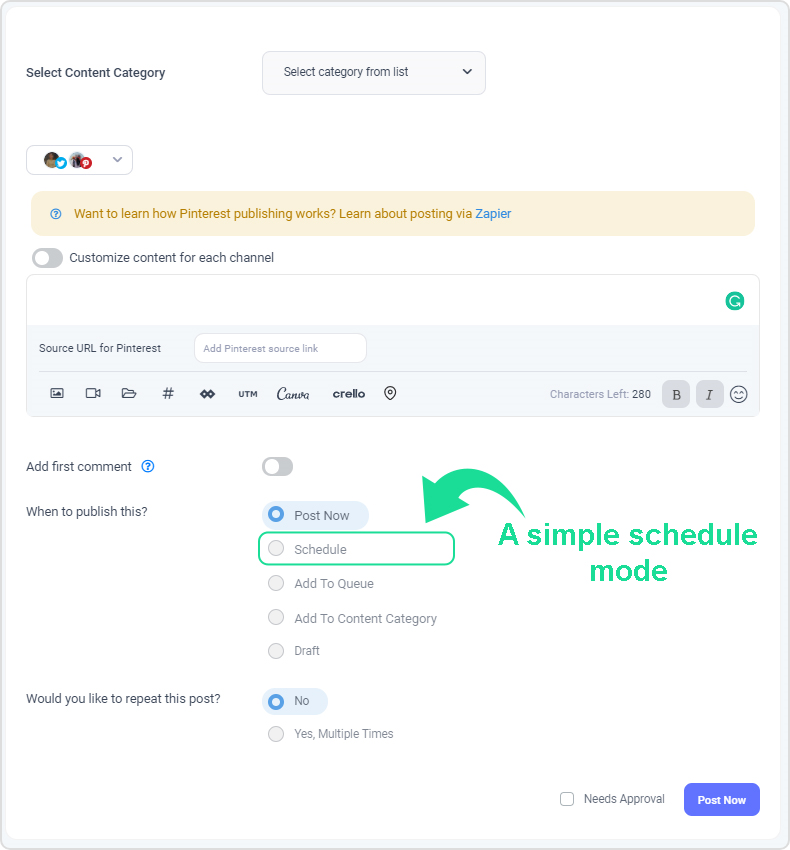
To get started with scheduling your social media posts, all you need is to log in to your ContentStudio account.
Go to the Publish section and choose the Composer option to start the social media post-composition.
Upon landing on the next page, you’d choose the social media channels right off the bat.
Write down the social media post — feel free to include an image, a URL, and some relevant hashtags.
The next up is the area that allows you to choose the appropriate social media content scheduling option.
You can choose the “Schedule” option and the date and time for publishing this post.
Once you’re done with all that, feel free to hit the schedule button below. It’ll schedule the post to be published on the given date and time.
That’s pretty much it.
However, the ContentStudio doesn’t stop here because it offers several ways to schedule your content. If you’re curious about it, keep reading.
The second way to schedule your content on social media channels is by adding the post to the queue.
It’s a social queue, which is a custom-made social media schedule for a specific social channel.
It means that you can create these queues for every page or group you add to your workspace in the ContentStudio dashboard.
Furthermore, you can map out a week-long social media calendar. The core idea behind adding the posts to the queue is that it allows ContentStudio users to choose the best time to post for more engagement and traction.
To add posts to the queue, simply go to the social media composer.
Choose the social media platforms to publish and prepare your social media post afterwards.
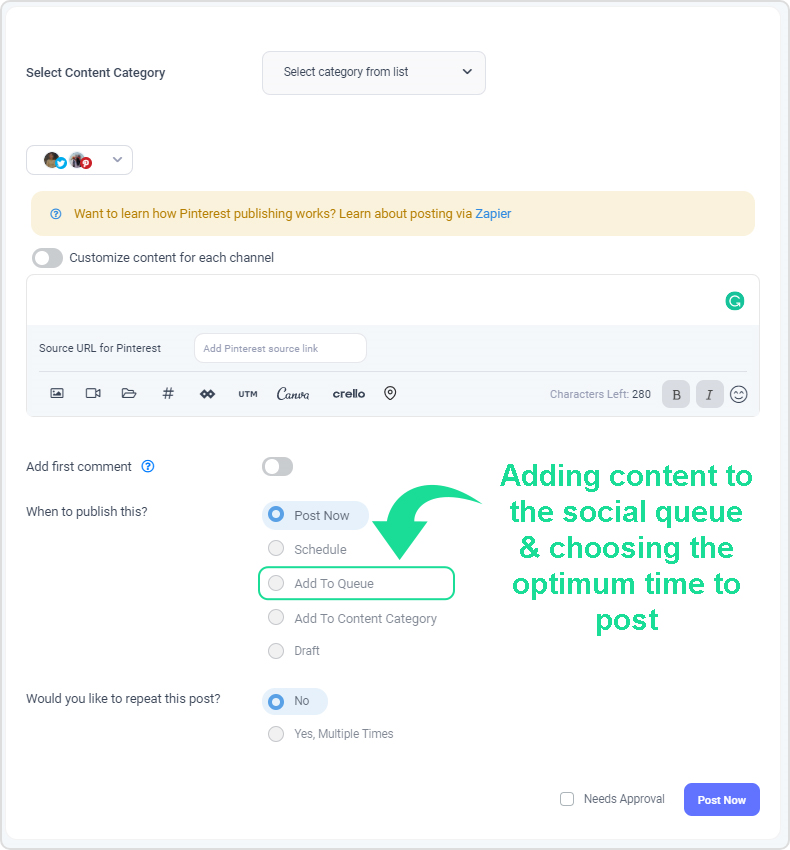
Now choose the “Add to Queue” option from the options below.
Once you’re done with the selection, hit the “Add to Queue” button.
And that will put your social media post into the social queue.
There is a third option in the social media post composer called “add to content category.” Consider it as another way to schedule your social media content in the ContentStudio dashboard.
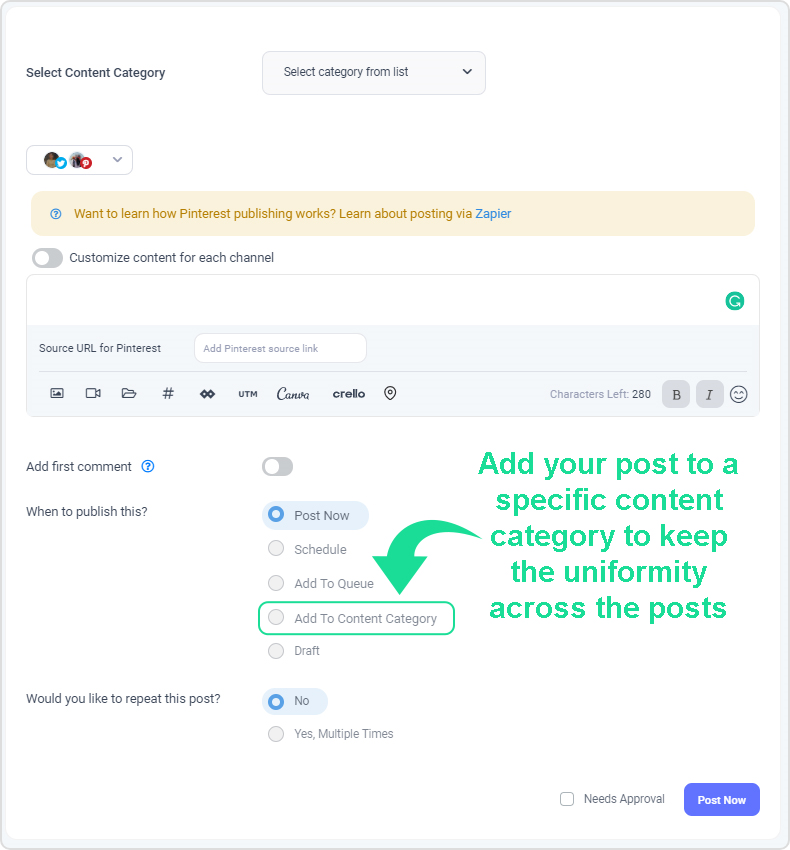
This content scheduling feature comes in handy if you need to create separate categories for various types of content so that it brings clarity to your social marketing strategy.
The way it works is that you can add a specific type of content in its relevant category’s queue. As a result, you could bring uniformity to your social media posting, especially if you have multiple sub-categories to cover.
Suppose you’re a digital marketing agency that provides services like content writing, Facebook ads, email marketing, SEO, and graphics designing. So you can allocate a specific type of content for each working day of the week.
You could assign content marketing-related posts for Monday, Facebook ads-related posts to Tuesday, Email marketing posts on Wednesday, SEO for Thursday, and graphics designing to Friday.
Furthermore, you can use the queue for different social media channels as well as no need to post on each platform individually, but instead, you can create a category and add posts to it. Let me elaborate on how it works.
To get started with content categories, you need to create categories and add content to their queues to be scheduled for your social media channels.
To do so, log in to your ContentStudio account. Click on the profile icon on the top left.
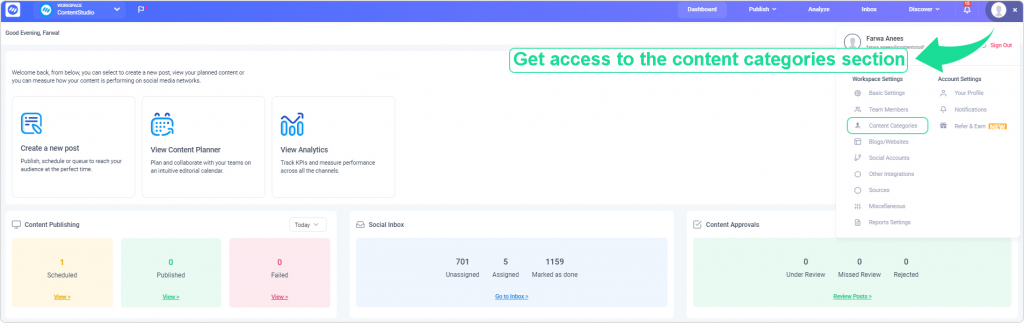
Click on the “Content Categories” option to create content categories.
Once you’re on the content categories page, you could name the content category and add social media profiles to that content category.
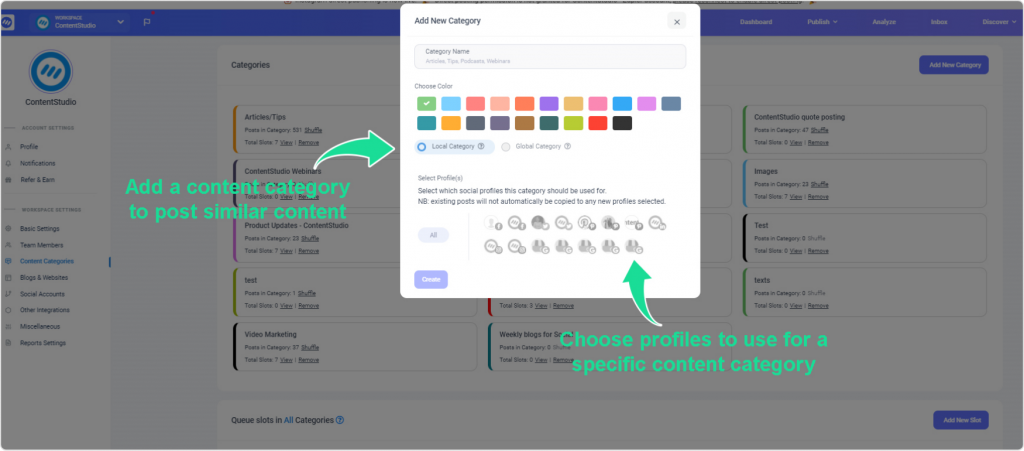
This way, you won’t have to choose the social media profiles every time you choose a content category to post your content.
I’ve used several social media scheduling tools before, but I have never seen such a feature on any platform.
The fourth way to schedule your social media posts is by using the “repeat post” feature in the ContentStudio dashboard. It’s a simple yet useful social media tool in ContentStudio that reposts social media content at the given date and time.
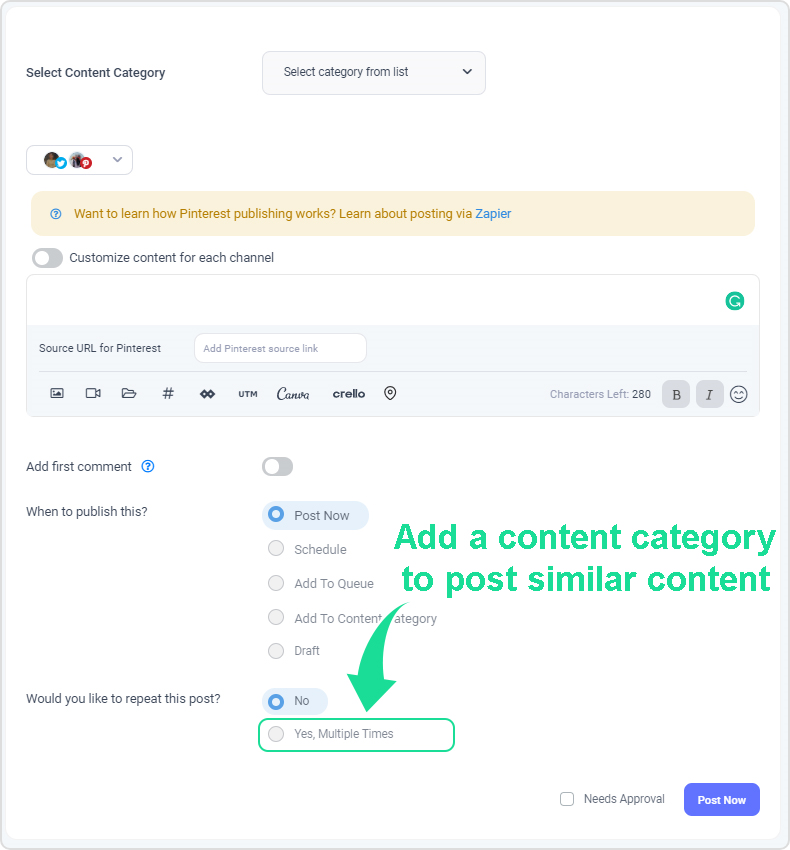
It’s one of the most fascinating features of ContentStudio. The way it works is that it allows you to repost your social media content multiple times without returning to the dashboard. All you need is to check the “repeat post” button and choose the time interval for repeating the posts.
So basically it automates the social media posts for you. As a result, your social media posts get published multiple times at your chosen time and date.
To repeat the social media posts, go to Composer in your ContentStudio account and start preparing your social media post for publishing.
Select the schedule option from the “when to publish” section.
You’d find the “repeat post” button down below. All you need is to enable the repeat post feature from there and set the time and date for posting.
That’s it.
Let’s take a sneak peek at some of the best social media platforms to publish content and on which social network should you share content most frequently?
Facebook is the most popular social media platform. According to WeAreSocial, the social media giant continues to dominate the global social media stage. When it comes to numbers, it’s quite ahead of the rest of the platforms. The total active monthly users crossed the historic 2.5 billion mark back in 2019, which means it’d continue to grow in 2021-22.
If you want to attract the audience or build a community on social media and you aren’t cashing in on Facebook, you’re making a mistake. Here’s an Ultimate Guide to Schedule Facebook Posts, Reels & Stories.
Pinterest is a top-tier social media platform for sharing images and infographics. It’s a platform famous for attracting a female audience, but it also caters to the male population. The core niches that dominate the image-sharing platform are fashion, home and decor, entrepreneurship, fitness, and health.
Furthermore, the platform has gained over 70 million new monthly active users within the past few months. Therefore, the total active monthly users reached 322 million at the start of 2020. It’s a no-brainer that one should pay close attention to publishing content on Pinterest.
TikTok has become a mainstream social media platform rather quickly. Since it has amassed 800 million monthly active users within a couple of years, so it is arguably a major player in the space.
If your brand or content strategy resonates with the TikTok platform, you should put out content on TikTok to capitalize on the real estate that has so much attention. TikTok has 500 million users from China alone, which amounts to 80% of the total user base and 300 million from the rest of the world. The point is that it’s a bit hard to ignore such statistics.
YouTube is one of the most popular social media platforms out there. According to Pew Social Media Facts Sheet, Facebook and YouTube are the dominant players in the U.S. social media market. Several surveys conducted between 2012 to 2019 suggest that 69% of the U.S. adults were using Facebook in 2019, and 73% of the adults were using YouTube.
Furthermore, YouTube is considered the second most popular search engine on the internet. If you have been putting off video content, you might be missing out on opportunities.
Instagram is a photo-sharing platform acquired by Facebook in 2012. It has already crossed the one billion monthly active users mark a while ago. Research revealed that Instagram is the third most popular social media platform right after Facebook and YouTube.
This platform has emerged into more than just a photo-sharing app by bringing features like Stories, IGTV, and live streaming. You could put out long-form, vertical videos on IGTV or post brief stories (videos) to keep the audience in the loop. Most beginners overthink the Instagram algorithm updates and end up doing nothing significant. You will be better off if you pay attention to your niche and posting great content.
It’ll be wise not to put off publishing content on Instagram. You can schedule your Instagram posts through ContentStudio as it now supports Instagram direct publishing.
If you wonder how to grow Instagram followers, follow the Instagram influencers to learn the growth tactics. Keep an eye out for their techniques, strategies, and patterns.
Medium is an online publishing platform that allows users to write and publish articles on the internet. Medium is a different social media platform than Twitter, YouTube, and Facebook, but it has over 60 million monthly active users.
If you’re into writing or publishing, it’s the best social media platform to hop on and publishing your content. If you haven’t heard about content marketing techniques, it’s time to put more effort into learning what they are and how you can leverage this publishing platform for your benefit.
We discussed four different ways to schedule your social media content via ContentStudio social media composer.
There are hundreds of social media scheduling tools out there. The reason ContentStudio stands out from competitors is that it offers a whole lot under the same umbrella.
The essence of this article is to educate readers on the value ContentStudio provides to the users from the social media management standpoint.
Who would have thought they could schedule social media posts and articles from the same social media management tool?
I’m sure some of you might be excited to give ContentStudio a try. Here’s the link for a free trial.
Before you leave this article, let me ask you a question:
How do you schedule your content these days?
Feel free to share your thoughts even if you haven’t scheduled social media posts before.
We can’t wait to see you schedule your first social media post via ContentStudio.
Hassaan Khan is a Senior Contributing Writer and Editor at ContentStudio and a writer for SaaS and e-commerce brands, with bylines at SEMrush, ThriveGlobal, and BloggingCage. He covers social media marketing, technical SEO, and analytics, from Instagram impressions to hashtag analytics, and reviews articles for technical accuracy and SEO soundness.
View all posts by Hassaan KhanRecommended for you
Telegram marketing: The complete guide to channels, bots, ads, and growth
Social media content planning: How to build a process that actually scales
AI agents for social media management: A complete guide
HubSpot vs Hootsuite: pricing, features, and which fits