
Pinterest marketing guide: Turn visual discovery into business results
Nov 10, 202622 minutes

Written by
Wasiq NaeemUpdated

Much like every other thing in life, blog posts lose their charm even if they did well immediately after their publication. You can always kiss Sleeping Beauty back to life though by refreshing the content and adding new life to it.
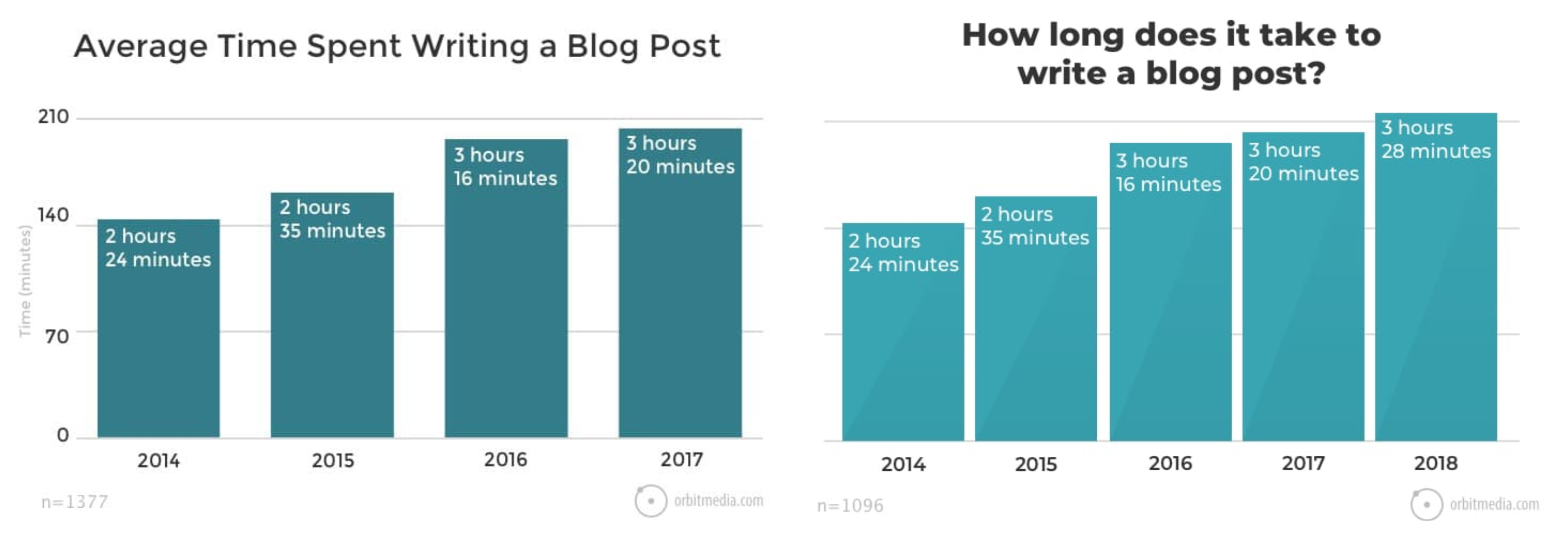
Coming up with a blog post takes a lot of planning, writing, re-writing, and hair-pulling. Most of us spend about three hours and twenty-eight minutes writing a blog post as Orbit Media’s latest survey confirms. What’s more, 1 in 8 bloggers spend 6+ hours on an article, the same study reveals.
Top that up with the time that goes into keyword research, planning a topic, optimizing your blog post, and promoting the content and, you’ve hours poured into an article. And, it’s just one long-form blog post.
Line up all the content that you’ve written, and you’d note the extensive resources that go into its production and promotion. Alas, the content that you so lovingly create reaches its expiry date. However, thanks to a content refresh, you can restore its life.
Content that grows via organic search eventually witnesses decay after a product lifecycle. The team over at Animalz dug into the science behind 100,000-view blog posts. They learned that each piece of content experiences the following growth phases:
Here’s a visual presentation of these stages:
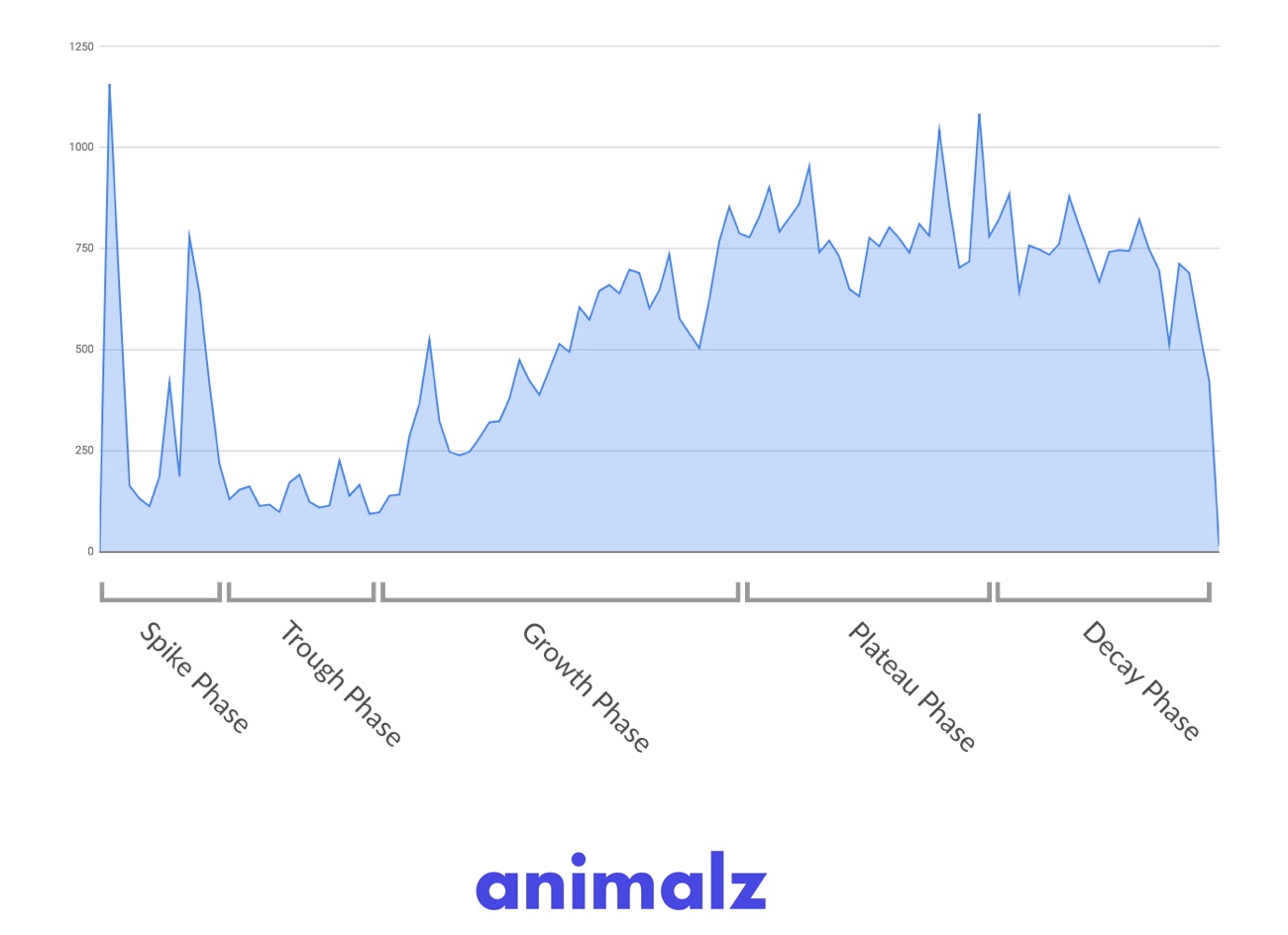
It’s the decay phase on the extreme right side of this graph that we’re concerned about here. A blog post enjoys its prime time in its growth phase. By the time it hits the plateau phase, the piece is either replaced by other similar content by someone else or it reaches the finale of its content quality, domain authority, and/or backlinks.
No new traffic drives to your post in the decay phase. Luckily, you can always resurrect the dying post. A refresh will update the content, and the hyperlinks tucked into it while adding new keywords and making it more visually appealing. This attracts more traffic and takes the SEO ranking up by a notch too.
Think of it like turning the clock on an apple the turns brown (plateau phase) and shrivels up (decay phase). By sprucing up the content, you’re preventing the apple from drying and dying; pushing it back into its lively phase.
A case in point here is Healthline. Ryan Purtill, Healthline’s senior SEO manager, shared on Moz that optimizing their content enabled them to:
Here’s a graph showing how their traffic spiked after refreshing a post that ranked for the keyword “iron deficiency anemia.”
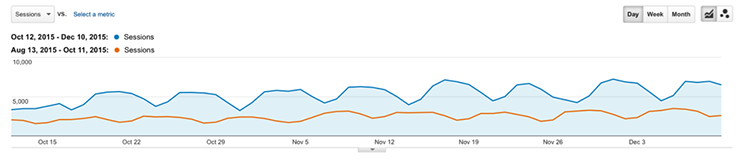
After updating, this post showed a 114% increase in traffic and positioned the content on the first page of the search engine.
The ultimate decay in a content lifecycle is the chief determinant, which sets the need for a content update. Here are more reasons for sprucing up your content:
The lack of traffic coming to your post is the first cry for a refresh. A drop in CTA clicks is another, related call for help. In other words, the decay-phase-decline carves out the need for a content update.
Everybody has a different take on how often you should blog. Names like Mark Manson, James Clear, and Wait But Why publish about 1 blog post per week or per month. On the flip side, names like Huffington Post published a blog post every 58 seconds.
Orbit Media’s research that we mentioned above highlights that the surveyed bloggers publish several posts in a month. So, we’re talking about an editorial calendar that is chock full of creative ideas for new posts. Honestly, that can be challenging!
Fortunately, the content refresh strategy can help keep your calendar full. Once you identify posts that need an update (we’ll talk about which ones shortly), you can pencil them into your schedule, leaving it packed with content opportunities.
What happens when a bigger, better, and more valuable version of something emerges? The old, outdated version is sidelined, and the newer version enjoys the limelight. Ranking in the search engine results pages (SERPs) is the same. Old content becomes the outdated version that is smoothly outranked by a newer version.
Notice how googling “best content marketing examples” brings up fresh content instead of stale content:

The Google Caffeine update prioritizes content recency as a ranking factor. In simple words, the search giant favors fresh content over the old one. So, updating your content freshens it, improving your ranking.
In an AMA session, Brian Dean, an SEO expert and founder of Backlinko, shared that refreshing a page with 75% new content took his ranking for a target keyword from number 7 to number 2 overnight.
If you wrote a post in 2015, chances are it answers your audience’s problem within that timeframe. Let’s suppose, you shared a list of tips for getting more social shares. Even though the tips may be evergreen, they always need refreshing.
For instance, you can add more tips or update the present ones with more meaningful content. You can also mention how tools such as Content Studio can be helpful for boosting your social presence. Over time, you will also need to check if all the links in your blog post are working.
Plus, you can add new research to your content. Research in your content should be no older than 4-5 years.
For example, you can write about the latest trends in coworking spaces or the best coworking space management software
Over time, you may update your target audience’s persona. Or, you may tweak your brand voice. Any changes in your strategy mean that the content already available on your site no longer serves the new audience or does not align with your new brand image, calling for a content refresh.
Search engine optimization practices are never the same. If anything, they keep changing as Google announces updates in its algorithm. For instance, we’ve recently learned of an uptick in the number of voice searches.
2 in 5 adults conduct a voice search at least once daily. What’s more, 50% of the searches on the internet are expected to be voice-based by 2020. These numbers leave us with an interesting takeaway – we need to optimize content for voice search, which wasn’t a concern a few years back.
Consequently, content refresh comes into the picture. Besides, you can optimize images, add new long-tail keywords, update your meta-description, and so on.
Web design also registers changes in its trends with a modern design leaning in favor of simple and clean UX design. If the content on your site is housed in an outdated design, it would fail to capture any eyeballs.
Your readers expect an engaging experience with visuals breaking the wall of text and enhancing readability. Besides, visuals are a great resource for explaining your point as the brain processes images 60,000 times faster than text.
Consider this, for example:
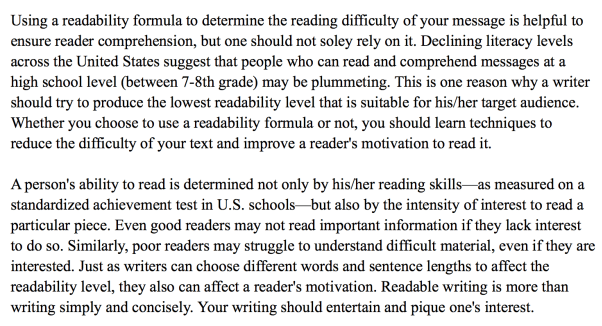
This screen is hard to read. It takes the reader a while to go through it. If anything, he’ll skim read this passage.
Now look at this screen:
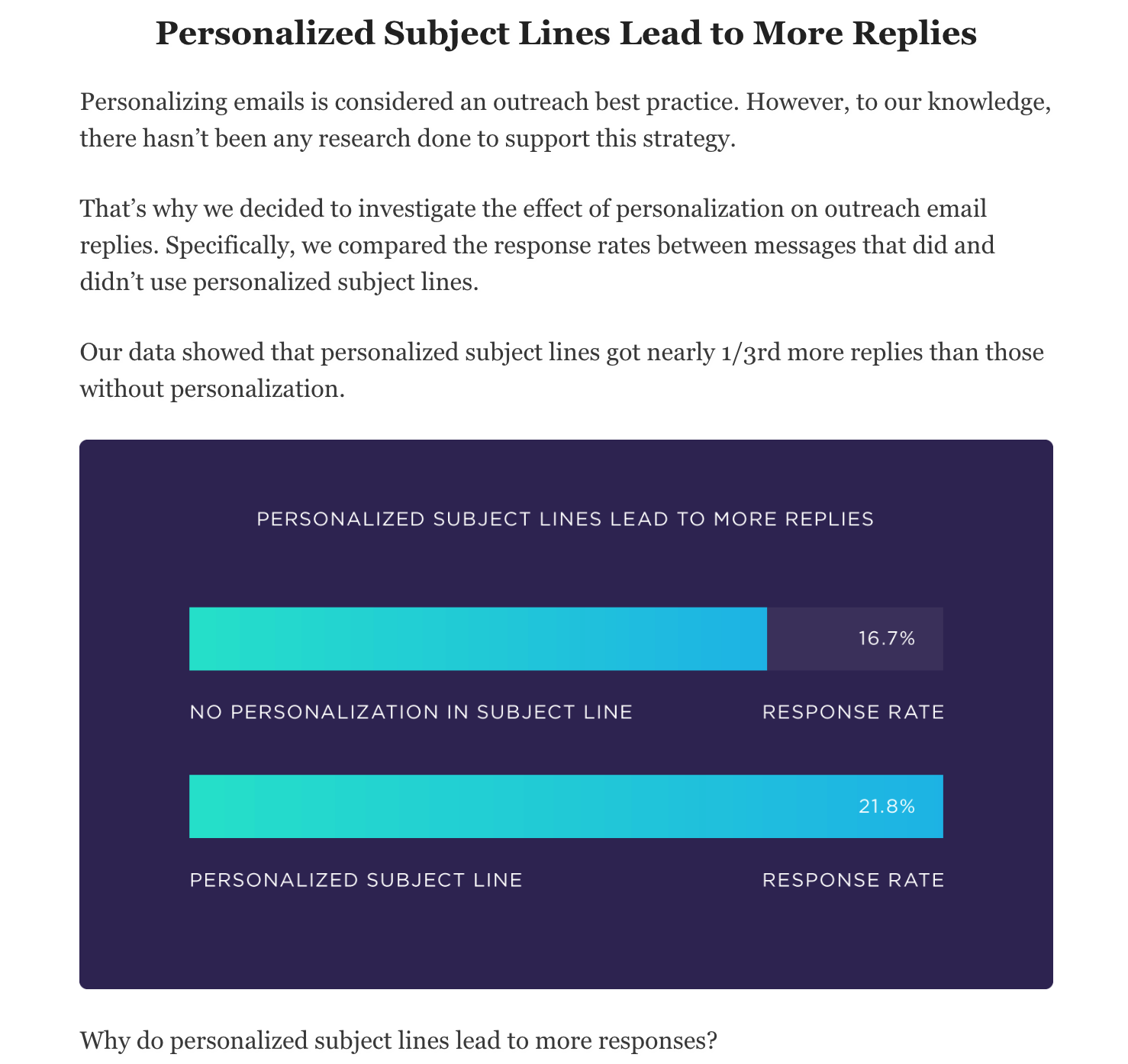
This passage is far easier to consume as a supportive visual explains the point and the text is divided into small, readable paragraphs.
Another thing you need to keep in mind is an intelligently created thank you page.
Lastly, you need to update your content if it does not obey web copy hacks that boost readers’ experience. Some pointers to take into account here:
We’ve covered a lot of ground by now. To recap, here are three main takeaways
Now that you’ve recognized the need for a content update, the question is which content should you refresh?
You could:
Sticking to what’s efficient, let’s walk you through finding content pieces that need refurbishing:
A content superstar is a piece that has previously encouraged good traffic and clicks. Dive into metrics on your site to identify such a piece. Look for posts that have had good traffic in the past but haven’t yielded much in the last three months.
Search for pieces that have been frequently downloaded, widely shared on social, or got the greatest clicks on your CTA (greatest over here depends on your blog). Or, you can give Google Search Console a whirl.
Go to the Search Traffic section and select Search Analytics in the menu. Check all the boxes for Clicks, Impressions, CTR, and Position. Then, choose Pages. This will give you a list of pages and their stats. Hit download at the bottom left corner of the page and export the list in a spreadsheet editor.
Select content pieces to refresh based on the following criteria recommended by David Schneider, co-founder of Ninja Outreach who updated his content and increased organic traffic by 40%. According to Schneider, re-optimize posts with:
Evergreen content is content that is forever relevant. But why should you refresh it when it’s evergreen already, you ask? That’s because evergreen content needs maintenance. So, touching it up will help you make the most of the content.
Make a note of content that ranks high for your top keywords. List pieces that rank in the first 2-3 pages on the browser and spice them up. A little push with the refresh can help you take your already-good ranking to a better ranking.
Bonus Point: Run your content through a refresh checklist or spreadsheet.
This sheet analyzes the performance of each piece and helps highlight the content that needs pruning.
Prepare a spreadsheet such as this one and answer your queries with a ‘yes’ or ‘no.’

This sheet will also help you determine the type of refreshing up your content needs. For instance, some pieces may need a complete re-write, more like a complete haircut. Others may require a trim only such as link updates, tweaks in the written content, and small changes that freshen the content’s overall appeal.
Here we go:
Use the tips shared above to find out which content to update. Add the select pieces to your content calendar. Scheduling content to refresh helps you:
It’s possible that the content that you are refurbishing now has been written with old SEO tactics in mind. For instance, the write-up may be stuffed with keywords. The latest updates, however, reveal that Google doesn’t appreciate keyword stuffing.
To erase the usage of the excess keyword. Instead, add:
For optimizing your content for voice, use Answer The Public, a free research tool that spews out questions for keywords. For instance, let’s try ‘social media for business as the keyword:
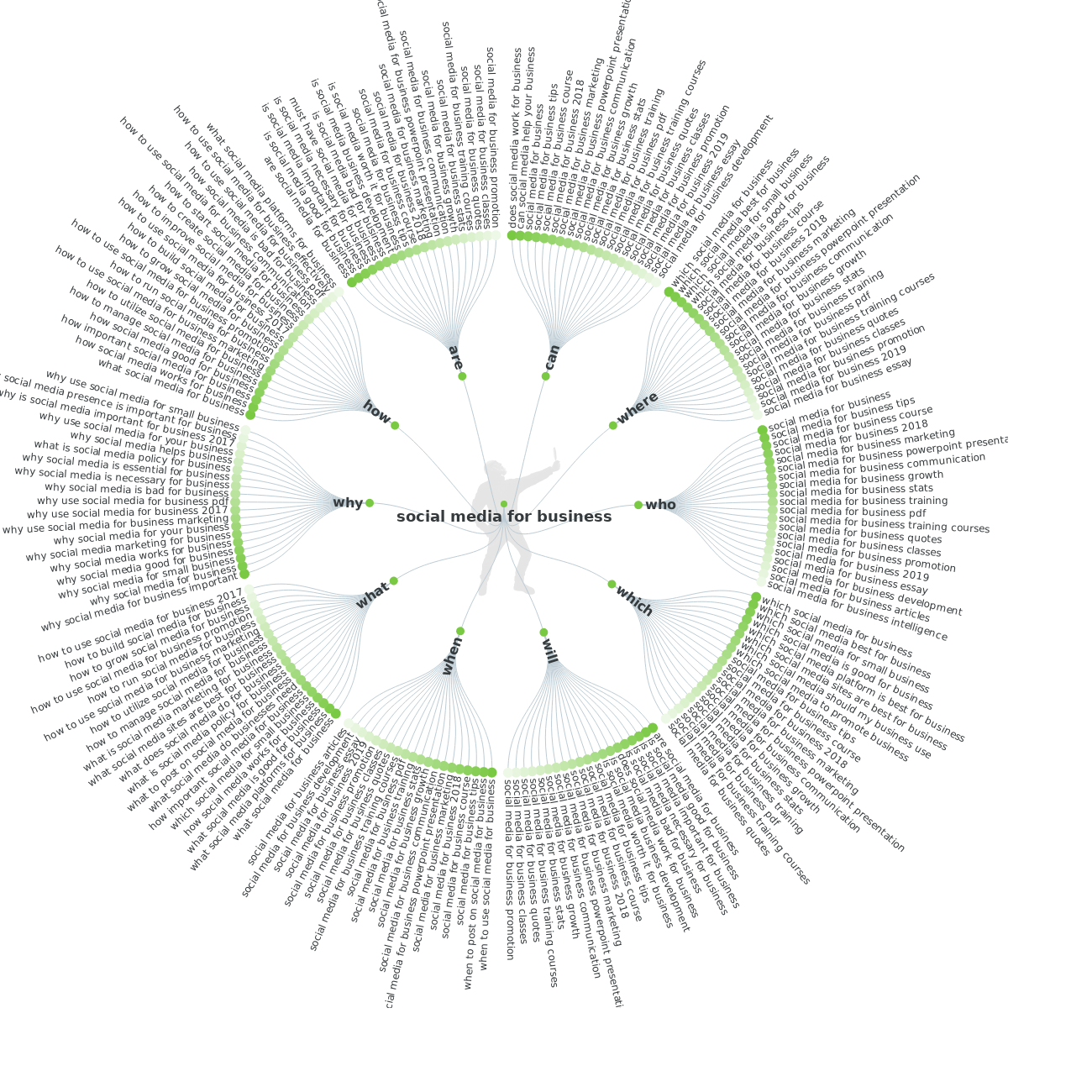
These suggestion questions provided by Answer The Public are natural language phrases. You can get an idea of your audience’s mindset from here and refresh content accordingly.
Semantic search relates to search with meaning. As search engines become intelligent, they seek to understand the user’s search intent and context to offer better search results.
Here are steps for updating content for semantic search:
A case in point is apple here. A user search for Apple maybe looking for the fruit or the tech giant, Apple might be his search intent. If your content talks about the tech giant, adding a laptop to Apple, ‘Apple laptop’ can help clarify the search intent.
In addition to updating the keywords and optimizing content for voice and semantic search, follow through an SEO checklist for on-page optimization.
Here’s what to do:
The Yoast SEO plugin for WordPress makes it easy to add your meta description.
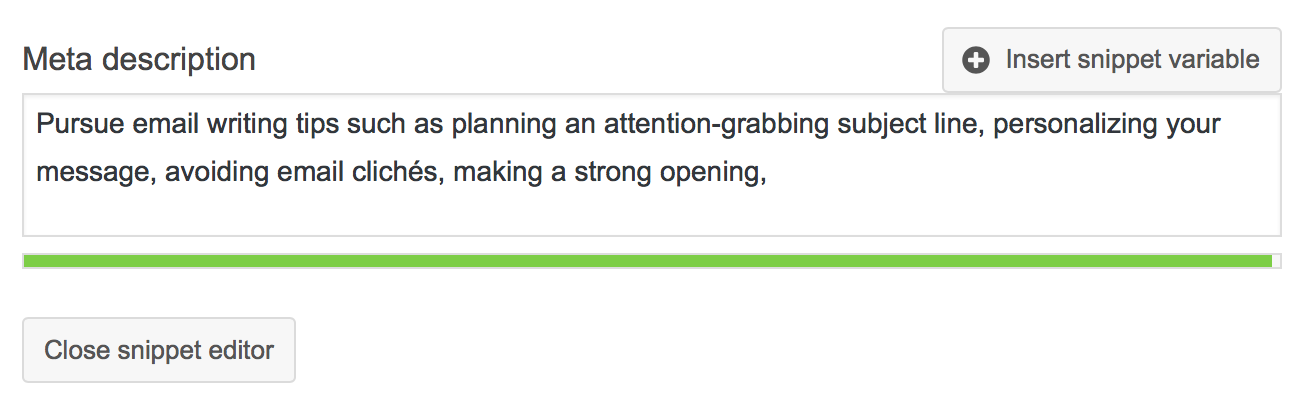
Let’s get to the text itself now. Begin with proofreading the content thoroughly. It’s common for typos to slip your surveillance so you may pick one up at this point. Or, you can spot a grammatical error.
See if you can add more value to the content or if you should exclude something from it. How can you make this more actionable? Examine the voice too. Does it align with your brand’s present voice? Also, take steps to boost your content’s readability.
To this end:
Check all the links in your content piece. Are they working? Or, do they direct a user to an error page? Replace any faulty links. At the same time, survey all the research and statistics you’ve added to your content.
Replace old research that dates back to four years with an updated version if available. Here’s an example: We begin this piece with a 2018 survey of bloggers by Orbit Media. There’s a 2017 version available too.
So, instead of the graph on the left side, we used the right version from the latest research because it covers 2018’s stats too:
Interlinking your pages is a good way for signaling the search engine of your site’s structure besides offering a rich library of relevant information to your readers. Visitors clicking on these pages tend to stay on your site, improving dwell time. Therefore, internal linking can positively affect your ranking.
As with getting links from authority sites, linking to powerful sites can also positively impact your ranking. So, here’s the plan at this point:
60% of all internet searches are conducted via a mobile device. This means that a sizeable chunk for your audience reads and interacts with your content from their mobile devices.
So, if your content isn’t already mobile-ready, then you need to add this to your to-do content refresh list. Take some of these steps:
Add a pop of visuals
Blog2Social highlights that visuals in your content can help drive traffic by 12%, conversion by 80%, and engagement and shares by 200%. In fact, posts with images generate 650% higher engagement than posts with no images.
So include some visuals when you update content. Choose from stock images, charts, and visual data, graphics such as infographics, GIFs and memes, and videos.
Last but not least, don’t forget to re-date the content that has a date assigned to content such as a blog post. Add an editor’s note saying that this is the updated version so that your readers know that they are reading fresh content.
An important caution over here: Don’t update or tweak the URL of your piece. Changing the URL will alter it, so places, where your content is linked, will no longer be able to take readers to your content.
Letting a content piece sink to the bottom of the unknown abyss is a nightmare. After all, you invested hours and resources into crafting the perfect content, you can’t let it go to waste with the snap of Thanos’s fingers, right?
To refresh your content periodically and extend its life. Update the keywords, optimize it for voice and semantic search, check the links, research, and content itself. Don’t forget to include visuals to boost readability.
Have any confusion related to content refreshing? Leave your questions in the comment section.
Wasiq Naeem is a Senior Content Strategist at ContentStudio and a research-driven content and digital marketing veteran. He writes on social media strategy, analytics, audience growth, and competitor analysis, covering topics like best posting times and competitor mapping. As a senior editor, he also reviews and fact-checks articles for depth and accuracy.
View all posts by Wasiq NaeemRecommended for you
Pinterest marketing guide: Turn visual discovery into business results

95% of marketers use AI. Only 39% see better performance. The gap isn’t the AI

Seedance 2.0: What it does, key features, and use cases

Evergreen content: How to create Long-lasting traffic for your website