ContentStudio API plan is now available. Create automations using Claude, Zapier, n8n, make, etc. Explore plan!

ContentStudio
Product

Platform

Publish

Plan and schedule content

AI Studio

AI-generated captions, images

Analyze

Measure social media KPIs

Engage

Social media customer care

Social Listening

New

Follow every conversation

Discover

Manage and read feeds

Top features

Workspaces

Clip maker

Calendar/Planner

Smart scheduling

Content library

White-label

New

AI Library

Bulk scheduling

Approval workflow

Client management

White-label reseller

New

AI video generator

Competitor analytics

Automation

Google Ads Analytics

New

Meta Ads Analytics

New

See all features

right-arrow-icon
contentstudio-tour

ContentStudio overview tour

Discover how ContentStudio simplifies workflows, helps in scaling up and delivers the results you need.

Solutions

By Business Type

For solo creators

For agencies

For small business

For marketing teams

For enterprise

By network

Facebook

Facebook

Instagram

Instagram

X (Twitter)

X (Twitter)

Google Business Profile

Google Business Profile

LinkedIn

LinkedIn

TikTok

TikTok

Bluesky

Bluesky

Meta Threads

Meta Threads

YouTube

YouTube

Pinterest

Pinterest

Telegram

Telegram

CUSTOMER STORYnew-tab-icon

How Webeing scaled client results using smarter workflows with ContentStudio

40%

increase in productivity with ContentStudio

Resources

Info Hub

Blog

Help docs

Glossary

Integrations

Case studies

n8n templates

Free Tools

Facebook video downloader

New

X (Twitter) video downloader

New

AI caption generator

Facebook post generator

LinkedIn video downloader

TikTok hashtag generator

YouTube title generator

TikTok caption generator

X (Twitter) hashtag generator

See All

right-arrow-icon
Video libraryContentStudio academy
video library

Access our complete collection of step-by-step tutorials covering all ContentStudio features.

APIPricing

Book a demo


Sign in

  1. Home
  2. ›Free tools
  3. ›YouTube name generator

YouTube name generator

Get unique YouTube channel name ideas for your niche with AI. Free.

GeneratealistofuniqueYouTubenamesforthatperfectlyalignwithtargetaudience.
  • Free forever
  • Channel name ideas
  • Any niche
  • 16,500+ brands use ContentStudio

What is a YouTube name generator?It is a tool that suggests names for your YouTube channel. You enter a few keywords or your niche and it returns a list of unique, easy-to-remember channel name ideas. ContentStudio's YouTube name generator is free and uses AI, so you can generate again until a name fits your brand.

On this page

  • How to use it
  • Names for every niche
  • Keyword-rich names
  • Name ideas by niche
  • Channel name vs. handle
  • Channel name rules
  • Picking a good name
  • Changing your name
  • Is it free?
  • Manage your channel
  • More tools
  • FAQ

How to use it

How to use the YouTube name generator

  1. 1

    Enter keywords or your niche

    Type what your channel is about, such as "budget travel", "retro gaming" or "marketers". Add a word about your style (funny, calm, expert) for different results.

  2. 2

    Generate

    Click Generate YouTube names now and get a list of channel name ideas.

  3. 3

    Shortlist three

    Say each one out loud. Keep names that are easy to spell after hearing them once.

  4. 4

    Check availability

    Search each name on YouTube and check whether a matching handle (@name) is free. Check other networks and the domain too.

  5. 5

    Set it in YouTube Studio

    Add the name and handle under Customization, then Basic info.

Names for every niche

Perfect YouTube name generator

Struggling to find the perfect name for your YouTube channel? Our YouTube name generator is built for content creators and aspiring YouTubers. Whether you focus on gaming, cooking, technology or lifestyle vlogging, the tool gives you creative names that fit your niche.

Gaming channel names

Energetic, short names that work as a handle and look good on a stream overlay.

Personal brand names

Your name plus a clear topic, such as "Sara Cooks" or "Dev with Max". Easy to grow with you.

Brand and business channels

Keep your company name and add what the channel teaches, such as "Acme Academy" or "Acme How-To".

Faceless and niche channels

Descriptive names that tell viewers the topic at a glance, such as "Calm Space Facts".

Keyword-rich names

Get keyword rich YouTube names

Our YouTube name generator helps you create channel names with impact. Enter relevant keywords and you get creative names that match your brand and your target audience. That works for your own channel and for the brands and clients you manage.

A keyword in the name, such as "Fitness" or "Recipes", tells new viewers what the channel is about before they watch. Don't force it, though. A memorable name beats a keyword-stuffed one, and your video titles do most of the work in search. Write those with the YouTube title generator.

Name ideas for other networks

  • X (Twitter) username generator
  • TikTok username generator
  • Facebook username generator
  • Instagram username generator
  • Bluesky username generator

Name ideas by niche

YouTube channel name ideas by niche

Use these as a starting point, then generate your own. Check availability before you fall in love with one.

  • Gaming

    Pixel Rush · Respawn Club · Late Night Loot

  • Cooking

    Ten Minute Table · The Hungry Hour · Pan & Plate

  • Fitness

    Daily Sweat · Lift Simple · Move With Mia

  • Tech

    Byte Size Reviews · Plug & Play Lab · Tech Unboxed Daily

  • Travel

    Carry-On Only · Map & Mile · Slow Road Stories

  • Education

    Explained Simply · The 5-Minute Class · Curious Minds Club

  • Beauty

    Glow Notes · Brush & Blend · Skin First Studio

  • Business

    Founder Friday · The Growth Desk · Small Biz Lab

Channel name vs. handle

YouTube channel name vs. handle

Every YouTube channel has two names. Pick them together.

Channel name

The display name on your channel page and under your videos. It can include spaces and capital letters, such as "Ten Minute Table". Widely reported as up to 50 characters.

Handle

Your unique @name and channel URL, such as @tenminutetable. YouTube requires 3–30 characters: letters, numbers, underscores, hyphens and periods. No two channels can share a handle.

Keep them as close as you can. If @yourname is taken, add a short word such as "tv", "hq" or your topic, not a random string of numbers.

Channel name rules

Rules for YouTube channel names

  • Length: keep the name short. Long names get cut off on phones.
  • Characters: stick to letters, numbers and simple characters so the name is easy to read and type.
  • No inappropriate content: no offensive language, hate speech or slurs. YouTube's Community Guidelines apply to channel names.
  • No impersonation: don't use a name that pretends to be another person, brand or channel.
  • Trademarks: don't use a name that belongs to another brand. It can lead to legal trouble or the name being removed.
  • Not misleading: the name should match the content you post.
  • Consistent with your brand: if you have a brand, keep the YouTube name in line with it across platforms.
  • Future-proof: choose a name that won't box you in if your content changes.

Picking a good name

How to pick a good YouTube channel name

  1. 1Reflect your content and niche. The name should hint at what viewers get.
  2. 2Keep it simple and memorable. Short, easy to say and easy to spell.
  3. 3Be unique. Avoid names close to popular channels in your niche.
  4. 4Think about growth. "Vegan Desserts" is clear, but "Plant Kitchen" leaves room for more.
  5. 5Check availability. Search YouTube, check the handle, the other social networks and the domain.
  6. 6Get feedback. Say the name to a few people from your audience and ask them to spell it back.

Changing your name

How to change your YouTube channel name

  1. 1Open YouTube Studio.
  2. 2Go to Customization, then Basic info.
  3. 3Edit the Name field (and the Handle field if you want a new @name).
  4. 4Click Publish.

On the YouTube mobile app, go to Your channel, tap the pencil icon and edit the name. YouTube limits how often you can change it (widely reported as twice within 14 days). If your channel has a verification badge, changing the name removes the badge, and you need to apply again.

A complete YouTube management solution

Once your channel has a name, it needs videos. ContentStudio is an AI social media management platform for marketers, creators and agencies. With it you can:

  • Schedule videos and Shorts. Plan uploads on a calendar and publish on time with ContentStudio's YouTube scheduler.
  • Write with AI. AI Studio, our AI social media content generator, writes titles, descriptions and captions in your new brand voice.
  • Track your channel. See how your YouTube videos perform next to your other social accounts and refine your strategy.
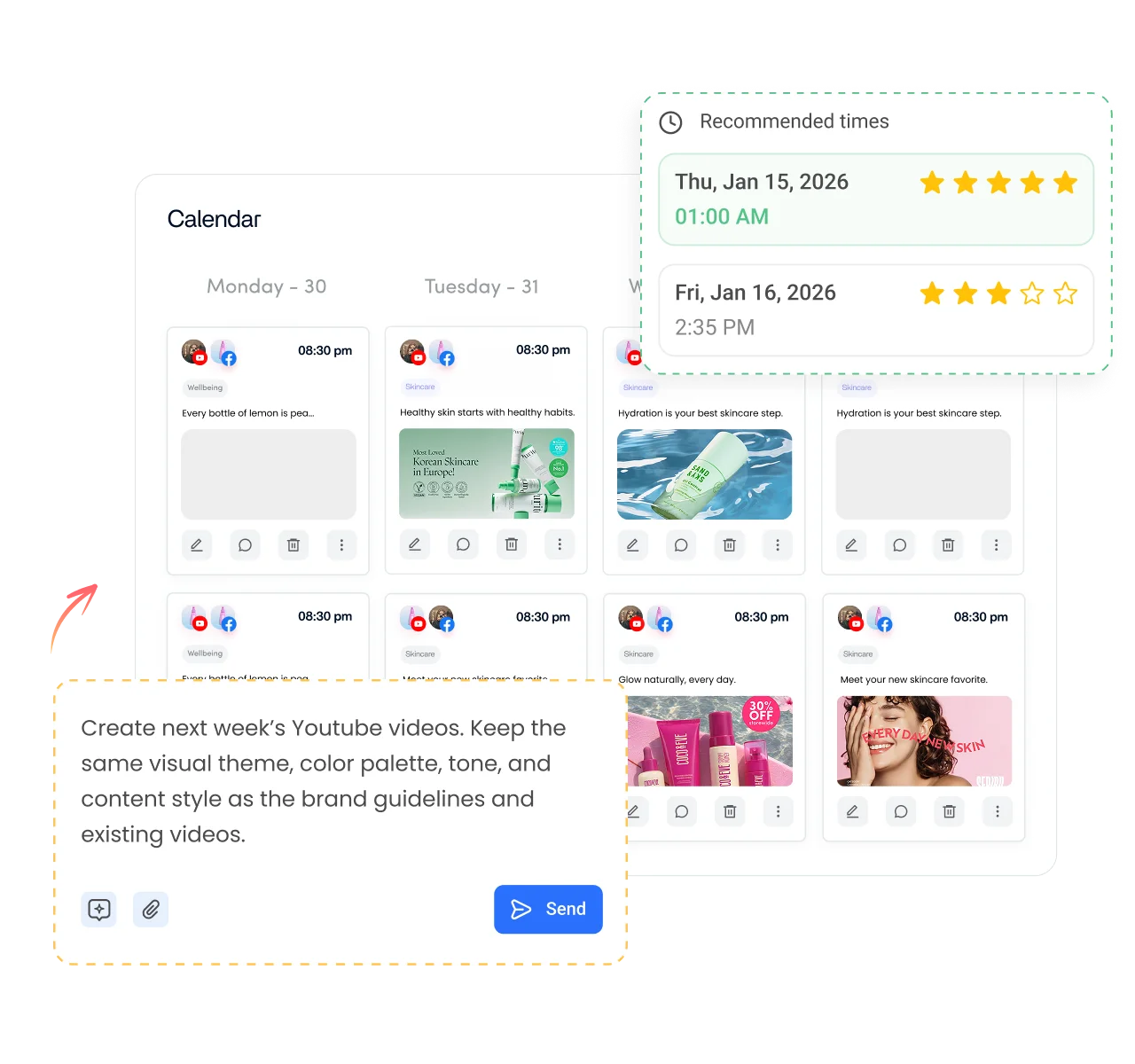
Schedule YouTube videos free for 7 daysSee the YouTube scheduler
Planning YouTube uploads for a new channel in ContentStudio

Is it free?

Is the YouTube name generator free?

Yes. ContentStudio's YouTube name generator is 100% free, and you can generate as many name ideas as you like. It is part of ContentStudio's suite of free social media tools.

  • Free forever
  • Channel name ideas
  • Any niche
  • 16,500+ brands use ContentStudio

More free YouTube tools

All free social media tools →
YouTube title generatorClick-worthy video titles
YouTube hashtag generatorHashtags and tags for videos
YouTube keyword toolFind what viewers search for
YouTube script generatorScripts with hooks and structure
YouTube description generatorSEO-friendly video descriptions
FAQs

Frequently asked questions

ContentStudio

Book a 30 min call

Have questions? Schedule a quick call and we will guide you through everything.

Book a free call

What is a YouTube name generator?

A YouTube name generator is a tool that helps you create unique and catchy names for your YouTube channel. You enter keywords or a niche and it suggests names you can shortlist, check and use.

Why use ContentStudio's YouTube name generator?

Whether you are starting a new channel or rebranding, the name shapes how viewers see you. ContentStudio's generator uses AI to suggest creative names based on your keywords, themes or niche, so you get many options in seconds and can pick one that is easy to find and remember.

How does the right channel name spark more YouTube views?

A good name makes your channel easier to find and remember. A relevant keyword tells new viewers what you cover, and a catchy, clear name makes people more likely to click, come back and recommend your channel. Your videos still have to deliver.

What are the rules for channel names on YouTube?

Channel names must follow YouTube's Community Guidelines: no offensive language, no impersonation of another person or brand, and nothing misleading. Avoid trademarks you don't own. Handles must be 3 to 30 characters and can use letters, numbers, underscores, hyphens and periods.

How to pick a good YouTube channel name?

Pick a name that reflects your niche, is short and easy to spell, is unique in your niche and leaves room to grow. Check that the name and handle are free on YouTube and other networks, then ask a few people from your audience for feedback.

How do I choose a YouTube channel name?

Start with your niche and audience, generate a list of ideas, and shortlist names that are short, easy to say and not used by other channels. Check that the handle is free, then set it in YouTube Studio. Once it is live, plan your first uploads with ContentStudio's scheduler.

How do I change my YouTube channel name?

In YouTube Studio, go to Customization, then Basic info, edit the Name and click Publish. On mobile, open Your channel and tap the pencil icon. YouTube limits how often you can change it, and a name change removes a verification badge.

Is the channel name the same as my YouTube username?

Not quite. The channel name is the display name viewers see. Your handle (@name) is the unique username in your channel URL and mentions. You can set both, and they can differ.

Is this a random YouTube name generator?

It is AI-based, not random. The names are built from the keywords you enter, so they fit your niche. Generate again for a fresh set if you want more variety.

Name it here. Grow it with ContentStudio.

Start free trial

Grow faster on social, every
single week

Get insights, emerging platform trends, AI strategies, and product updates trusted by 100,000+ marketers.

Lawrence Giordano
Thomas Smith
Anthony Garcia
Matt Li Haoming
Angela R.
100,000+ marketers subscribed

ContentStudio

5.3K subscribers

  • •Step-by-step tutorial and how-tos
  • •Product deep dives and launch demos
Subscribe on YouTube

One scheduler for every social network

Social Media Schedulers→
Facebook logoFacebookX (Twitter) logoX (Twitter)Instagram logoInstagramLinkedin logoLinkedinYoutube logoYoutubeTiktok logoTiktokPinterest logoPinterestBluesky logoBlueskyThreads logoThreads

Product

  • Publishing
  • AI Studio
  • Analytics
  • Inbox
  • Social Listening
  • Discover

Features

  • Content Calendar
  • Smart Scheduling
  • Automation
  • Content Composer
  • Approval Workflow
  • AI Library
  • See all features

Developers

  • Integrations
  • API
  • MCP Server
  • ContentStudio CLI
  • Zapier
  • Make
  • n8n

AI Agents

  • ChatGPT
  • Claude
  • Gemini
  • Grok Bot
  • Hermes Agent
  • Cursor
  • Codex
  • OpenClaw

Upgrade from

  • Hootsuite
  • Buffer
  • Sprout Social
  • Sendible
  • Agorapulse
  • Metricool
  • SocialPilot
  • See all

Resources

  • Blog
  • Help Docs
  • Changelog
  • Glossary
  • Free Tools
  • Case Studies
  • Mobile App
  • Chrome Extension

Company

  • About Us
  • Plans & Pricing
  • Reviews
  • Careers
  • Write for Us
  • Affiliate Program
  • Brand Assets
  • Contact Us
contentstudio-logo
Download on the App StoreGet it on Google Play
Facebook iconX (Twitter) iconInstagram iconLinkedIn iconYouTube iconTikTok icon
4.74.7 star rating, 25,000+ reviews on Capterra and G2

16,500+ brands trust ContentStudio

SSL Secured
GDPR Compliant
CCPA Compliant

© 2026 ContentStudio. All Rights Reserved.

Privacy|Terms|GDPR|System status|Security policy|Child safety|Sitemap