
How to build an executive’s LinkedIn content workflow with Claude Code
Oct 1, 202615 minutes

Written by
Khadija AnwarUpdated

Steps to delete TikTok videos:
Go to your profile > Select video to delete > Tap 3 dot lines > Select delete
Note: You will learn to remove drafts, published, liked and favorite TikToks.
If you are unable to figure out deleting videos on TikTok, then you have come to the right place. Deleting old videos that are not drawing much likes or views gives you the opportunity to create new videos with better TikTok editing and filters.
Here’s a quick preview.

Step 1:
Open TikTok App and go to the profile

Step 2:
Tap the video you want to delete and already posted on TikTok
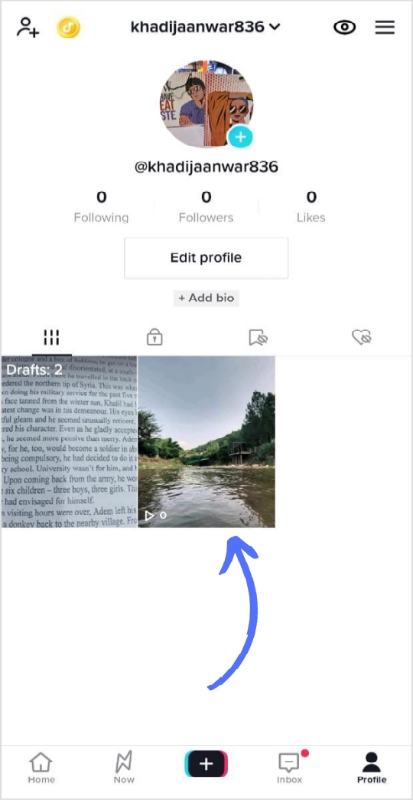
Step 3:
Open the video and tap three dot lines
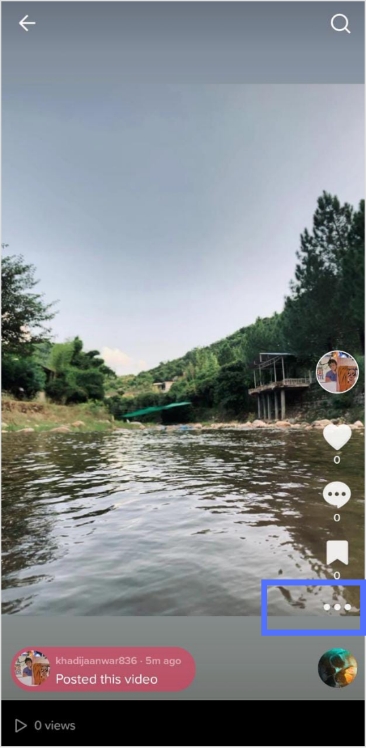
Step 4:
Select the delete icon present at the end of the row.
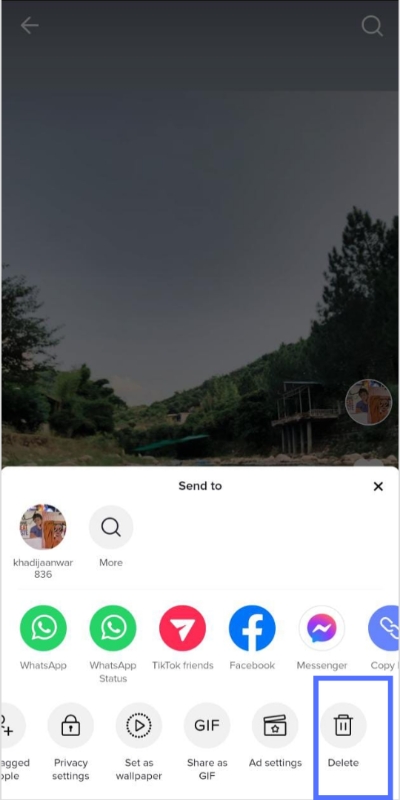
Step 5:
Tap “delete” to confirm
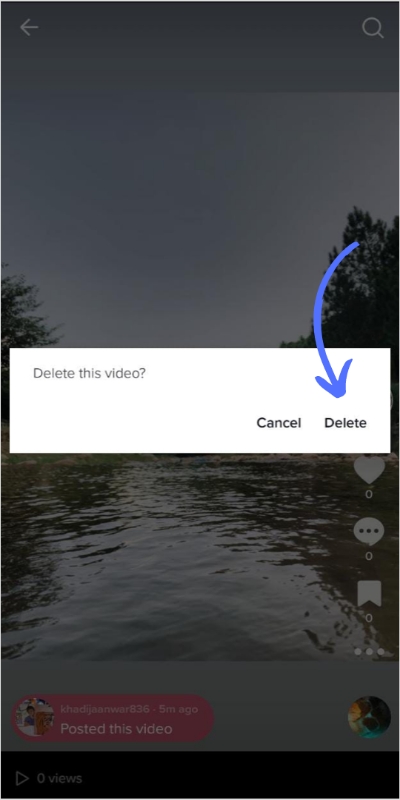
Related: How To Stitch on TikTok?
The easiest way to manage & grow your social channels
Trusted by 80,000+ forward-thinking agencies & brands worldwide
Discover MoreStep 1:
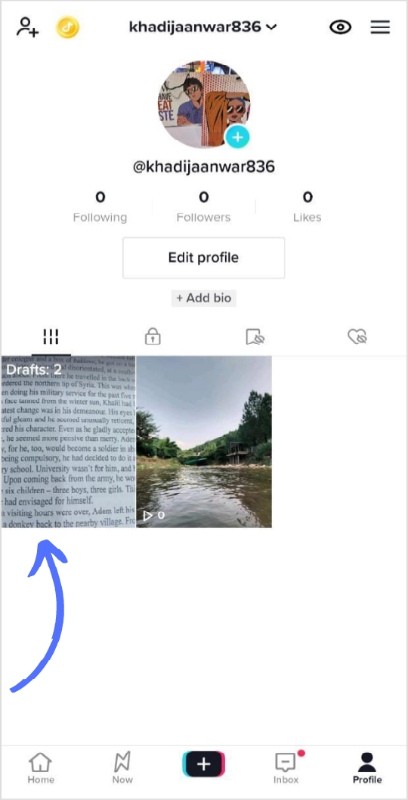
Go to your TikTok Profile again and tap “drafts”
Step 2:
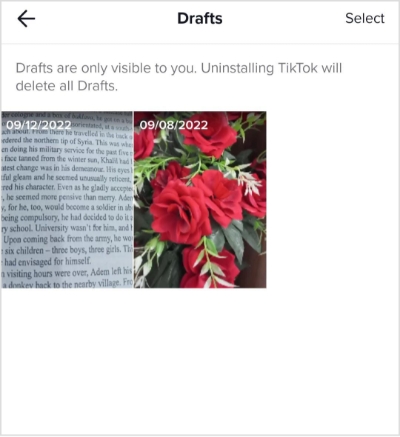
Tap the video in the drafts gallery that you want to delete
Step 3:
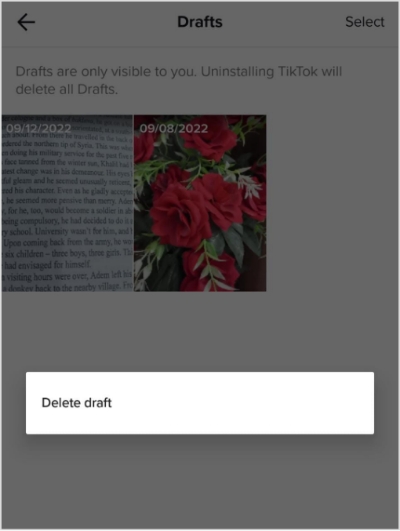
Tap the draft and delete option will pop up
Step 4:
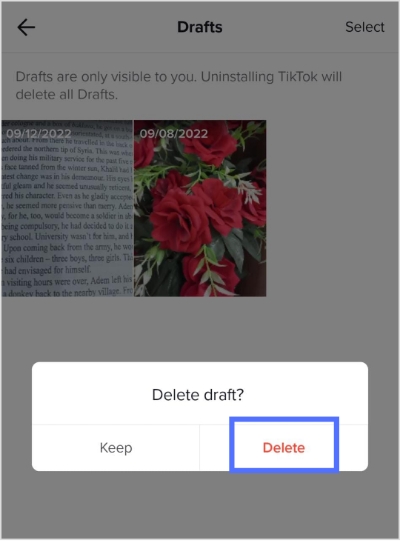
Tap “delete” to confirm.
Here’s a recap of the above.

Related: How To Switch To A TikTok Business Account?
Step 1: Go to your TikTok profile
Step 2: Tap the heart symbol tab beside the saved tab
Step 3: Select the video you want to delete
Step 4: Go to the video and tap on the heart symbol once
Step 5: Your video will be unliked and deleted automatically from your TikTok account.
Here’s a preview of the above steps
 Related: How To Get Rid Of Shadowban On TikTok?
Step 1: Go to your TikTok profile.
Step 2: Tap the saved symbol tab beside to private video tab
Step 3: Select the video you want to delete
Step 4: Go to video and tap once on the saved symbol
Step 5: Your video will be unsaved and deleted automatically from your TikTok account.
Here’s a preview of the above steps

Yes, you lose likes when you delete TikTok videos permanently. To avoid losing likes, make your video private instead of deleting it completely.
You can delete any published or saved video from your TikTok account, but you can’t undo it later.
Yes, you can delete a clip on TikTok.
No, it doesn’t have an archive.
Trending:
How To Put A Link In TikTok Bio?
A Complete Guide to Schedule TikTok Posts in 2022
Post & Schedule TikTok Videos With ContentStudio Now!
Plan 0 Days of Content in 0 Minutes
Create, schedule, publish and analyze your content across all your social media channels from one simple dashboard.
4.7 on Capterra • 16,500+ marketers trust ContentStudio
Khadija Anwar is a Senior Technical Writer at ContentStudio with over 500 published write-ups across the ContentStudio blog and beyond. She specializes in step-by-step platform guides and Help Center content across Facebook, Instagram, LinkedIn, YouTube, TikTok, and X, and reviews how-to articles to verify every step and platform detail is accurate and current.
View all posts by Khadija AnwarRecommended for you
How to build an executive’s LinkedIn content workflow with Claude Code

How to turn one product photo into 5 video Ads with Claude Code

Social media MCP server: How to automate posting with ContentStudio

How to automate social media with n8n: A practical guide