
Facebook ads analytics: How to track and improve your performance
Sep 17, 202617 minutes

Written by
Samana BatoolUpdated

Do you ever scramble to post on Facebook at the perfect time, only to forget or get sidetracked?
We’ve all been there.
But what if you could craft your witty updates and insightful thoughts beforehand, ensuring a consistent and engaging presence for your followers?
In this guide, you will learn how to schedule Facebook text posts. This will allow you to craft brilliant text posts ahead of time and publish them at a suitable time for maximum engagement.
Here, we’ll explore how to leverage the capabilities of ContentStudio to schedule your Facebook text posts.
Facebook Marketing
Manage and grow your brand on Facebook. Create, schedule, and publish posts, videos, and Reels to Facebook pages and groups.
Get Started for FREE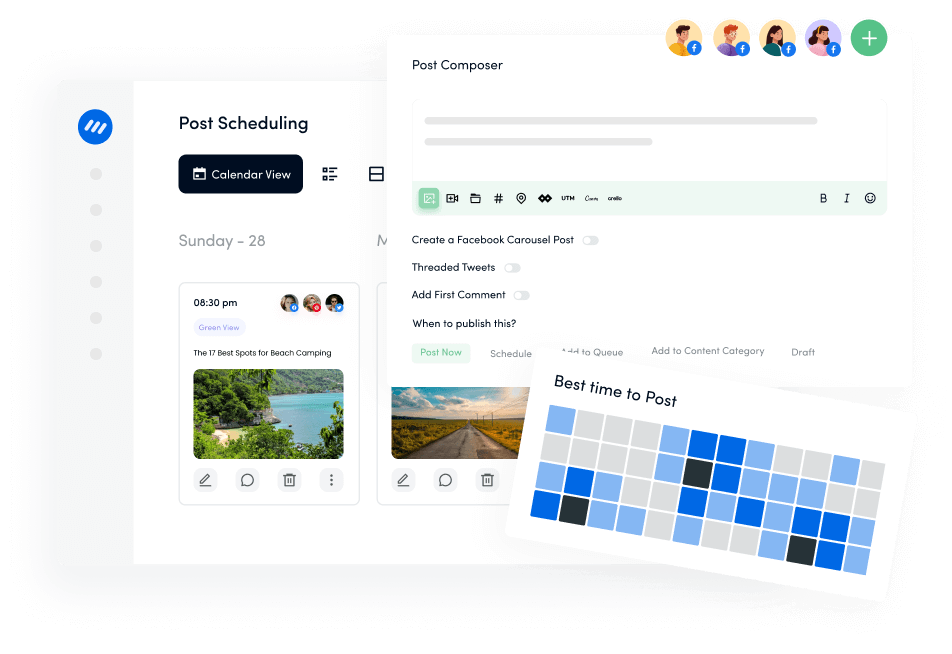
Meta Business Suite has a few basic features that allow you to schedule Facebook text posts. However, it has significant limitations, including:
Considering these limitations, it is clear why you need to use a third-party social media management tool like ContentStudio to schedule your Facebook text posts.
ContentStudio is an all-in-one social media management tool that offers far more superior capabilities and features than Meta Business Suite. You can use ContentStudio to not only schedule Facebook text posts but also thoroughly analyze their social media performance and manage your online presence.
Here’s how you can use ContentStudio to schedule Facebook text posts:
Open the official website of ContentStudio and login to your ContentStudio account to access the dashboard. If you don’t have an existing account, you can sign up with your email or simply log in with your Facebook, X, or Google account.

Once you are in ContentStudio’s dashboard, you should access the Social Accounts section, which provides a list of all your connected accounts.
Click on your profile icon and select Social Accounts.

Now choose the relevant option, whether you want to connect a Facebook group or Page with ContentStudio.

Provide permission to allow ContentStudio to access your Facebook profile and connect with your page.

You’ll be able to see all the pages connected to your Facebook profile. Select the page of your choice and click the Save button.

Your connected Facebook Group / Page will be visible under the Social Accounts section.

Once you’ve completed all the integration steps, you can create and schedule your Facebook text post.
Open the Post Composer from the dashboard by clicking Compose and selecting Social Post.

Select your Facebook page/group from the left bar and write the text post under the Post Composer.

You can also use ContentStudio’s built-in AI writing assistant to craft an engaging Facebook post.

Once your Facebook text post is ready, the next step is to schedule it for posting at a suitable time.
Select the Schedule option located under the Posting Schedule.

A new window will open where you can select the date and time you want to upload your Facebook text post. Click Continue after making your selection.

Once your post’s content is finalized and the scheduled publishing date and time are properly configured, click the Schedule button to complete the process.

ContentStudio has a user-friendly Planner that allows you to edit and manage all the scheduled Facebook posts. You can access the Planner from the ContentStudio’s dashboard.

The planner section has multiple filters to help you sort out your social media posts. When you are dealing with scheduled Facebook text posts, you can simply choose the Scheduled filter from the Status section and your Facebook page/group from the Accounts section. Click on Apply to sort the posts using the selected filters.
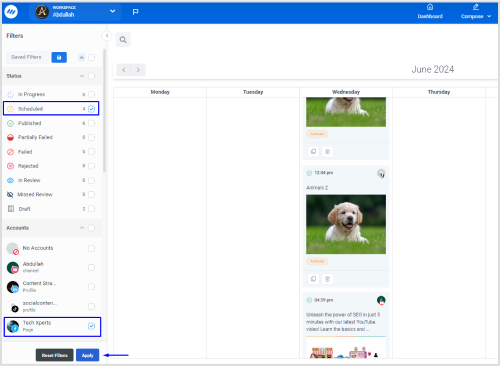
Once the filters are applied, you can see your scheduled Facebook posts on the planner. You can easily change their posting day by dragging and dropping.

If you want to edit the post’s content, click the edit icon to open Post Composer and make changes.

You are probably wondering why you need to schedule Facebook text posts in the first place. There are many benefits of scheduling social media posts and planning your content calendar in advance:
Scheduling Facebook text posts can help you save a lot of time and focus on other aspects of social media management and increasing audience engagement. It is even possible to plan and schedule an entire month of posts in one or two sittings, especially when you are using ContentStudio’s AI writing assistant or a free Facebook post generator.
Posting consistently on social media platforms like Facebook is important to keep your audience up-to-date. Scheduling posts in bulk can bring consistency and high audience engagement to grow your profile.
Social media marketing is all about organization. If you schedule your Facebook text posts in advance, you can organize your entire profile more strategically and ensure it aligns with upcoming events and holidays.
Consistently posting at the right times when your audience is most active can help you increase engagement and grow your following. Moreover, scheduling is useful in reaching a wider international audience by scheduling time zone-friendly posts according to your specific audience.
Related Read: How to grow your Facebook business page organically
The bottom line is that scheduling Facebook text posts is highly useful for growing your reach on this massively popular platform and making a mark. ContentStudio makes scheduling your text posts easy and managing your entire profile from the same platform.
The key features of ContentStudio, such as the content calendar, extensive scheduling options, drag-and-drop planner, and social media analytics, can help you enhance your Facebook presence.
Yes, you can schedule Facebook text posts with Meta Business Suite or ContentStudio. Meta Business Suite allows you to schedule posts 29 days in advance, while ContentStudio offers more comprehensive features to schedule and manage Facebook posts.
Yes, ContentStudio allows you to schedule and post the first comment on a post. You can do it from the Post Composer while scheduling your posts.
Yes, you can edit a scheduled post in ContentStudio. The editing options include deleting the post, editing the post’s content, or rescheduling it through drag-and-drop feature.
Samana Batool is a Social Media and Content Marketing Specialist at ContentStudio who turns complex tactics into user-friendly strategies. She covers social media management, content strategy, posting schedules, and agency growth, plus tool comparisons like Hootsuite versus Sprout Social, and reviews content for clarity and practical accuracy, drawing on hands-on digital marketing experience.
View all posts by Samana BatoolRecommended for you
Facebook ads analytics: How to track and improve your performance

70 ChatGPT prompts for Facebook to drive reach and engagement

Facebook cover photo size: The complete 2026 guide
Ultimate guide to schedule Facebook posts, Reels & Stories