How to use LinkedIn for Business: Setup, teams, and workflows
Dec 12, 202328 minutes

Written by
Khadija AnwarUpdated
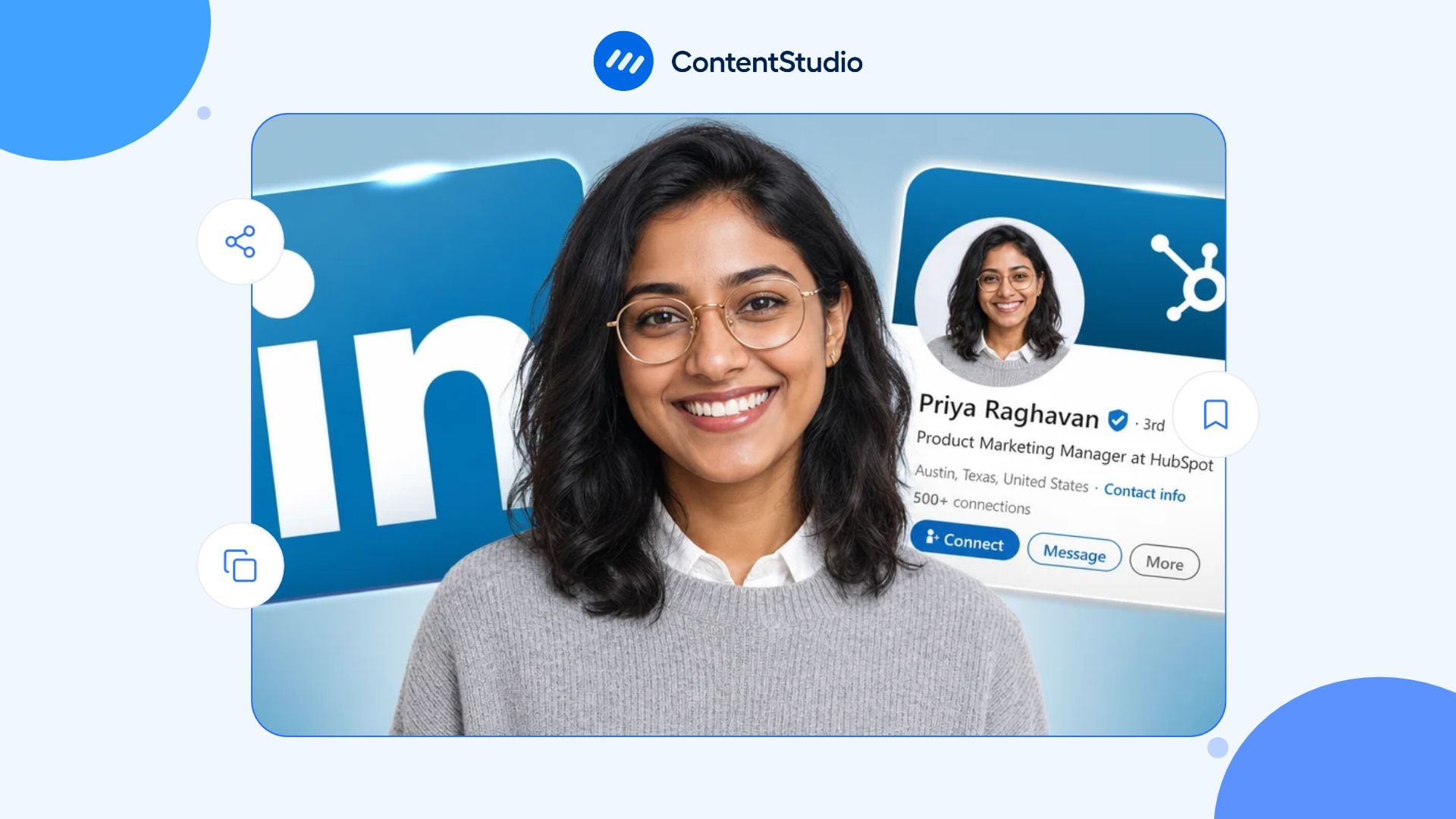
Your LinkedIn profile often gives recruiters, potential clients, hiring managers, and industry peers their first impression of you. Beyond an online résumé, it brings together your experience, skills, work samples, recommendations, professional interests, and activity.
A clear LinkedIn marketing strategy helps you shape your profile around your goals, whether you want to find a job, attract clients, build credibility, recruit talent, develop partnerships, or grow your professional network. Sharing relevant content and participating in industry discussions also helps visitors see how your expertise applies to your current work.
This guide explains how to optimize your LinkedIn profile, from your photo and headline to your About section, experience, Featured content, skills, recommendations, custom URL, privacy settings, and ongoing activity.
An optimized LinkedIn profile helps the right person understand your professional relevance: what you do, the experience behind your work, and why they might want to connect.
It should be:
Start with the foundations: a recognizable photo, a clear headline, an informative About section, accurate experience, relevant skills, and selected examples of your work. Before uploading a headshot or banner, check the LinkedIn recommendations in this social media image-size guide, then inspect the crop on desktop and mobile.
Your posts can provide further evidence of the expertise described in your profile. If you regularly share professional insights, a LinkedIn scheduler can help you plan approved posts. Use that activity to explain your work and contribute useful perspectives, not simply to keep the account busy.
You can have several professional goals, but your profile needs a primary focus. A profile designed for a job search looks different from one designed to attract consulting clients or build executive visibility.
| Primary goal | What the profile should emphasize | Useful evidence |
| Find a new role | Target role, transferable strengths, achievements, skills, job-search preferences | Relevant experience, projects, certifications, recommendations |
| Attract clients | Audience, problem solved, services, approach, outcomes, contact route | Case studies, service resources, client-safe examples, testimonials |
| Build executive visibility | Leadership perspective, industry focus, strategic experience, principles | Articles, interviews, speaking, published insights, Featured work |
| Support sales | Market expertise, customer understanding, problem-solving credibility | Buyer education, relevant posts, case studies, product knowledge |
| Recruit talent | Hiring focus, candidate experience, industry specialization | Roles, hiring perspective, talent-market content, recommendations |
| Build a personal brand | Expertise, recurring topics, professional voice, unique perspective | Original posts, articles, resources, engagement, public projects |
| Develop partnerships | Industry relevance, collaboration themes, complementary strengths | Joint work, events, partnerships, community activity |
| Change careers | Transferable experience, clear direction, evidence of learning | Relevant projects, coursework, certifications, portfolio work |
Before editing, write one sentence:
“I want [specific audience] to understand that I help with [specific problem, role, or outcome] because of [relevant experience or evidence].”
That sentence becomes the basis for your headline, About section, Experience entries, Featured content, and activity.
Review the profile from a visitor’s perspective, not only as its owner.
Ask:
A profile audit is also useful before applying for a job, requesting a referral, launching a business, starting a new role, speaking at an event, or publishing more frequently.
Your profile photo appears in search results, connection requests, comments, direct messages, post engagement, recommendations, and profile previews. It is often the first visual cue a visitor sees.
LinkedIn recommends using a recent photo that looks like you, keeping your face prominent in the frame, wearing workplace-appropriate clothing, and using an approachable expression.
A polished photo does not require an expensive studio session. It does need to be clear, current, and appropriate for the type of professional relationship you want to build.
The background banner is valuable profile space. It can reinforce your professional focus, show work context, or make your profile visually recognizable.
You can use a banner to display:
Avoid creating a crowded banner with several logos, lengthy text, small type, promotional claims, or too many calls to action. The banner should support the profile, not compete with it.
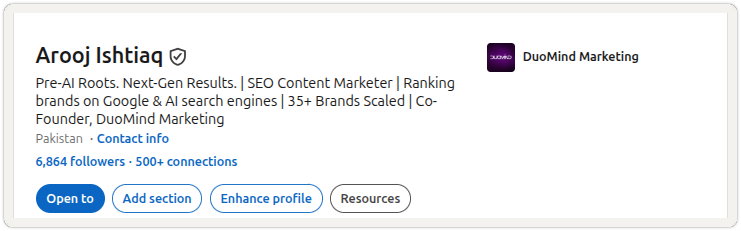
The LinkedIn headline appears in many places beyond the profile itself, including search results, comments, connection requests, messages, employee lists, and post previews.
LinkedIn advises using the headline to say more than a current job title. A useful headline commonly includes a role, area of expertise, audience, industry, professional outcome, or current career direction.
Role or professional identity | Specialty or expertise | Audience, industry, or outcome
Examples:
Avoid titles that tell visitors nothing about the work:
Those phrases may be true, but they do not explain your relevance.
Since the headline is visible in search results, comments, messages, and connection requests, choose wording that explains your role and professional focus before someone visits the full profile.
If people regularly mispronounce your name, LinkedIn offers a name-pronunciation feature that can help professional contacts address you correctly.
LinkedIn’s profile guidance recommends using the name-pronunciation recording when helpful; you create it through the mobile app.
Use the recording for your name. Do not turn it into a marketing slogan, sales pitch, or unrelated message. The feature is most useful when it supports respectful, accurate communication.
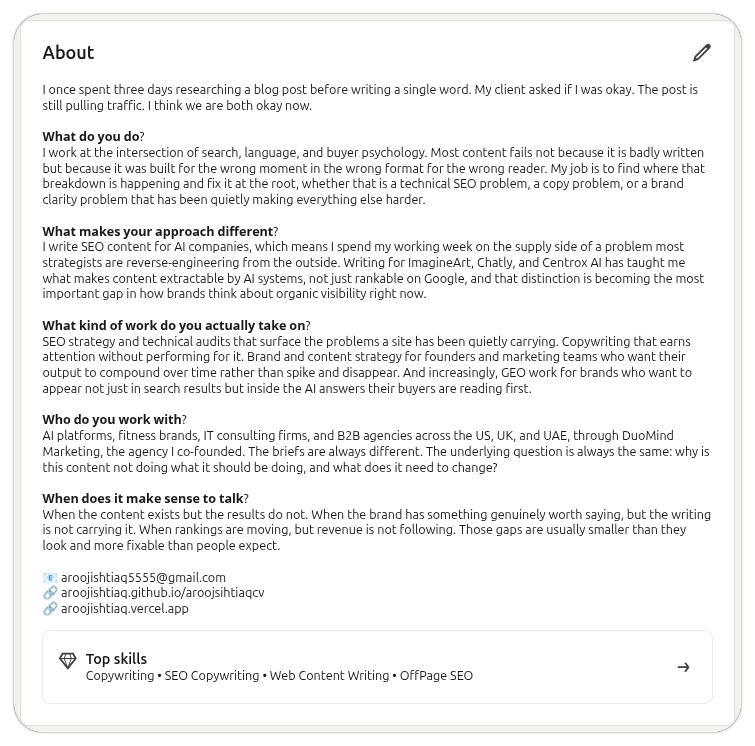
The About section gives you space to connect your role, experience, audience, skills, perspective, and next step. It should add context that a headline and Experience section cannot provide alone.
LinkedIn recommends using About to tell your own story, explain why your skills matter, and show the difference your work can make to the people you support.
I help [audience] with [problem, responsibility, or outcome].
In my role as [role], I focus on [relevant work].
My background includes [experience], which shaped how I approach [professional subject].
I have contributed to [verified project, scope, or outcome].
My areas of focus include [skills, methods, or industries].
I welcome conversations with [relevant people] about [topic, role, service, or opportunity].
Write in first person, use plain language, and break the text into short paragraphs. Avoid repeating every job, certification, or metric from your resume.
The About section is where a title becomes a coherent professional narrative; this walkthrough on adding a LinkedIn summary explains how to structure that narrative around your experience, strengths, and current direction.
Professional keywords can help people understand your expertise and may improve discoverability when recruiters, buyers, partners, or peers search for relevant roles, skills, industries, and services.
Use terms in the places where they make sense:
Keyword choices should make the profile easier for the right people to understand, not turn it into a list of search terms. The principles of SEO on LinkedIn can help you place accurate role, industry, service, and skill language across the headline, About section, Experience, and Featured assets without keyword stuffing.
Start with:
Do not add a term only because it is popular. If you cannot explain the skill or support it with relevant work, leave it out.
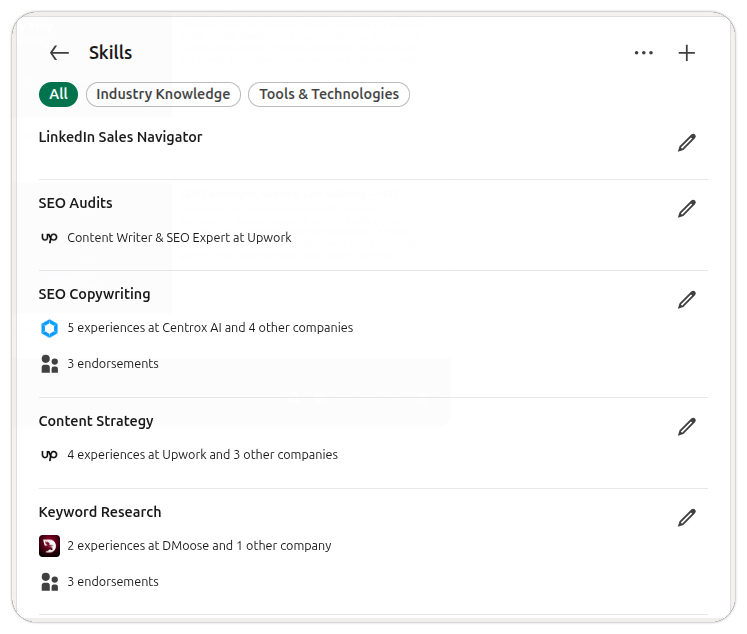
The Experience section should not be a copied job description. It should clarify your role, scope, contribution, and relevant outcomes.
For each role, include:
Less useful:
Responsible for managing marketing campaigns.
More useful:
Coordinated campaign planning, content production, webinar promotion, and reporting for B2B marketing programs serving operations leaders.
Less useful:
Led customer success.
More useful:
Led customer-success initiatives focused on onboarding consistency, customer education, and adoption reporting for mid-market SaaS accounts.
Use numbers only when they are accurate, meaningful, authorized, and understandable. Never expose confidential performance data, customer information, or unapproved results.
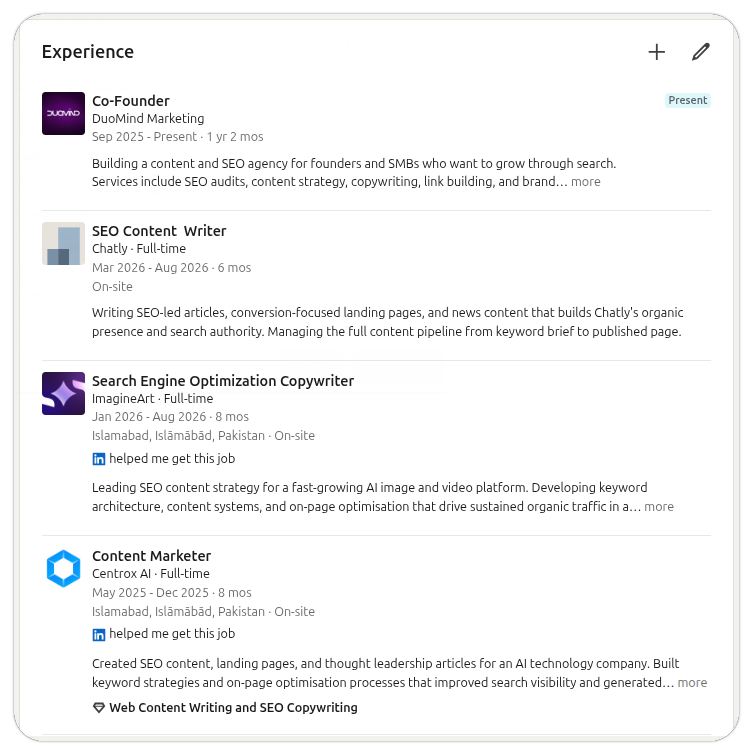
Featured is where you can give visitors direct evidence of your work, thinking, or expertise.
Possible Featured assets include:
Choose quality over quantity. A small set of strong, relevant assets is more useful than a crowded Featured section.
When a visitor needs more than a résumé or short post to evaluate your expertise, publish LinkedIn articles that explain your thinking in depth, then feature the strongest ones as durable proof of your work.
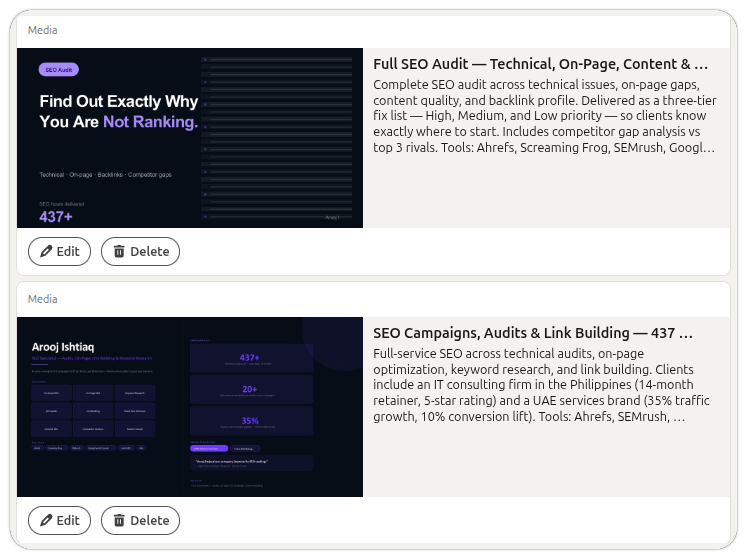
Skills can help visitors understand your professional focus and give connections a way to endorse capabilities they have seen you use.
LinkedIn recommends identifying relevant skills and reviewing the list regularly rather than accumulating a long, unfocused inventory. It also notes that members with five or more skills listed are more likely to receive connection requests.
A specialist should not list every skill they have ever encountered. A coherent set of skills makes the profile easier to understand.
Credentials can add useful proof when they are relevant to your current direction.
LinkedIn recommends adding licenses and certifications through the profile’s Add profile section area. It also encourages members to add projects, patents, publications, and other evidence that helps visitors understand their interests and commitment.
Add:
Do not add every short course or attendance certificate. Prioritize evidence that helps a relevant visitor understand your capability.
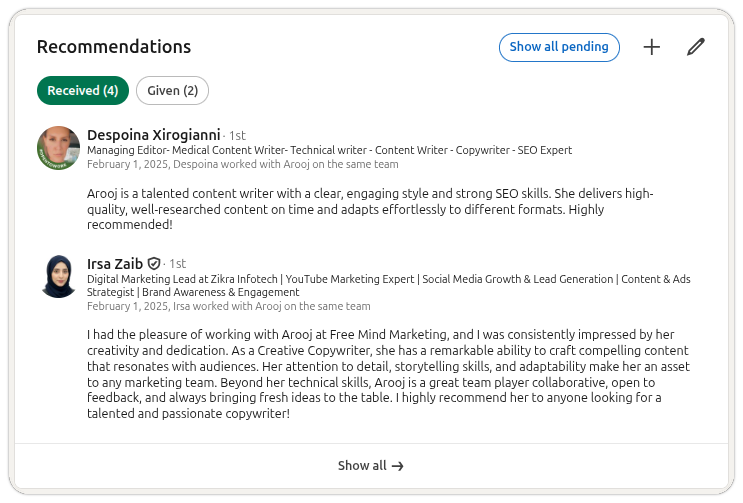
Recommendations are written testimonials from people who have worked with you. They can support credibility when they describe a real project, working relationship, skill, or outcome.
LinkedIn recommends personalizing recommendation requests and considering carefully whose perspective would add the most value.
Consider asking:
Instead of:
Can you write me a LinkedIn recommendation?
Try:
I appreciated working with you on the customer-onboarding project. If you are comfortable writing a recommendation, would you be willing to mention the work we did to clarify implementation handoffs and the impact that had on the team? I am happy to provide more context.
Do not ask someone to state results they cannot confirm. A specific, honest recommendation is more valuable than a generic one.
A clean LinkedIn URL is easier to share on a resume, website, portfolio, email signature, presentation, business card, application, or speaker bio.
A practical format is:
linkedin.com/in/firstnamelastname
If that is unavailable, use a professional variation, such as:
Avoid:
To update it, open your profile and look for Edit public profile & URL. Then update the public URL carefully, because previous links may stop working.
Profile optimization is not only about being visible. It is about being visible in the way you intend.
Review:
If you are job searching discreetly, review what current colleagues, recruiters, and public visitors can see. If you are building a public professional brand, make it easy for relevant people to understand your work and contact you appropriately.
LinkedIn’s Open to Work features can help communicate that you are open to opportunities. The right setting depends on whether you are searching publicly or privately.
Use it when:
Before enabling it, check:
Open to Work should clarify your direction; it should not replace a strong profile.
Your LinkedIn network should be built around real or potential professional context.
Follow up after:
LinkedIn recommends reviewing a person’s profile before reaching out, identifying common ground, and sending a thoughtful, personalized message rather than a generic connection request.
A useful connection note explains the context:
Hi Priya—your panel comments on customer onboarding were especially useful. I work on customer education for B2B SaaS teams and appreciated your point about measuring adoption after implementation. I would be glad to connect and continue following your work.
A connection request works best when the recipient can see why the interaction is relevant; the practical guidance on writing LinkedIn messages can help you turn shared context into a respectful first conversation.
An optimized profile needs activity that supports the expertise you claim.
Useful activity includes:
LinkedIn recommends sharing relevant content, commenting where you have a perspective, and following people who bring useful subject-matter content into your feed.
Do not post only because an algorithm recommendation says to post more. Publish when you have a useful question, insight, example, resource, or point of view.
When your profile claims a clear specialty, your posts and comments should give visitors evidence that you work in that area; a LinkedIn content strategy helps turn professional positioning into repeatable topics, evidence sources, formats, and publishing routines.
Employees can strengthen both their individual professional presence and the credibility of the organization they represent. The goal is not to make everyone repeat a corporate message.
A responsible employee-advocacy approach provides:
Your personal profile should remain yours. Share company content when you can add genuine context, professional expertise, or relevant experience.
Your resume and LinkedIn profile should be consistent on core facts, but they should not be identical documents.
Keep these details aligned:
Use the resume to tailor your evidence for a specific role. Use LinkedIn to provide ongoing context, activity, recommendations, work samples, and a more complete professional narrative.
If you decide to include a résumé, the process for adding a résumé to LinkedIn differs depending on whether you want a private file for job applications, a tailored Easy Apply attachment, or a public document in Featured.
AI can help you structure an About section, clarify a headline, identify vague language, compare your experience with a job description, or organize notes into stronger Experience bullets.
It should not invent:
Use AI to improve your own verified material.
I am updating my LinkedIn profile. Here is my verified work history, skills, project experience, and career goal: [paste].
My target audience is [recruiters, hiring managers, customers, partners, or peers].
Create three profile-outline options that include a headline, About-section structure, relevant skills, Featured-asset suggestions, and Experience-section themes.
Do not invent employers, clients, job titles, achievements, metrics, certifications, projects, or personal stories. Flag any claim that needs verification.
AI can make verified profile information easier to organize and edit, but it should not invent career evidence; the guardrails in this guide to using ChatGPT for LinkedIn apply to headlines, About sections, Experience descriptions, and job-search materials.
A profile visit is useful only when it leads to a relevant next step.
Review:
Profile views matter only when they lead to a relevant action, such as a conversation, application, inquiry, referral, or portfolio visit; a LinkedIn analytics workflow helps connect publishing activity with those broader outcomes.
Use this plan if the profile needs a full refresh.
ContentStudio does not edit LinkedIn profile fields directly. It helps you build the professional activity that gives profile visitors evidence of the expertise you describe.
Use ContentStudio to:
ContentStudio’s LinkedIn content scheduler can help you plan, approve, publish, and review the content that supports your profile positioning over time.
A LinkedIn profile can be complete and still be ineffective. The most common problems are not technical—they are clarity, credibility, and consistency problems. A visitor should be able to understand what you do, what experience supports that work, and why it may be relevant to them without decoding vague language or searching through an unfinished profile.
A headline that says only:
Marketing Manager at Company Name
may be accurate, but it gives a visitor little context. It does not explain your specialty, industry, audience, professional direction, or the type of work you are known for.
A clearer version might be:
B2B Marketing Manager | Content Strategy, Customer Education, and Demand Generation
Or:
Healthcare Recruiter | Clinical and Leadership Hiring | Candidate Experience and Workforce Planning
The headline appears in search results, comments, connection requests, messages, and profile previews. Use it to explain your professional relevance rather than repeating a job title that already appears in Experience. LinkedIn recommends using the headline to communicate the value you offer, not a vague title or buzzword.
An empty About section leaves visitors to infer your career story from job titles and dates. A generic version creates a different problem:
Passionate, results-driven professional with a proven track record of success.
This language could describe almost anyone. It does not tell the reader what you do, who you help, what problems you address, or what evidence supports your expertise.
Instead, explain your work in plain language:
I help B2B SaaS teams improve customer onboarding, product adoption, and customer education. My work connects customer-success strategy, product communication, and practical content that helps users get value sooner.
LinkedIn recommends using About to express your mission, motivation, skills, and relevant professional story; keep it concise and focused rather than treating it as a copied résumé.
A résumé and LinkedIn profile should be consistent, but they serve different jobs.
A résumé is typically tailored to one role or employer. A LinkedIn profile is a broader professional destination, where visitors can also see your About section, Featured resources, recommendations, skills, network, and activity.
Do not paste every résumé bullet into Experience. Instead:
A profile should provide more professional context than a two-page document, not duplicate it.
Experience descriptions often read like job descriptions:
Responsible for managing campaigns, coordinating stakeholders, and reporting results.
This explains duties but not what you actually contributed.
A stronger entry provides context:
Coordinated B2B campaign planning, content production, webinar promotion, and performance reporting for operations-focused audiences. Worked across product, sales, and customer-success teams to align campaign messaging with customer questions and launch priorities.
Use approved numbers, projects, scope, or outcomes where they make the contribution clearer. Do not invent results or publish confidential customer, employer, or financial information.
LinkedIn recommends using clear examples and measurable impact where relevant so Experience sections communicate more than a title and date range.
Terms such as these often add little without supporting proof:
You do not need to remove every descriptive word. You do need to explain what it means in practice.
Instead of:
Innovative leader with a passion for growth.
Write:
I lead cross-functional teams that improve onboarding workflows, clarify decision ownership, and turn customer feedback into practical changes.
Instead of claiming to be strategic, show the type of decisions you make. Instead of claiming to be results-driven, describe the result, scope, or process you contributed to.
Relevant keywords help the right people understand and find your profile. Keyword stuffing makes the profile harder to trust.
Less useful:
SaaS | B2B | Growth | Strategy | Marketing | Leadership | AI | Innovation | Sales | Customer Success
More useful:
My work spans B2B SaaS marketing, customer education, content strategy, lifecycle communication, and product-adoption programs.
The second version includes relevant terms but gives them a professional context.
Use keywords that accurately reflect your actual:
Do not add a keyword because it is popular or appears in a job description if you cannot explain or demonstrate it.
An old profile can create doubt even when the rest of the content is strong.
Review regularly for:
Update the profile whenever your role, priorities, skills, services, professional focus, or target audience changes. A quarterly review is a practical default; active job seekers, founders, consultants, recruiters, and creators may need a monthly check.
A profile photo does not need to be a formal studio headshot. It does need to be clear, current, and recognizably you.
Avoid:
Use a recent image with good lighting, a visible face, and a simple background. LinkedIn notes that a professional photo supports credibility and helps people recognize you in search results, connection requests, messages, comments, and meetings.
The banner is not mandatory, but leaving it as the default image can waste an opportunity to reinforce your positioning.
A useful banner might show:
Avoid turning the banner into a crowded advertisement. Small text, several logos, dense service lists, and multiple calls to action can make the profile harder to read.
The banner should support the first impression created by the photo, headline, and About section.
A profile may claim expertise but give visitors no way to assess it.
The Featured section can include:
Choose a small number of strong assets. A Featured section full of unrelated links is less useful than three resources that directly support your professional focus.
For example, if your profile says you specialize in customer education, feature an onboarding framework, a webinar clip, a customer-safe guide, or an article explaining your approach.
A long Skills section can create the impression that the profile has never been reviewed.
Remove skills that are:
Prioritize the skills that a relevant recruiter, client, partner, or peer would expect to see based on your role and experience.
LinkedIn recommends maintaining a relevant skills list and notes that profiles with five or more listed skills may receive more connection requests. The goal, however, is relevance—not simply adding more terms.
A vague request often produces a vague recommendation.
Weak request:
Could you write me a LinkedIn recommendation?
Better request:
I appreciated working with you on the onboarding project. If you are comfortable writing a recommendation, would you be willing to mention how we clarified the handoff process between implementation and customer success? I am updating my profile to reflect that part of my work.
A specific request helps the person remember the context and write a more useful recommendation. Ask only people who can speak honestly about your work.
Do not offer reciprocal recommendations as a transaction or ask someone to confirm results they did not see.
A large network does not guarantee strong professional relationships.
Avoid:
A relevant connection request explains the context: a shared event, referral, post, project, customer conversation, industry discussion, or mutual interest.
LinkedIn identifies impersonal outreach as a common profile and networking mistake. Personalized interaction helps build trust and makes the reason for connecting clear.
Your activity should support the professional focus stated in your headline, About section, and Experience.
For example:
| Profile positioning | Activity that supports it |
| Customer-success leader | Onboarding lessons, adoption frameworks, customer education, renewal insights |
| Recruiter | Candidate experience, hiring-process clarity, talent-market observations |
| Product marketer | Positioning lessons, buyer research, launches, customer education |
| Data analyst | Reporting decisions, data-quality lessons, dashboard adoption |
| Consultant | Decision frameworks, client-safe lessons, relevant industry analysis |
| Designer | Process explanations, portfolio context, design-system lessons |
Do not feel pressured to post every day. One useful post, thoughtful comment, or relevant resource is more valuable than a stream of generic motivational content.
LinkedIn recommends sharing original insight and participating thoughtfully in relevant conversations rather than relying on generic visibility tactics.
AI can help edit a headline, structure an About section, simplify an Experience entry, identify vague language, or compare verified experience with a job description.
It should not invent:
A profile that sounds polished but does not match your actual experience can create serious credibility problems in an interview, sales conversation, customer discussion, reference check, or professional relationship.
Use AI as an editor. Keep the evidence, voice, judgment, and final approval human.
Not every profile should be equally public.
Review:
A profile can be optimized for professional opportunity without exposing every piece of personal information.
A LinkedIn profile is not a one-time task. It should evolve with your work.
Review your profile when you:
The strongest profiles remain current because the people behind them review the details regularly.
You don’t build an optimized LinkedIn profile by adding every feature, skill, keyword, or trend. It is built by making your professional relevance clear and supporting it with credible evidence.
Start with a clear goal. Use a recognizable photo and purposeful banner. Write a headline and About section that explain your work in plain language. Add relevant experience, skills, work samples, certifications, recommendations, and activity. Then update the profile as your career or business evolves.
The best profile is not the most polished template. It is the one that helps the right person understand what you do, why it matters, and why they should take the next professional step with you.
Start by defining the role or direction you want. Update your headline, About section, Experience, skills, certifications, and Featured assets to emphasize relevant evidence. Keep your resume and profile aligned, enable Open to Work if appropriate, and connect with recruiters or professionals through genuine context.
Do not claim skills or qualifications only because they appear in a job description. Highlight demonstrated, transferable experience and use relevant projects or training to show your direction.
Make your audience and service clear in the headline and About section. Explain the problem you help solve, show relevant experience, add customer-safe examples or case studies to Featured, and provide a professional contact path.
Publish useful content that demonstrates your approach, but do not turn every post into a sales message.
Include your role or professional identity, relevant specialty, audience, industry, or outcome. For example:
Content Strategist | B2B Editorial Workflows, LinkedIn Marketing, and Customer Education
Use plain language and accurate terms. Avoid generic claims, excessive buzzwords, and unsupported outcomes.
There is no ideal word count. Write enough to clarify your professional focus, audience, experience, relevant proof, skills, and next step. Keep the opening concise because visitors may only see the first portion before selecting “see more.”
Use short paragraphs and avoid copying your entire resume.
Review it quarterly and whenever you change roles, skills, services, projects, goals, audience, education, certifications, contact details, or career direction. Active job seekers, freelancers, founders, recruiters, and people building a public professional brand may benefit from monthly reviews.
A complete, current profile using relevant language can make it easier for the right people to understand and find you. Use accurate role, skill, industry, and service terms naturally across the profile.
Search visibility also depends on many factors outside a single profile update, including the searcher’s query, their network, profile relevance, location, activity, privacy settings, and LinkedIn’s own systems. Do not treat keywords as a guarantee of ranking.
Plan 0 Days of Content in 0 Minutes
Create, schedule, publish and analyze your content across all your social media channels from one simple dashboard.
4.7 on Capterra • 16,500+ marketers trust ContentStudio
Khadija Anwar is a Senior Technical Writer at ContentStudio with over 500 published write-ups across the ContentStudio blog and beyond. She specializes in step-by-step platform guides and Help Center content across Facebook, Instagram, LinkedIn, YouTube, TikTok, and X, and reviews how-to articles to verify every step and platform detail is accurate and current.
View all posts by Khadija AnwarRecommended for you
How to use LinkedIn for Business: Setup, teams, and workflows
How to grow LinkedIn followers organically?
How to View LinkedIn Profiles Anonymously?
How to use LinkedIn for b2b marketing: Strategies, tips, and best practices