
Instagram trends 2026: What’s actually working right now
Jul 30, 202610 minutes
Black Friday: save up to 50% on all plans

Written by
Hassaan KhanUpdated
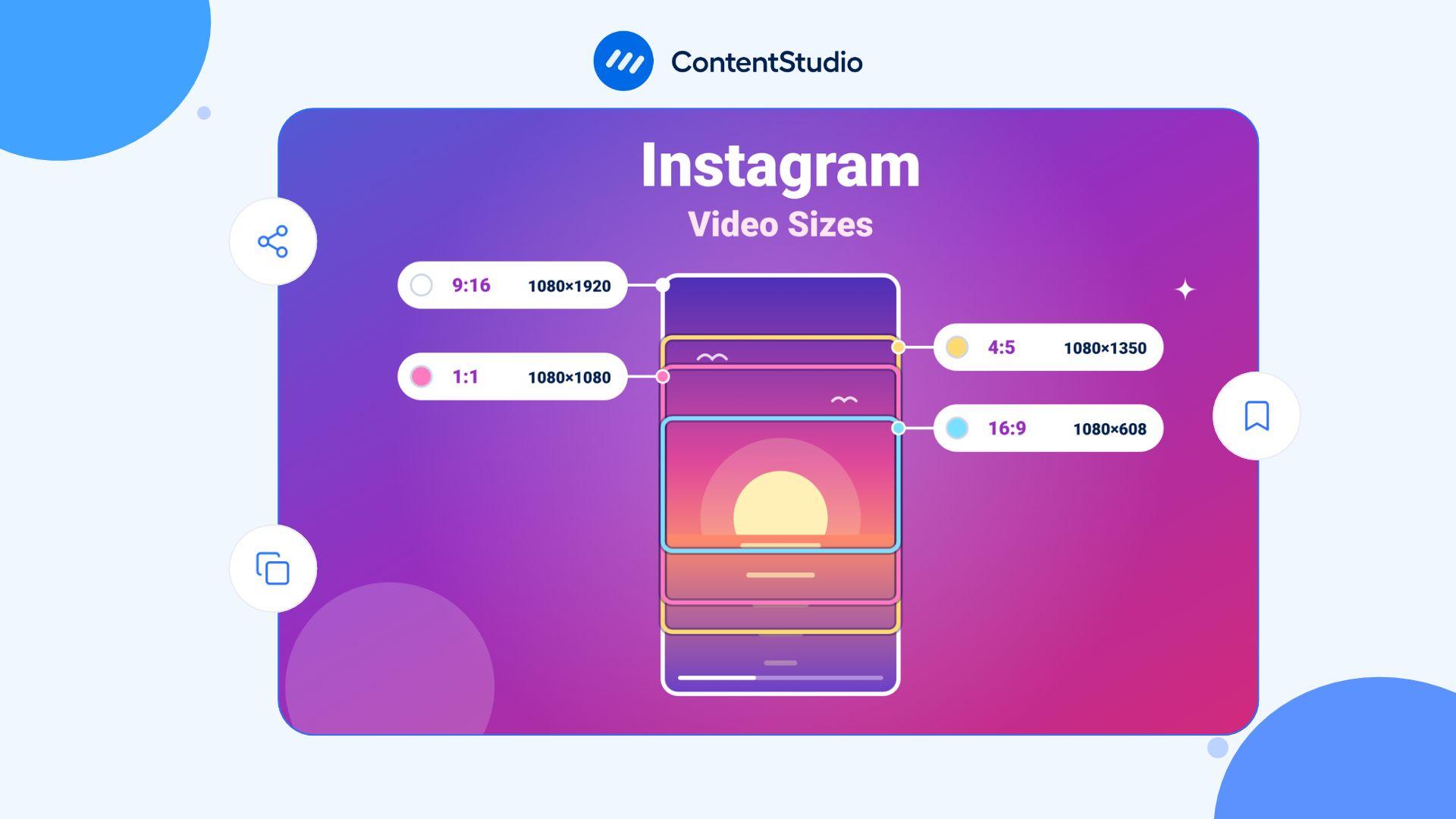
Instagram video size affects how a Reel, Story, feed video, carousel, or Live appears on screen. Using the wrong dimensions can crop important details, add blank space around the edges, or make the video look out of place on the platform.
The safest approach is to prepare each video for its intended format before uploading. A 9:16 vertical video works for Reels, Stories, and Live. Feed videos and carousels support vertical, square, and landscape orientations.
If you manage a business account, an Instagram marketing plan helps you decide which video format fits each campaign goal and audience.
An Instagram scheduler keeps approved Reels, Stories, and feed posts organised in one publishing calendar so the team is not manually uploading the same content across multiple formats.
Instagram video size is not just the file size in megabytes. It covers several related specifications that together determine how the video looks, loads, and performs on the platform.
Getting these specifications right before export saves time and prevents Instagram from cropping or compressing the video in ways that reduce quality.
Instagram displays video differently depending on the format and placement. A video that looks perfect in one context can appear cropped, stretched, or letterboxed in another.
The dimensions matter because they affect:
Understanding how Instagram Reels differ from feed videos and Stories in both format and discovery helps teams plan the right asset for each placement from the brief stage rather than discovering crop problems at upload.
Instagram does not reject most videos for being the wrong size. Instead, it adjusts how they display, which often reduces quality or changes the composition.
If the video does not match the expected dimensions, Instagram may:
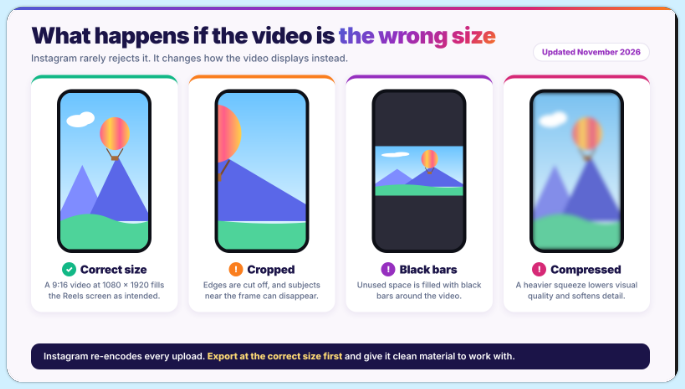
Exporting at the correct dimensions before upload is the most reliable way to prevent these issues. Instagram re-encodes every uploaded video, so starting with a clean, correctly-sized export gives it the best material to work with.
Also Read: How to build an effective video marketing strategy
Use this table as a starting point. The exact length and file size limits can vary by account type and interface version.
| Format | Aspect ratio | Resolution | Max length | Max file size | Codec |
| Reels | 9:16 | 1080 × 1920 | 3 minutes (up to 15 mins for select accounts) | 4 GB | H.264, MP4 |
| Stories | 9:16 | 1080 × 1920 | 15 seconds per clip | 4 GB | H.264, MP4 or MOV |
| Feed video | 4:5 / 1:1 / 16:9 | 1080 × 1350 / 1080 × 1080 / 1080 × 566 | 60 seconds | 4 GB | H.264, MP4 |
| Carousel video | 4:5 / 1:1 / 16:9 | 1080 × 1350 / 1080 × 1080 / 1080 × 566 | 60 seconds per clip | 4 GB per clip | H.264, MP4 |
| Live | 9:16 | 1080 × 1920 | Up to 4 hours | Streamed, not uploaded | Set by encoder |
Reels are Instagram’s primary short-form video format and appear in the main feed, the Reels tab, and the Explore page. They are the most discovery-friendly video format on the platform.
Safe zone: Keep key text, faces, and graphics away from the top and bottom 15 percent of the frame. Instagram overlays the username, caption, and action buttons in these areas, which can cover important content.
Related: An ultimate guide to Facebook Reels
Stories appear full-screen for 24 hours and are one of the most-watched formats on Instagram. They are played vertically and disappear after the viewing window closes.
If you upload a longer video to Stories, Instagram splits it into 15-second clips automatically. For videos longer than 60 seconds, only the first 60 seconds may be used. Plan content for the 15-second clip length to maintain a natural flow rather than relying on automatic cuts.
Related: How to add music to Instagram Story
Feed videos appear on the main Instagram profile grid and in followers’ feeds. Unlike Reels, feed videos sit alongside photo posts in the grid and are not promoted through the Reels discovery tab.
Maximum length: 60 seconds
Maximum file size: 4 GB
Recommended format: MP4 with H.264 codec
The 4:5 format is the most common recommendation for feed videos because it fills more of the mobile screen, which typically improves engagement. Instagram will crop a video to fit the selected format if the original does not match.
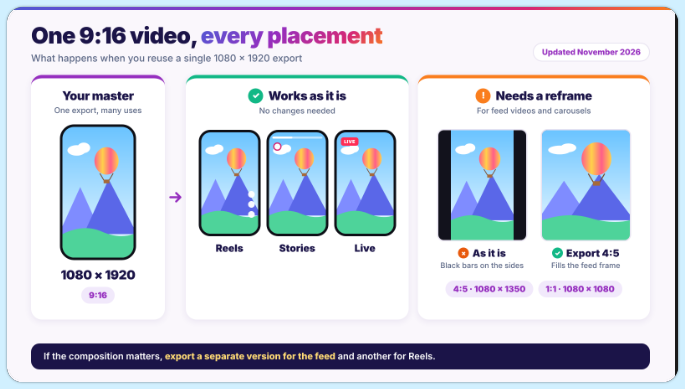
Carousels let you combine up to 10 pieces of content, mixing videos and photos, in a single post. Each video in the carousel can have its own specifications, but Instagram recommends keeping all slides at the same aspect ratio for a consistent look.
The first slide of the carousel determines the aspect ratio displayed in the feed grid. If the first slide is 4:5, all subsequent slides will be cropped to 4:5 in the full-screen viewer even if their native resolution differs.
Related: 10 ways to increase engagement with Instagram carousel posts
Instagram Live streams in real time and cannot be pre-uploaded as a file. The video is captured live through the Instagram app or a connected streaming encoder. The dimensions are fixed at the standard vertical format.
After a Live session ends, Instagram gives the creator the option to share the replay to their feed or Stories. The replay uses the same 9:16 format. Quality depends on the connection during the original stream, so a stable internet connection is the most important technical factor for Live.
Exporting with the correct settings before upload prevents most video quality problems. Instagram re-encodes every uploaded video, so the cleaner the source file, the better the final result.
Step 1: Choose the correct aspect ratio for the intended format before editing. Do not crop at the end of the editing process.
Step 2: Set the resolution to match the target format. 1080 × 1920 for Reels, Stories, and Live. 1080 × 1350 for 4:5 feed or carousel. 1080 × 1080 for square.
Step 3: Export as MP4 with the H.264 codec. This is the most widely supported format and produces consistent results across Instagram placements.
Step 4: Use AAC audio at 128 kbps or higher for stereo audio.
Step 5: Set the frame rate to 30 fps for most content. Use 60 fps for fast-motion or gaming content where smooth playback matters.
Step 6: Keep the file size under 4 GB. For most content, an appropriately exported MP4 will be well under this limit.
Step 7: Preview the exported file locally before uploading. Play it through completely and check audio sync, colour, and crop.
Step 8: Upload to Instagram and check the result after processing. Instagram may take a few minutes to serve the full-quality version.
The best time to publish matters as much as the format. The guide to the best time to post on Instagram covers when your audience is most active and how to align your upload schedule with peak engagement windows.
| Mistake | What happens | How to avoid it |
| Uploading a 16:9 video for a Reels post | Instagram adds black bars on the sides | Shoot or crop to 9:16 before exporting |
| Exporting at a lower resolution to save space | Instagram compresses further, reducing quality | Export at 1080p; compression happens on Instagram’s end anyway |
| Using the wrong aspect ratio for the first carousel slide | All subsequent slides are cropped to match | Set all carousel slides to the same aspect ratio before uploading |
| Uploading a Story video longer than 15 seconds | Instagram auto-cuts the video at 15-second intervals | Edit to 15-second clips before uploading for more control over the breaks |
| Exporting with VFR (variable frame rate) | Audio can fall out of sync after upload | Set the camera or export to constant frame rate (CFR) |
| Using ProRes or high-bitrate codecs for Instagram | Unnecessarily large files; Instagram re-encodes anyway | Export to H.264 MP4 for the final Instagram upload |
Getting the dimensions right is one part of a successful Instagram video workflow. The other is consistency. A guide to scheduling posts on Instagram covers how to plan uploads in advance and maintain a regular publishing cadence without manually posting at peak times.
For teams managing multiple formats and approvals, a guide to Instagram planning apps covers tools that help organise the full video production and publishing workflow from brief to upload.
Getting Instagram video size right is about matching the export to the intended format before uploading, not adjusting after the fact. Use the correct aspect ratio and resolution for each format, export as H.264 MP4, and preview the result before publishing.
Instagram re-encodes every uploaded video, so starting with a clean, correctly-sized source file gives it the best material to work with. The safe zone, the frame rate, and the audio codec matter less than getting the aspect ratio right, but all of them contribute to a video that looks as intended on every device.
ContentStudio helps teams plan, approve, and schedule Instagram content across all formats without manual daily uploads. Start a seven-day free trial. No credit card required.
The best size depends on the format. Use 1080 × 1920 for Reels, Stories, and Live. Use 1080 × 1350 for a 4:5 feed video or carousel. Use 1080 × 1080 for a square feed video or carousel. Use 1080 × 566 for a 16:9 landscape feed video.
Instagram Reels use a 9:16 vertical aspect ratio. The recommended resolution is 1080 × 1920 pixels. Keep key content away from the top and bottom 15 percent of the frame where Instagram overlays the username and action buttons.
Instagram Stories use a 9:16 vertical aspect ratio. The recommended resolution is 1080 × 1920 pixels. Each Story clip is a maximum of 15 seconds. Instagram splits longer videos automatically.
Instagram feed videos support 4:5 (1080 × 1350), 1:1 (1080 × 1080), and 16:9 (1080 × 566). The 4:5 format takes up the most vertical space in the feed and is the most commonly recommended.
Instagram carousel videos support the same aspect ratios as feed videos: 4:5, 1:1, and 16:9. The first slide determines how all slides are cropped in the viewer, so keep all slides at the same aspect ratio.
Instagram Live uses a 9:16 vertical aspect ratio. Live is streamed through the Instagram app rather than uploaded as a file. The session can run up to 4 hours.
MP4 with the H.264 codec is the most widely supported and reliable format for Instagram uploads. MOV is also accepted but MP4 is the safer default. Use AAC audio at 128 kbps or higher.
The maximum file size for most Instagram video formats is 4 GB. In practice, most correctly exported videos will be well under this limit. Live videos are streamed rather than uploaded, so the 4 GB limit does not apply.
IGTV is no longer a separate feature on Instagram. Instagram shut down the standalone IGTV app and removed it from the main app. Long-form video content is now published as Reels or as standard feed videos. The IGTV sections from the original version of this article have been removed.
Instagram may crop the video, add black bars, reduce the visible area, or prompt the user to adjust the crop before publishing. The result depends on how far the video dimensions deviate from the expected format.
Hassaan Khan is a Senior Contributing Writer and Editor at ContentStudio and a writer for SaaS and e-commerce brands, with bylines at SEMrush, ThriveGlobal, and BloggingCage. He covers social media marketing, technical SEO, and analytics, from Instagram impressions to hashtag analytics, and reviews articles for technical accuracy and SEO soundness.
View all posts by Hassaan KhanRecommended for you
Instagram trends 2026: What’s actually working right now

Instagram vs. Facebook: Which platform should your brand prioritize?

Instagram Stories guide: How to create, use, and analyze them in 2026
How do Instagram Reels work? Complete guide for creators and businesses [2026]


Plan, create and publish to 12 social channels
Up to 50% off on every plan
Offer ends in:
 Claim your deal
Managing social media doesn't get cheaper than this