ContentStudio year in review 2025: Key highlights and what’s next
Dec 30, 202518 minutes
ContentStudio API plan is now available. Create automations using Claude, Zapier, n8n, make, etc. Explore plan!

Written by
Wasiq NaeemPublished
Updated
Happy new year! Let’s take a moment to appreciate ourselves. Despite the difficult times, we have all made it through! Consider the new world your oyster, and you’ll be ready to achieve anything! ????
This year, our goal at ContentStudio is to make it the ultimate digital marketing platform. That’s why we are so excited to introduce all these new updates that we have released this month!
Let’s dive in…
First of all, let me introduce you to the New ContentStudio Design outlook!
Here at ContentStudio, we’re striving to make our tool user-friendly, intuitive, and fun. We have released an overview redesign, new authorization screens, and UI improvements.
Let’s get into it!
Authorization Screens
We have revamped our existing front-end design with the new design for the following pages:


Evergreen Automation

Discover Feeds
Introducing you to the new design of Cover Stories

and Grid, and List View to view articles as you prefer:

I hope you’re as excited about the new design as we are! Let us know what you think. As always, we are open to suggestions and feedback!
Sometimes errors happen, posts fail. ????
It’s okay though, don’t worry, as we have introduced validation checks at Social Composer so you can avoid (publishing) errors altogether!
As you know, ContentStudio offers two different types of option to compose a message: Social and Blog Composer.
???? Up until now, our Social Composer module lacked a validation process. This resulted in a lot of “failed” posts.
???? Social media networks are like apples and oranges ????????. They’re each fundamentally different. You can’t just post the same image or video everywhere since each platform has its own limits!
???? To optimize your social experience, we enforced the text-limit restriction, video/image size restriction, and aspect ratio check while publishing.
These errors will look like this:

We also have made a list of all the optimal social media image sizes, videos, and gifs supported by each platform for your ease! ????
While the error is still unresolved, you will not be allowed to publish to your social media network!

(Bonus: With these checks, you won’t feel like throwing away your computer when the posts don’t publish! ???? Hurray for that!)
ContentStudio now enables you to change the text font to Bold or Italic while composing a post in Social Composer if you want to, and it works for all the social media networks! How cool is that? ????

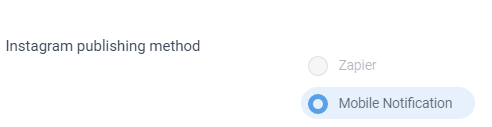
We now give you more control over the Instagram publishing method.
We have added the option to choose between ‘Zapier’ and ‘Mobile Notification’ where you can set and prioritize the way you want to publish posts through the Instagram publishing method.
We’ve made the inbox module smarter for you to monitor and engage with your audience queries more effectively using ContentStudio.
By Minimise toolbar
Now, it’s more manageable for you to minimize the side menu to avoid cluttering information shown on the left side and manage your social media activities widely. By clicking on this icon you can minimize your sidebar.

On another side, click on ‘…‘ to enable you to maximize the sidebar.

Select all social channels with a single click
You asked for it – you got it. ContentStudio enables you to select all of your social media channels with a single click.

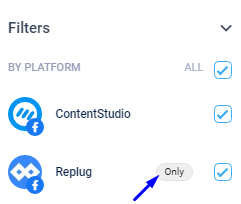
Select an individual social account – fast
In the recent improvements, ContentStudio not only allows you to select all social accounts at once but you can also select an individual account by hovering over the social account and clicking on the “Only” action.
As YouTube continues to dominate to be the most popular video-sharing platform, the need for integrations of cutting-edge features and functionalities have become relentless!
With this new feature, the integration method has changed from global API to user’s individual APIs. That means users can add their own Youtube API key to run YouTube Automations.
But wait.. what exactly is an API?
API is the interface for programmers. It is a set of protocols, codes, and functions that programmers use to interact and work with on other software applications.
How does this help me?
But with this recent release, YouTube API can be added on the ‘Other Integrations’ page.
Here’s how to create your own Youtube API Key.

This API Key will help to fetch the required content from YouTube for ‘Videos to Blog’ and ‘Videos to Social Media’ automation!
TL;DR: Post away your favorite videos from YouTube at a click of a button! Of course, adding in a mixture of content for your socials (that means article links, graphics, infographics, videos, gifs, memes) will increase the engagement rate overall! ????
This one is highly requested! ????
When it comes to managing your account, Design is everything.
We give you a chance to try our new design for Setting pages. Experience a unified design with a focus on ease of access. We have rolled an exciting update for you where the Settings page is newly designed.

ContentStudio always creates ease for their customers. Now, we have made it so much easier to manage your social media activities with our UTM tool. ????
Now, ContentStudio added a Default UTM to the UTM list to track your traffic.

UTM is a code that is added to the links when shared allows you to track the traffic and social engagement. We enable you to create customize UTM for each social channel.
Campaign Name: Contains campaign name which you have created already to track the performance of it.
Campaign Medium: It is based on the medium which you want to select for presenting your campaign or product to the audience such as email, newsletter, social and etc.
Campaign Source: You need to identify the source like Facebook, Twitter, etc. which shows you that from which source you are receiving more traffic or leads.
P.S: You can disable the default UTM, which is added when you share links to your social media channels by turning it off.
Looking for a better way to upload CSV file for mac users? ????
You ask, and we deliver. ✌️
We have improved CSV formatting for Bulk Upload to CSV and Evergreen Recipe. Now the users do not have to convert their CSV file in the correct format to upload it to ContentStudio.
All you have to do is to make a file from MAC, then follow the following instructions given in this article: https://docs.contentstudio.io/article/720-how-to-create-csv-file-on-mac
Previously, campaigns were using the global API for Youtube that was causing the interruptions as we were hitting the rate-limits.
But now with the recent release, you can use Video Automation Recipe for YouTube but first, you need to add your API Key. You can add the API key by going to **Settings > Other integrations. **
Following bug fixes and UI improvements have been made with the latest release:
Let’s dive in!


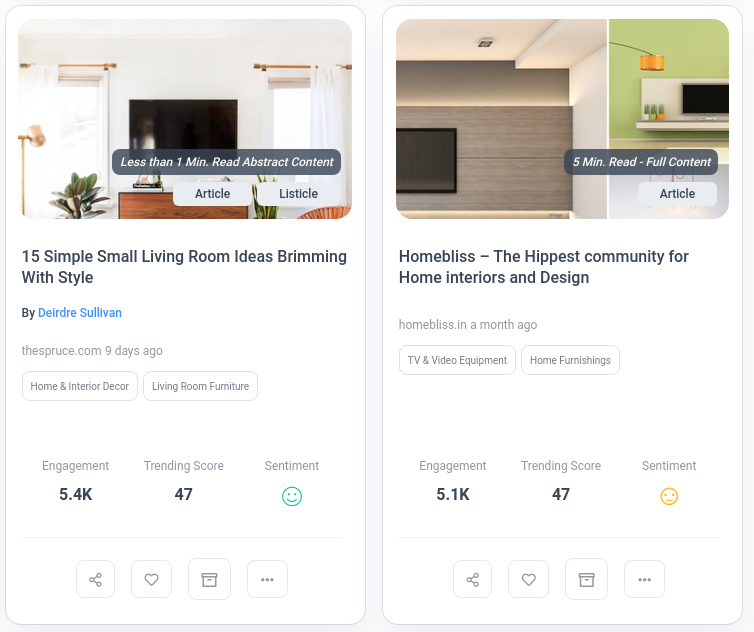


Not bad for a month’s worth of work, eh?
Still haven’t seen the update or feature of your dreams? Let us know in the comments!
Plan 0 Days of Content in 0 Minutes
Create, schedule, publish and analyze your content across all your social media channels from one simple dashboard.
4.7 on Capterra • 16,500+ marketers trust ContentStudio
Wasiq Naeem is a Senior Content Strategist at ContentStudio and a research-driven content and digital marketing veteran. He writes on social media strategy, analytics, audience growth, and competitor analysis, covering topics like best posting times and competitor mapping. As a senior editor, he also reviews and fact-checks articles for depth and accuracy.
View all posts by Wasiq NaeemRecommended for you
ContentStudio year in review 2025: Key highlights and what’s next
ContentStudio now speaks your language: French, German, Spanish, Italian, and Greek
Introducing AI Video Generation: Transform ideas into cinematic videos in seconds

New ContentStudio Home: Reimagining AI-powered content creation