ContentStudio API plan is now available. Create automations using Claude, Zapier, n8n, make, etc. Explore plan!
How to schedule Instagram posts, reels & stories in 2025

Written by
Wasiq NaeemPublished
Updated


Instagram is currently the 4th most popular social media platform, boasting over 500 million daily active users. Given its vast user base, it’s crucial to leverage the opportunities Instagram provides. The most effective way to maximize your presence on this social media platform is by scheduling Instagram posts, reels, and stories to ensure consistent engagement with your audience.
You greatly simplify your life if you grasp how to schedule Instagram posts, reels, and stories in advance. It is among the best Instagram hacks a social media manager may use in their daily work. Your entire Instagram marketing strategy will change when you use a social media optimization solution that enables you to schedule Instagram posts.
Daily publishing would be considerably more straightforward and let you manage campaigns, update photos, review old posts, and assess how well your profile performs.
Use this write-up to automate Instagram posts immediately, and you’ll never revert to your old habits!
Related read: The ultimate guide to Instagram automation
Instagram Marketing
Schedule your Instagram posts, Reels, and Stories, and get recommended best time to publish for maximum engagement.
Get Started for FREE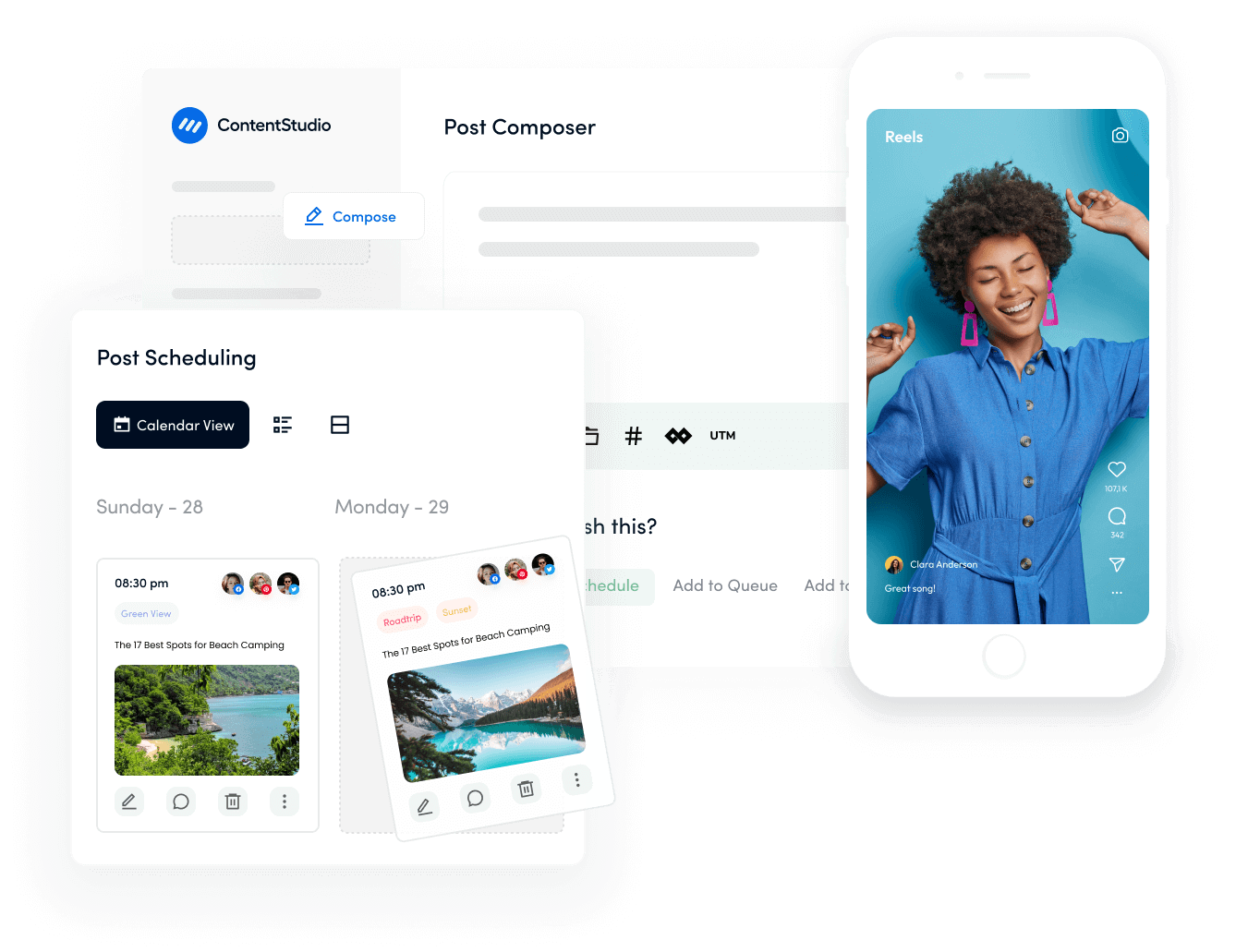
Why should you schedule Instagram posts in 2025?

Before I take you through the process for scheduling Instagram posts, let’s quickly go over the rationale. These are some persuasive reasons to schedule your Instagram posts to cope with Instagram algorithm:
- Time-saving
You probably wear multiple hats, whether a business owner, an artist or a social media manager. Since there are only 24 hours in the day, time is money. The main benefit of scheduling your Instagram posts in advance is time savings.
It gives more freedom for creating creative content ideas and other business requirements. Additionally, you won’t have to scramble to make a post immediately and may instead plan.
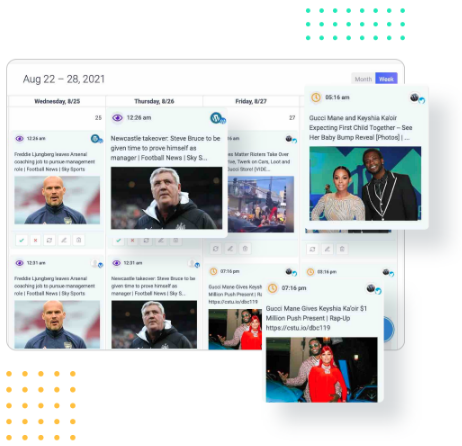
Social Media Calendar for Digital Agencies
Organize all your social posts and visualize your client’s social media content plan with an interactive Content Calendar
14 days free trial - no credit card requiredRelated read: 30+ Instagram tools for marketers
- Consistency
Any social media strategist will tell you that maintaining a regular posting schedule is one of the determining variables in their success. It’s crucial to post engaging material throughout the week, even if it’s not necessary to do so daily.
- Ordered content schedule
Undoubtedly, scheduling Instagram posts maintain order in your content calendar. You’ll be able to see your content as a whole and see any gaps or possibilities for the next few weeks.
- Are there any holidays or social media events you can take advantage of?
- Do your Instagram posts have a good mix of lifestyle and product photos?
- Are your posts in line with your broader social media and professional objectives?
It’s a quick and straightforward technique to ensure that your material is persistently relevant and that you are not simply posting for blogging.
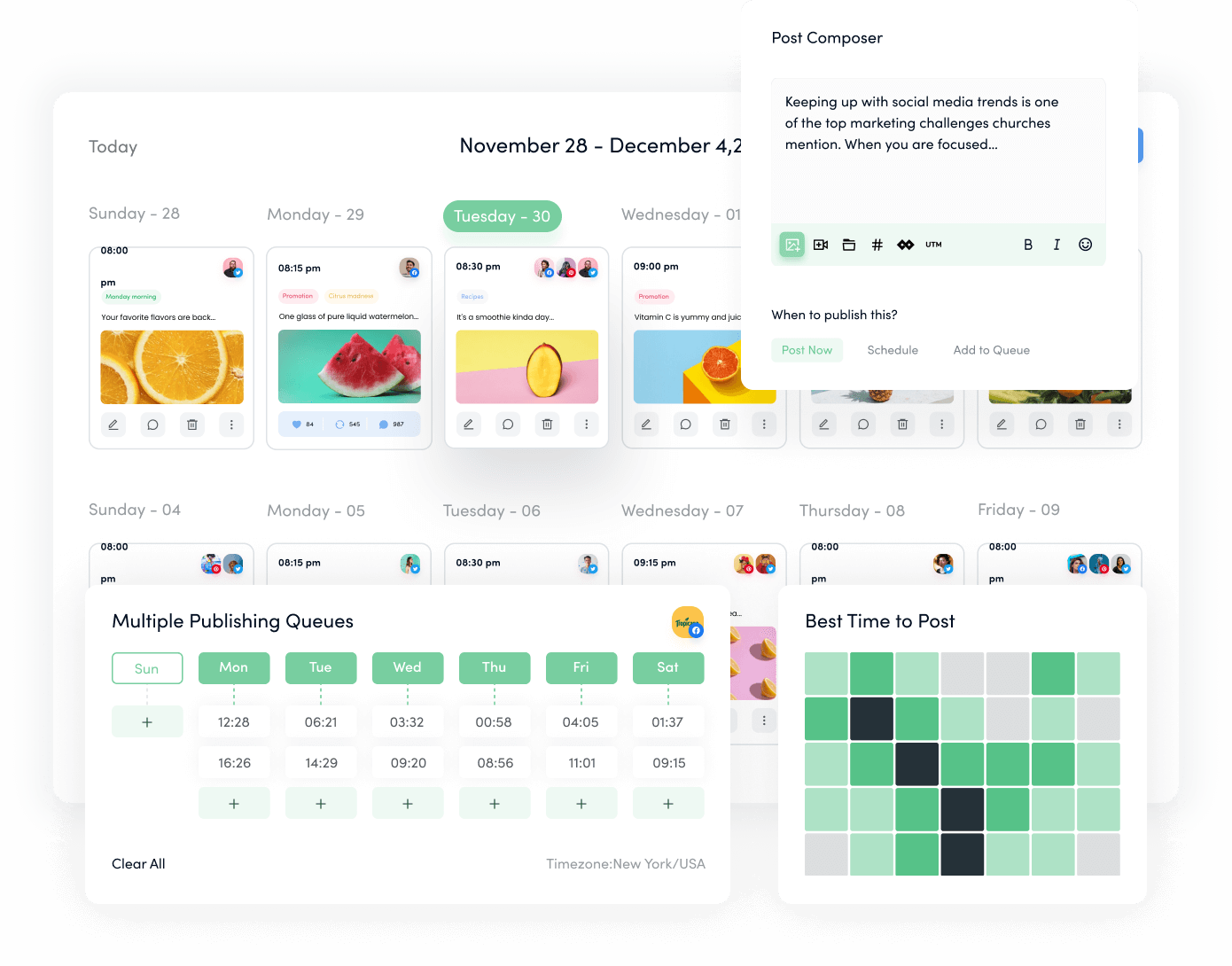
Plan, Organize and Schedule Your Social Content
Experience an organized workflow to streamline your social media posts. Increase your productivity and boost social engagement.
14 days free trial - no credit card required- Posting through MAC or PC
It’s a terrific way to be productive to post to Instagram from your computer, mainly if you’re already producing graphics and social media content on your PC or Mac. If you ever face loading or display issues while posting from a desktop, a quick fix is to clear browser cache to refresh your browser environment.
By scheduling from your desktop, you can also evaluate forthcoming posts on a larger screen, type captions using a full keyboard, and quickly switch between tabs.
- Coherent graphical content
Users are still drawn to grids and layouts that convey a coherent visual story in 2025, even though Instagram aesthetics may no longer be “picture-perfect.” This might be a grid combining memes and lifestyle posts or using complementing hues.
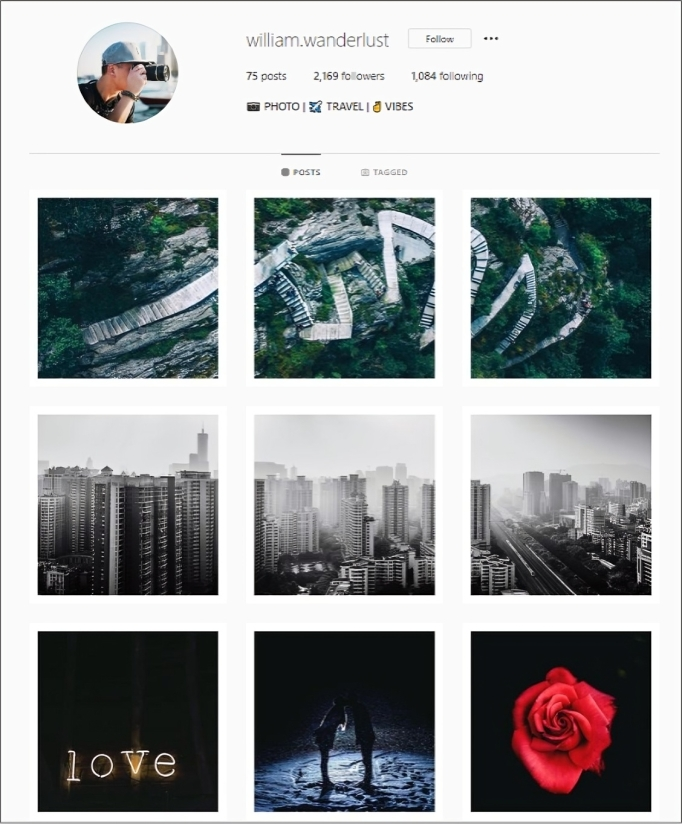
You just have a few seconds to make an excellent first impression, so planning an eye-catching grid will enable someone who hasn’t seen your profile before to immediately comprehend who you are and what you do.
Also read: Marketing with Instagram guides
How to schedule Instagram posts with ContentStudio?
ContentStudio is a social media management tool for marketers, businesses, and large teams. A multi-channel platform for planning, creating, organizing, and scheduling content across 30+ social media channels and blog sites.
You may easily schedule photos, videos, stories, and reels for your Instagram account using the push notification system.
Instagram engagement may be raised by carefully crafting your photos and videos. To achieve this:
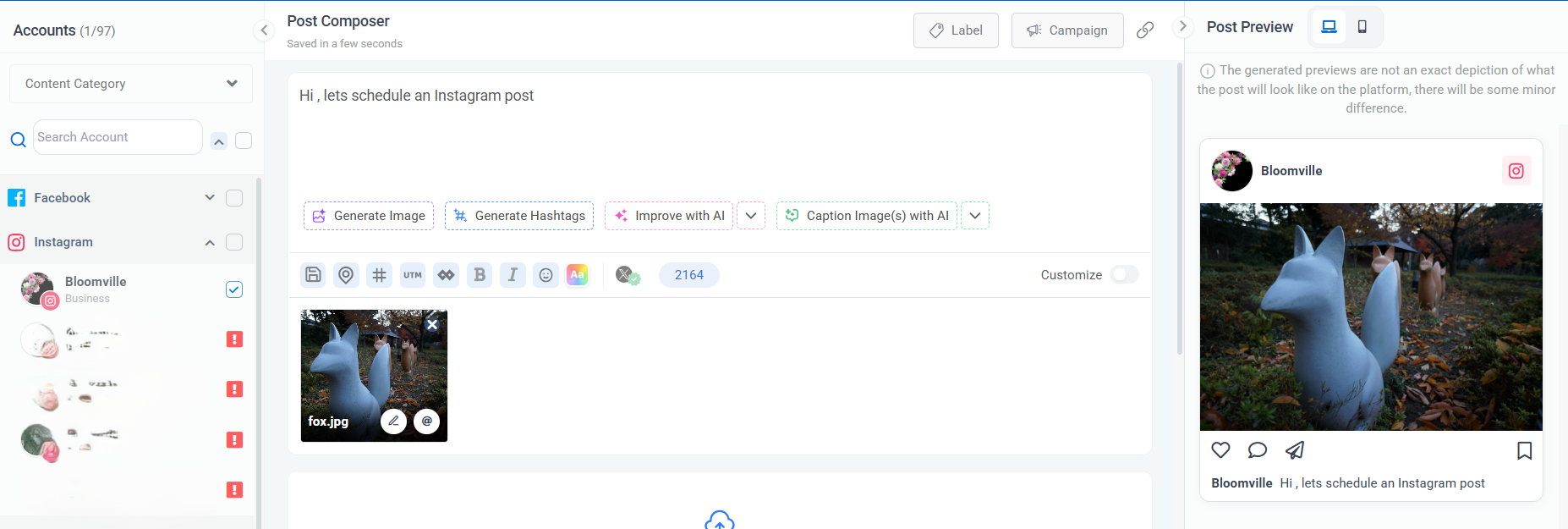
- Create a post using the ContentStudio desktop.
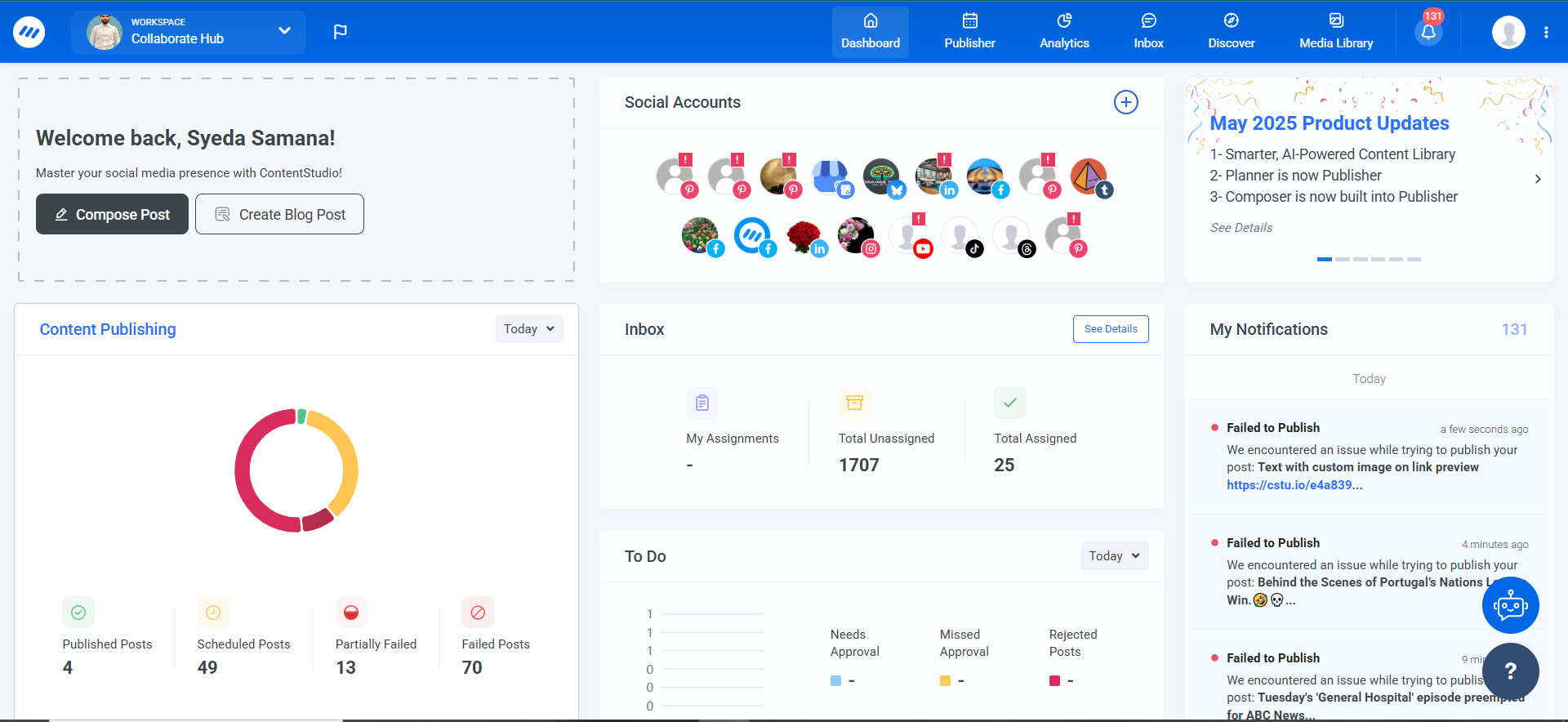
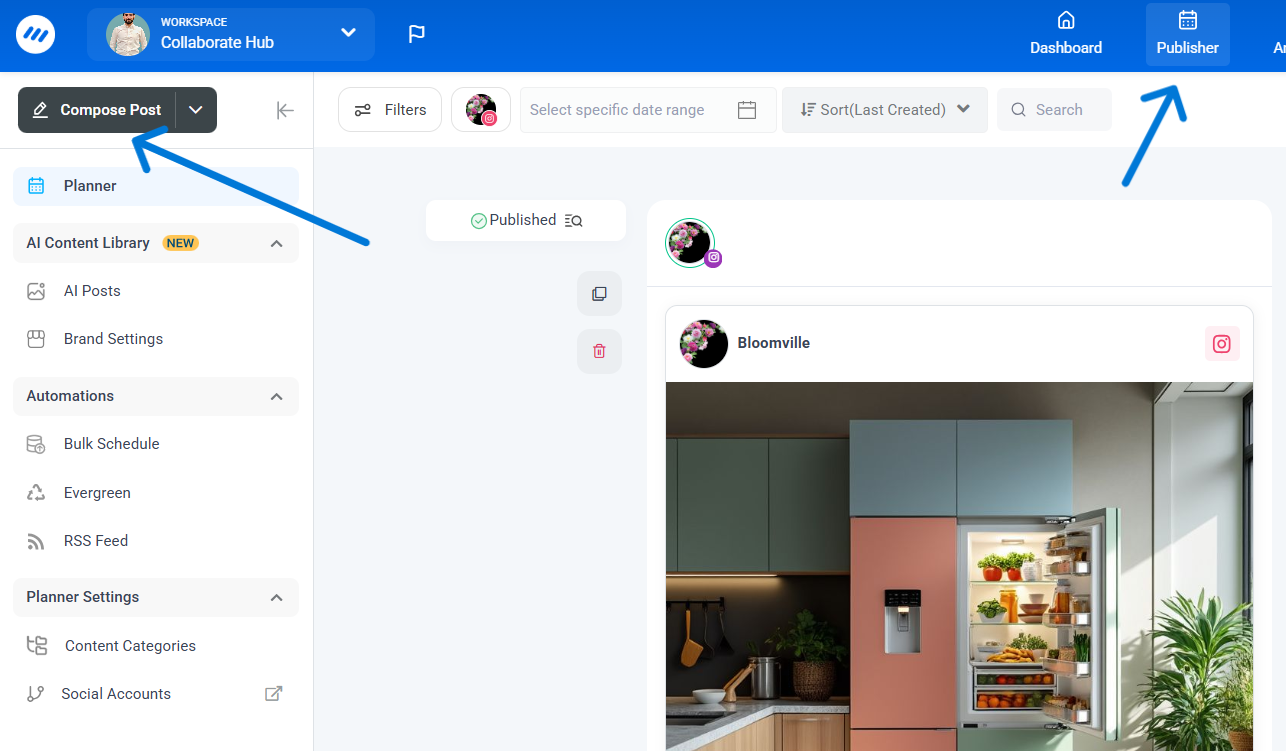
- Go to ‘Publisher’ section & then ‘Compose Post’.
- Compose your post by uploading the Image or Video.
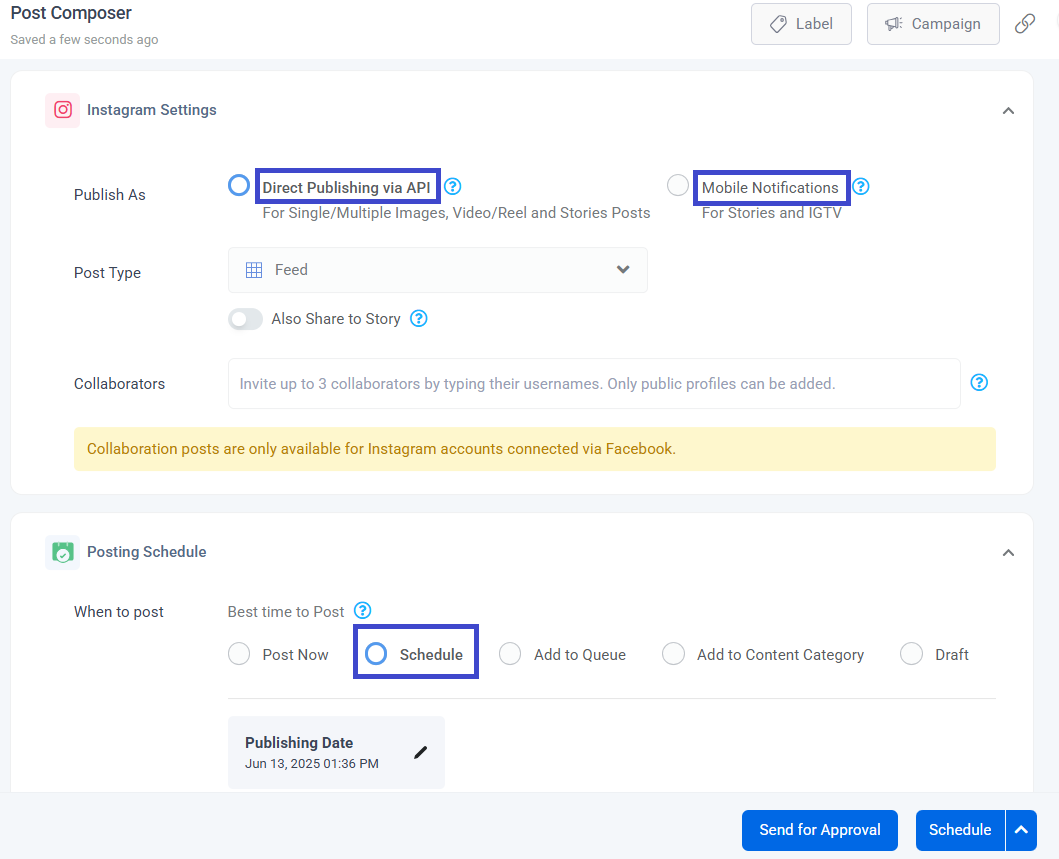
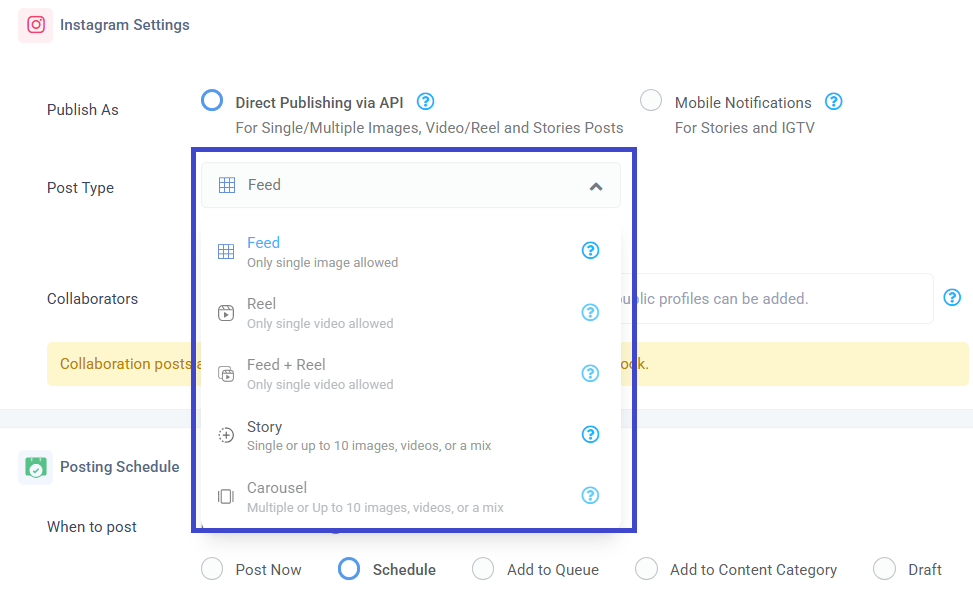
- You are provided with dual publishing options. You can directly publish using “Direct Publishing via API”. For scheduling your post you have to choose “Mobile Notifications method”. You will get a notification on the selected date and time.
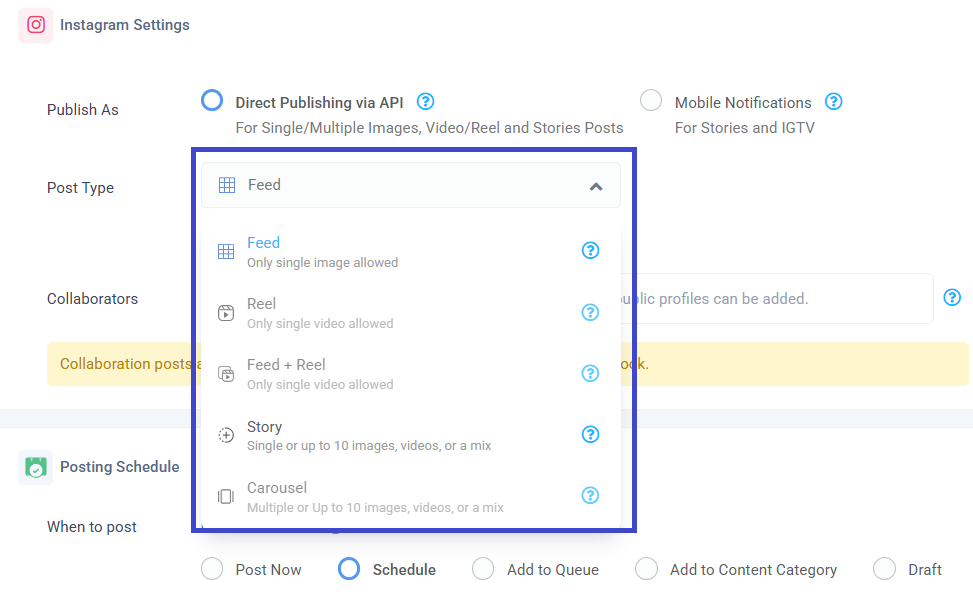
- You can choose your prefered post type.
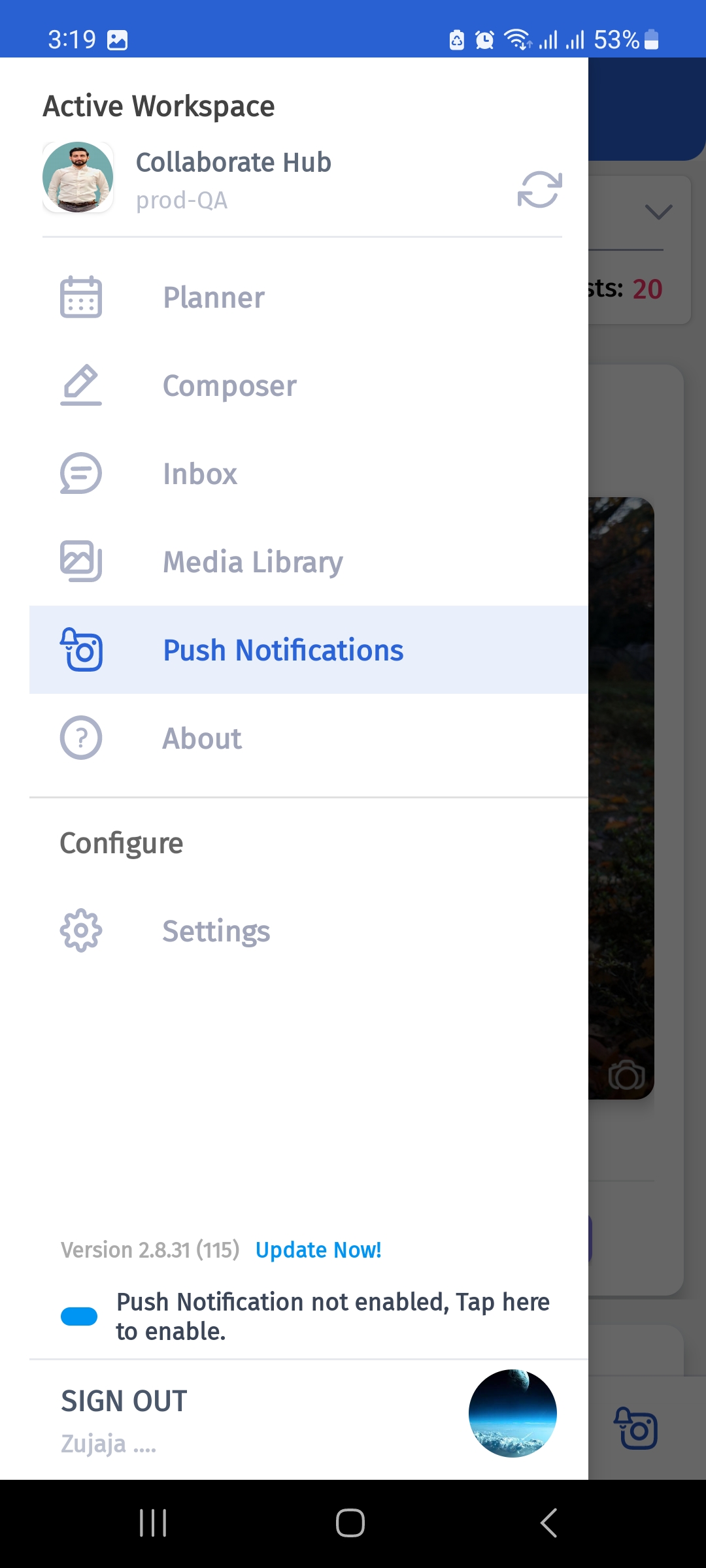
- You can perform the similar steps via mobile application. First of all you have to go to ‘Push Notifications’ from ContentStudio’s mobile app.
- Then, choose your Instagram account.
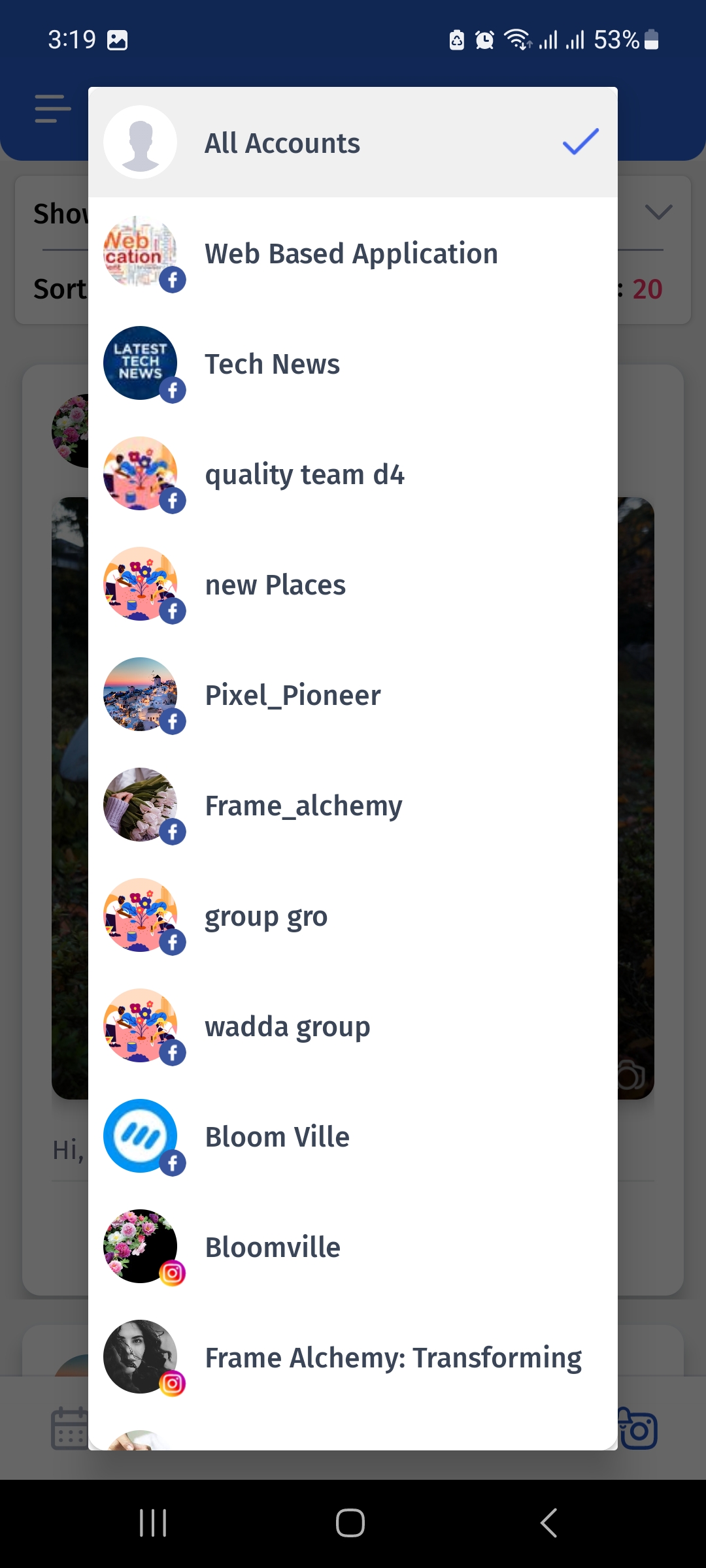
- Then you will be shown a notification of your post giving you an option to post or decline it.
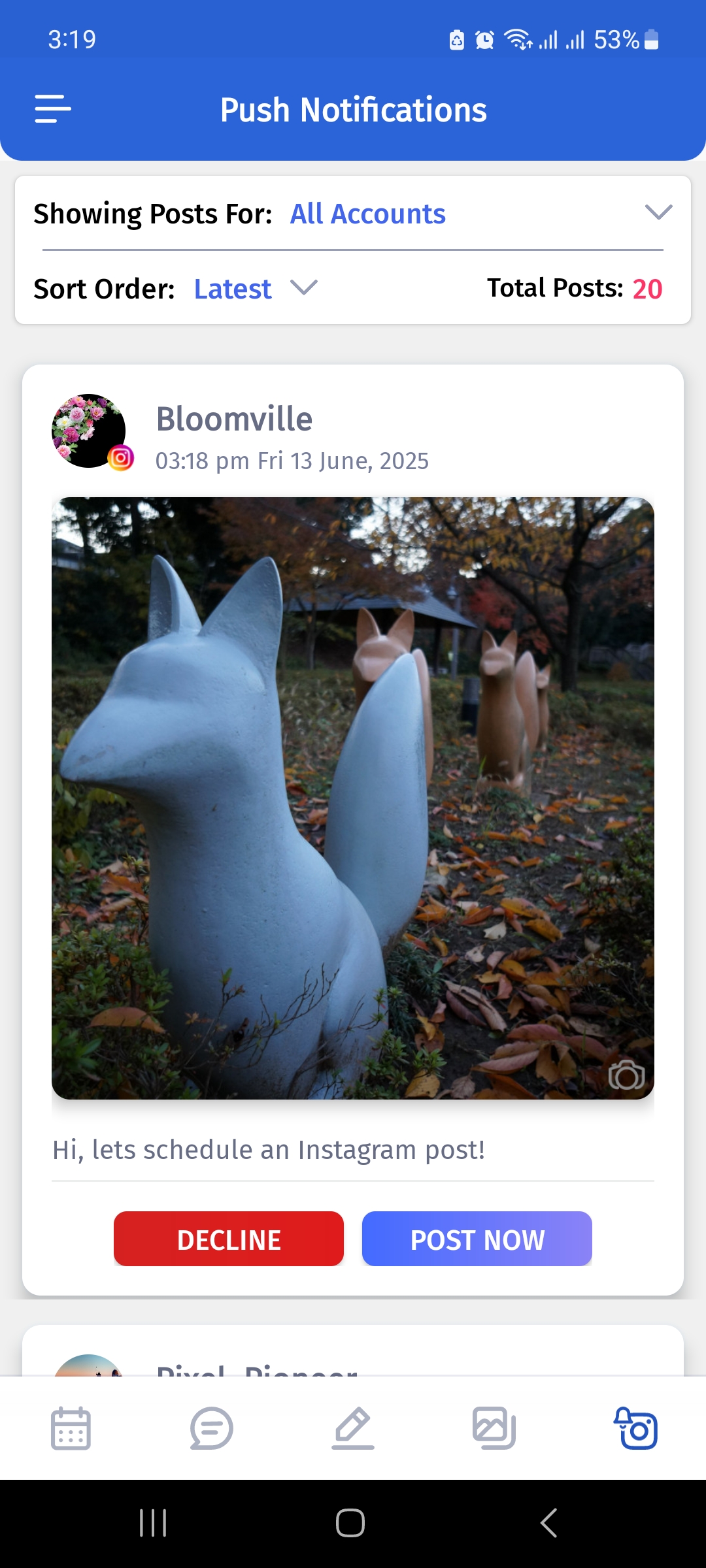
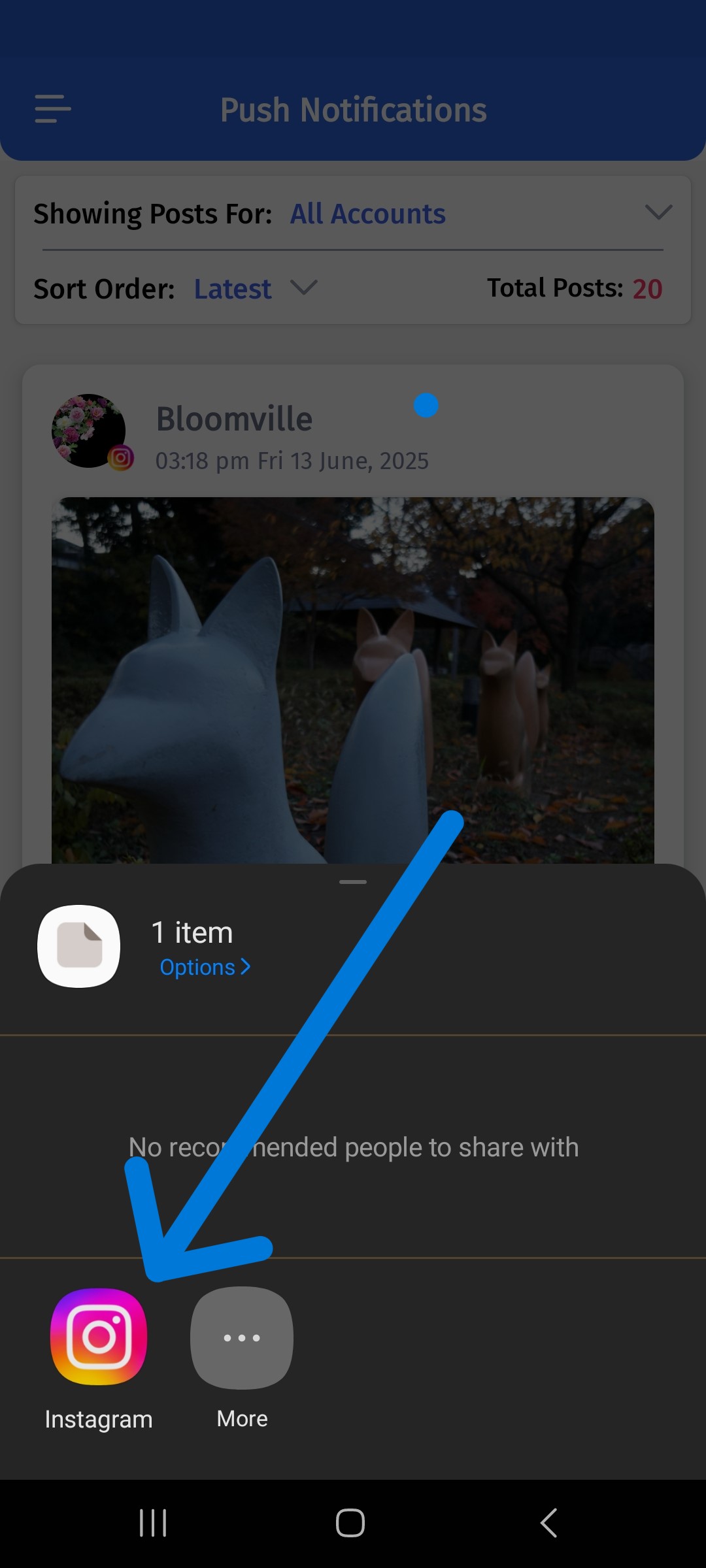
- Tap ‘Instagram icon’ to publish your post.
- Additional pop-up for confirmation:
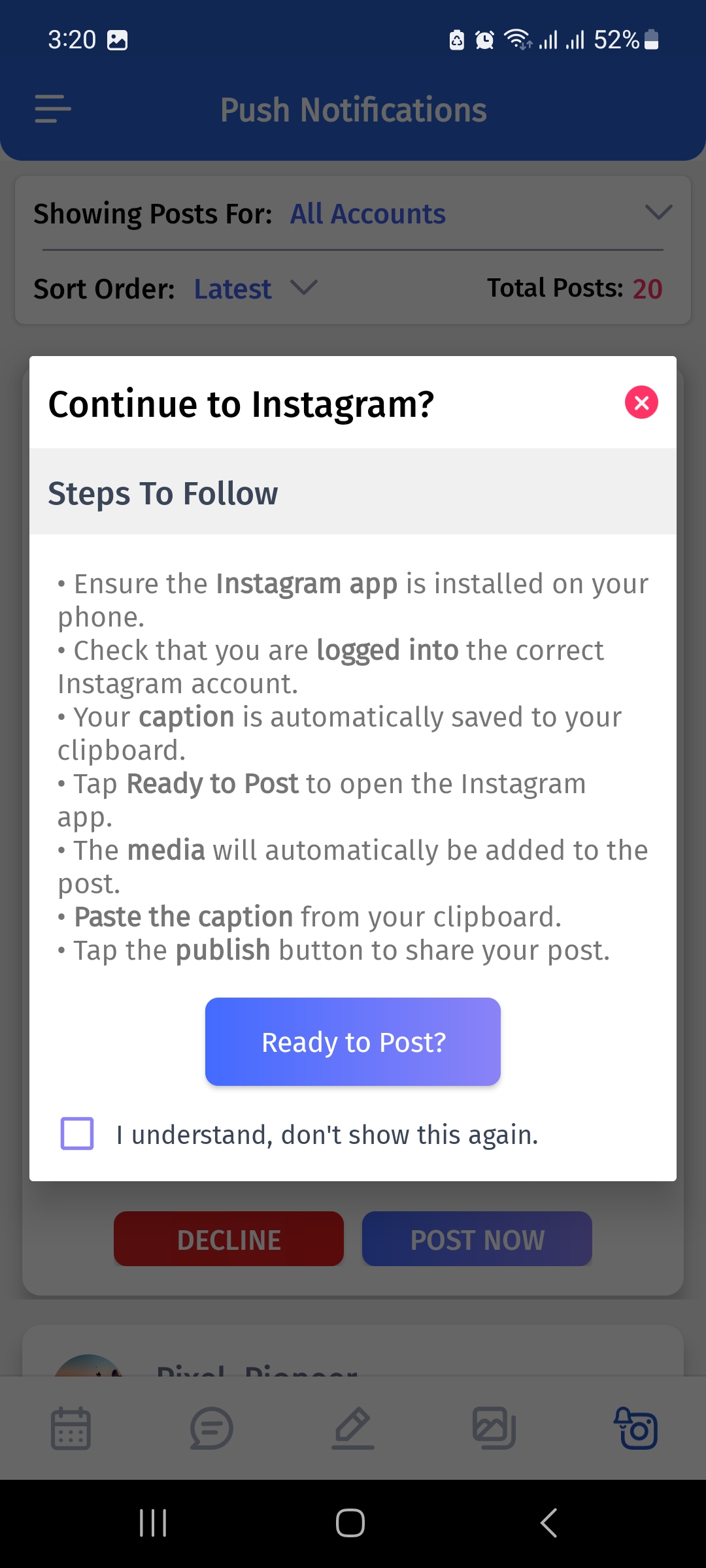
- You’ll be redirected to Instagram, where you can make any final edits and share your post.
Check out this video for a clear understanding:
Why should you schedule Instagram reels in 2025?
Instagram reels are vertical full-screen videos with a maximum runtime of 90 seconds with an extensive library of audio tracks and various specialized editing tools. Instagram Reels are a treasure trove for increasing your following.
Related read: Instagram Notes: All you need to know
Reels differ from Instagram stories in several ways. They persist longer than 24 hours as to Stories. A Reel that you upload remains viewable on Instagram until it is deleted. Short-form video is here to stay, whether you like it or not. Simply said, people adore them!
Both Facebook and Instagram are promoting reels. It’s integral to remember that there are various ways to participate in the reel machine, even if you are a little camera shy.
Making a sale is, after all, the ultimate purpose of a business! Selling through social media is crucial, developing a social media calendar, significantly enhances your content publication, which is always a bonus!
Read-up: A complete guide to Instagram video size
How to schedule Instagram reels with ContentStudio?
Instagram Reels can be scheduled using Content Studio. To understand this, you don’t need to be a social media expert.
Also read: How to schedule Reels, TikToks, and Shorts at the same time
- Logging into your ContentStudio account is the first step in the process.
- Now link your ContentStudio account to your Instagram Business account.
- If you don’t already have the ContentStudio mobile app installed on your phone, Instagram reels publishing won’t function.
- From Instagram post composer, you cab choose the post type.
- Upload your video(reel). Before continuing, though, explore the options on the composer page.
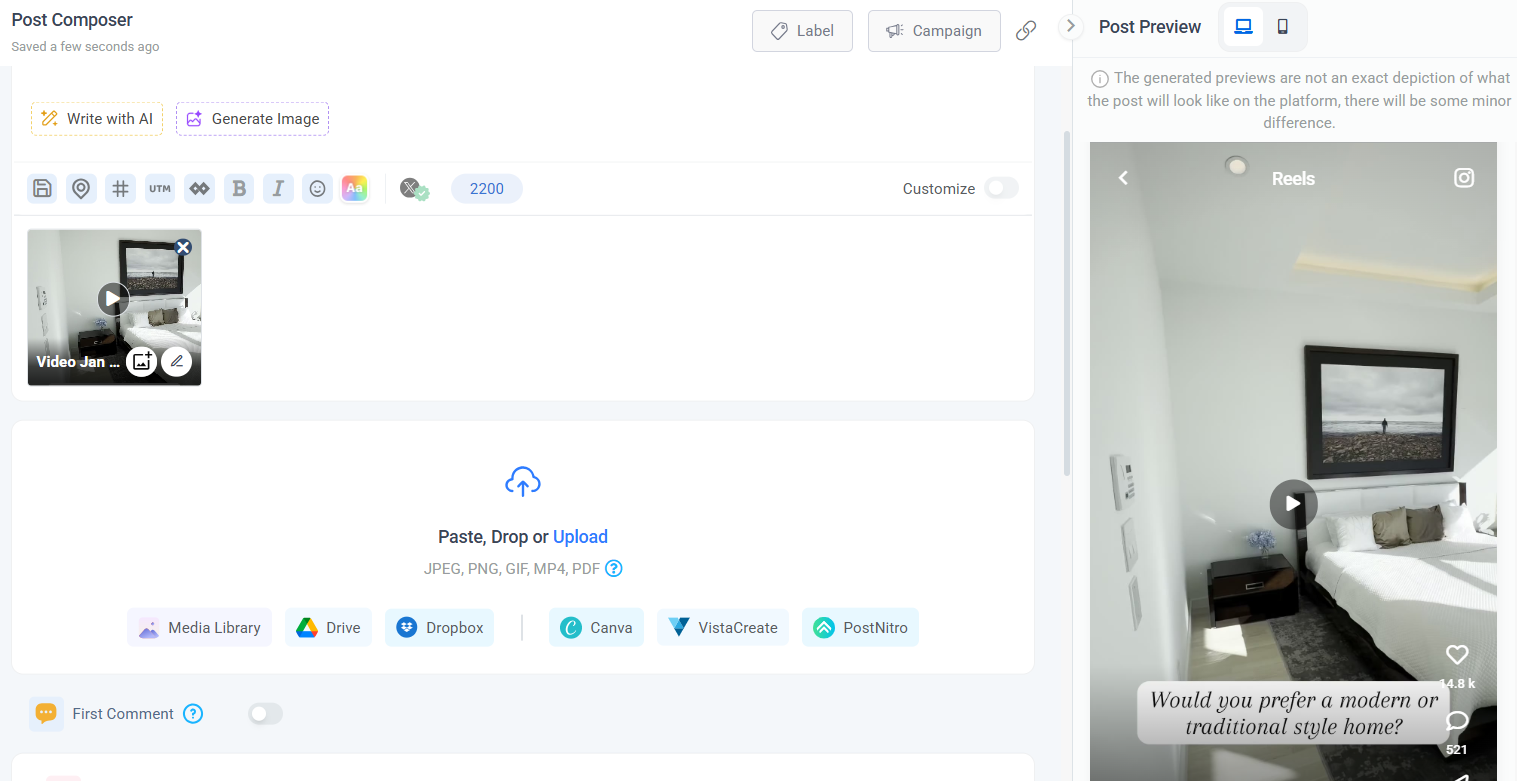
- Once you’ve finished uploading your video, click the Instagram publishing option under the text field.
- The ContentStudio dashboard offers Direct Instagram Publishing via API and Mobile Notification as two Instagram publishing options.
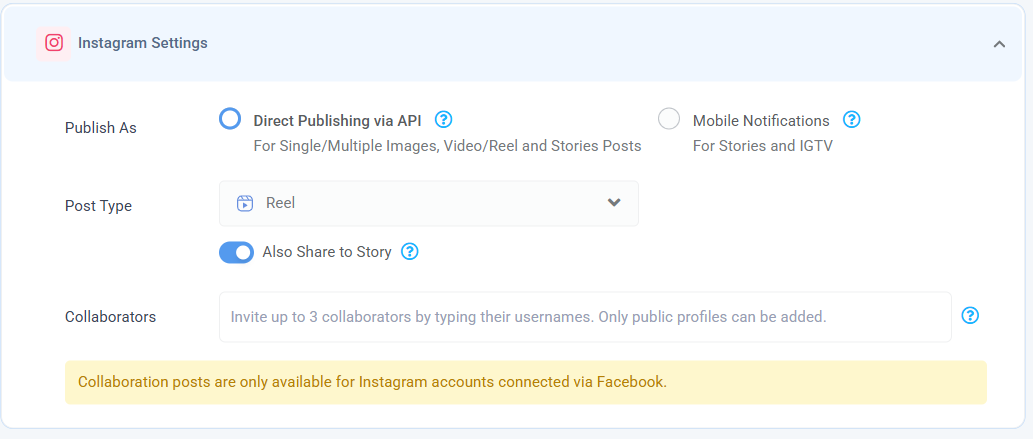
- Finish the scheduling procedure by selecting “Schedule” in the “when to post this?” section after choosing the appropriate Instagram publication option.
- The system prompts you to enter the Post’s publication time and date when you choose the “Schedule” option.
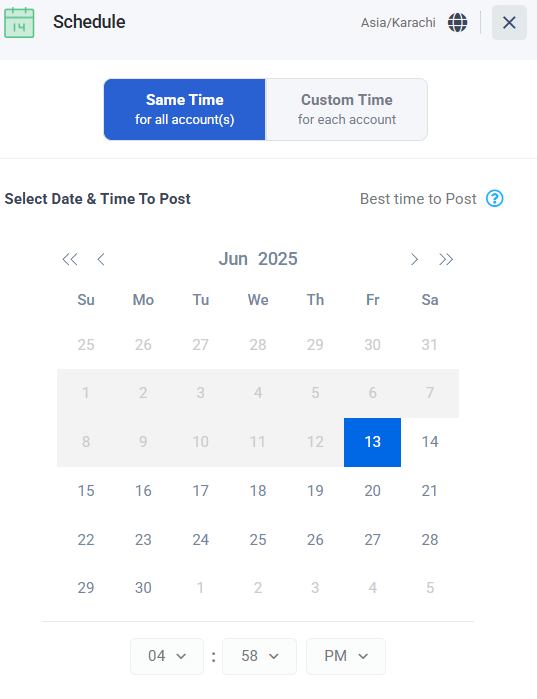
- Set the date and time that your Instagram Reel will be published. Simply click the Schedule button at the bottom after it’s finished.
- The scheduled Instagram Reel needs to be approved on your phone; a push notification will appear through the ContentStudio app.
To clarify any remaining confusion, let’s check out this video:
Read up: How to schedule Reels to multiple Instagram accounts
Why should you schedule Instagram stories in 2025?
Scheduling Instagram posts and stories is a method to increase engagement and expand your following, free up time in your workday, and promote productivity.
It’s okay to post Instagram stories on the spur of the moment. But these are just a few essential explanations for why scheduling Instagram Stories in advance is necessary:
Temporal efficiency
Even though it might seem like it, making and sharing new Instagram stories daily takes a lot of time. You can create Instagram stories as one less thing you have to worry about and free up time for other duties by setting aside an hour or two on the weekend to compose and plan your Instagram stories for the next week.
Greater editing options
When you plan Instagram stories using ContentStudio, you can access all of the dashboard’s built-in editing features. Using these editing tools, you can express your creativity using fonts, frames, and stickers not offered by the Instagram app.
Even your stickers can be used to make stories seem different. You’ll have more artistic freedom over your stories because you’re working on a desktop or laptop computer.
Posting at optimal times
You can view the days and times your followers are most active on Instagram with Instagram Insights, a free analytics tool offered by Instagram to Instagram business accounts. You must post the content on the days and hours indicated to you by Instagram Insights if you want most of your followers to see your Instagram stories.
Read-up: What’s the best time to post on Instagram?
Consistency of profile aesthetics
Instagram themes are a terrific tool for producing Story posts that complement the general design of your brand. They are accommodating when providing non-visual content, such as quotes, texts, or links to blog posts.
The issue is that most Instagram templates demand that you create your posts using programs like Adobe Photoshop. Additionally, it might be time-consuming to move your published posts from Photoshop to your phone. Working with Instagram themes is much simpler if you upload your stories directly from your computer.
Reduction in typos and broken links
Making mistakes while thumb-typing the text you’ll publish alongside your stories is possible, especially when autocorrect is involved. You can prepare your social text and links if you schedule your posts in advance. Use a real keyboard to enter your captions. Use grammar and spelling checker software to proofread them.
Greater engagement
You’ll start posting more Instagram stories frequently if you become accustomed to scheduling them. Your audience is likelier to watch and engage with your stories when they know the type of material you provide and when it is published.
Related read: 10 Ways to increase engagement with Instagram carousel posts
How to schedule Instagram stories with ContentStudio
Scheduling Instagram stories is same as scheduling instagram feed posts or Reels we mentioned in section “How to schedule Instagram posts?”. You just have to choose ‘Story’ as your post type.
Tips for scheduling Instagram posts, reels & stories
I’ll repeat it: You can’t merely schedule your posts for months or even just a few days in advance and hope that your Instagram account will take off.
The following are some crucial factors for businesses intending to use Instagram scheduling:
- Be crafty with captions

Instagram captions are prime engagement real estate. They shouldn’t be given less consideration. Your Instagram captions should be varied, just like your content strategy.
You have time to examine your captions and ensure variety when you schedule Instagram posts in advance. Before publishing your message, you can also provide you include the appropriate hashtags and don’t have any critical information omitted.
- Interact with your followers
Contrary to widespread assumption, scheduling Instagram posts doesn’t reduce your activity. The reverse is true. Again, scheduling frees up time in your schedule for in-person interactions with clients.
Be mindful of your alerts, and watch for cobwebs in your comment box. For satisfaction and loyalty, be proactive and make it a point to respond to Instagram DMs as soon as possible.
Related read: Instagram for business: 14 tips to grow your audience
- Optimize your scheduling
Sometimes you have to suspend publishing your planned content, whether it’s because of a brand emergency or a more significant crisis management effort. When your followers’ attention is elsewhere, failing to do so could come across as callous or have other adverse effects like decreased engagement.
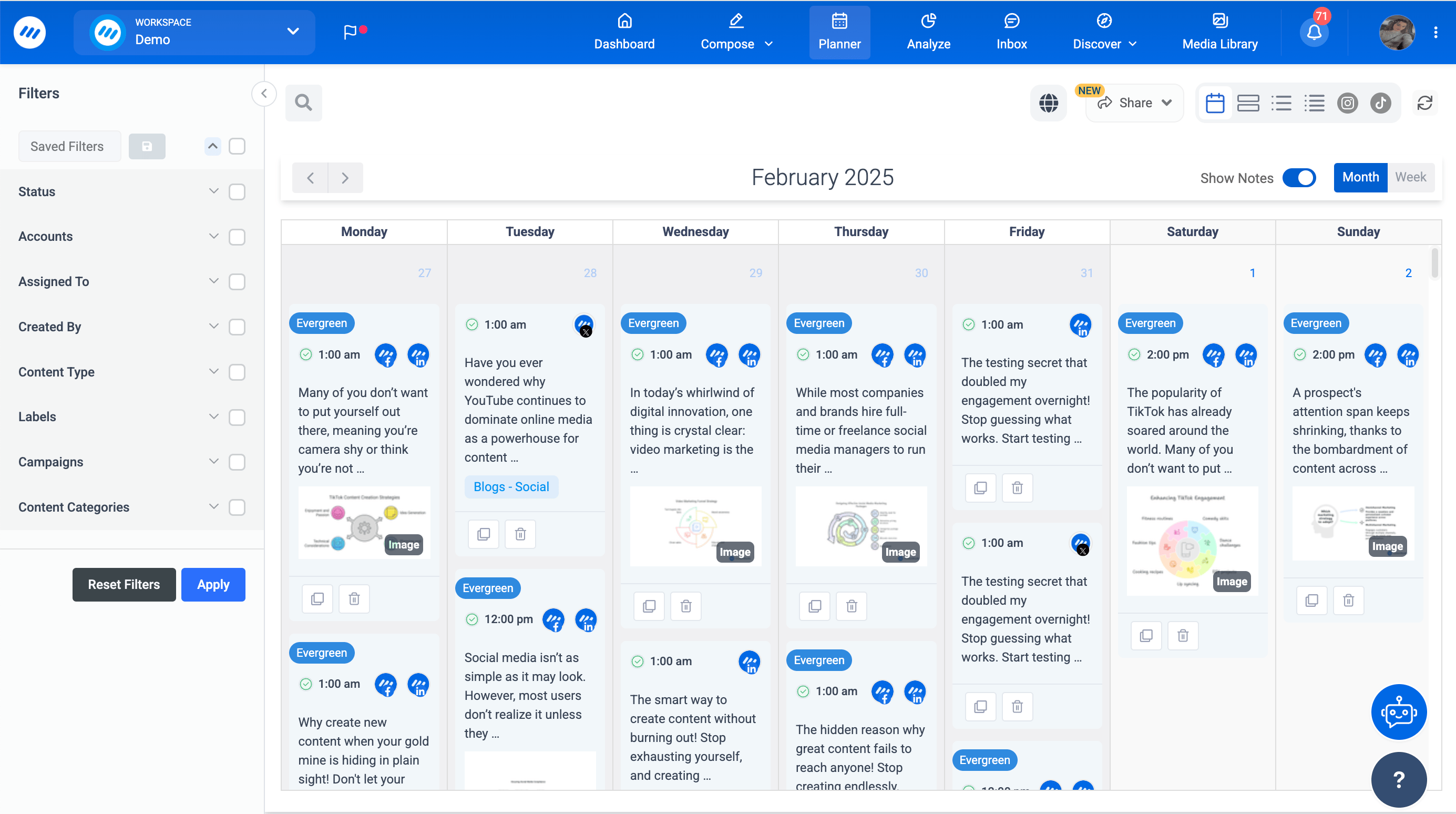
For instance, it is not ideal for your brand’s reputation to publish promotional content around certain holidays, on solemn events, or in the wake of catastrophes. This demonstrates how scheduling posts for Instagram is much more than just putting your brand on autopilot. In addition, ContentStudio provides tools that allow you to halt planned posts and restart them at a later time.
- Impress with impactful visual expression
Although it should go without saying, Instagram is primarily a visual medium. Additionally, even though viewers are less drawn to highly polished material, uploading high-resolution, consistent with your brand, and aesthetically pleasing images and videos is still worthwhile.

Make sure you schedule Instagram posts that will leave a favorable first impression on anyone who sees your page, whether it’s through solid colors or branded graphics. In this manner, you can persuade them to become a supporter and future client.
- Be considerate about SEO in captions.
Instagram’s Explore page changes continuously throughout the year, and sophisticated search tools are added. For instance, you can now search by keywords (rather than just hashtags) to find prolific information: Use the Instagram Explore Page as Inspiration.

Hence, the Explore page algorithm considers both your caption’s verbal and visual content. Therefore, there is a greater probability that your content will be more readily found by anyone searching on the app if you use pertinent keywords in your captions or the image Alt text.
Read-up: Instagram monetization: Make money with Instagram
Final words
Schedule posts on Instagram if you want to improve your Instagram presence and gain more time in your busy day. While doing so can appear easy, getting the most out of Instagram scheduling requires knowing the essential components of each Post and how to engage followers.
Consider what features best suit your needs when choosing the best Instagram scheduler for you. You can make a compelling content schedule that accomplishes that using the advice mentioned above and applications like ContentStudio.
In short, ContentStudio can help you spend less time blogging on the spur of the moment and more time developing your brand and network. Additionally, you can take some well-earned relaxation now that you have more free time.
Also read: Everything you need to know about Instagram threads app
FAQs
Can you schedule reels on Instagram 2025?
Yes! Instagram Reels can be automatically scheduled using Instagram management tool like ContentStudio.
Can you schedule Instagram posts for 2025?
Thanks to Instagram’s API, users of marketing solutions like ContentStudio can schedule Instagram posts in advance.
Can Instagram posts be scheduled in advance?
Instagram posts can be scheduled in advance by employing a scheduler like ContentStudio.
How do you schedule reels and stories on Instagram?
Reels and stories can be scheduled on Instagram using ContentStudio as a scheduler.
Is it possible to schedule Instagram stories?
Yes, Instagram stories can be scheduled quickly by a tool like ContentStudio.
Plan 0 Days of Content in 0 Minutes
Create, schedule, publish and analyze your content across all your social media channels from one simple dashboard.
4.7 on Capterra • 16,500+ marketers trust ContentStudio
Wasiq Naeem is a Senior Content Strategist at ContentStudio and a research-driven content and digital marketing veteran. He writes on social media strategy, analytics, audience growth, and competitor analysis, covering topics like best posting times and competitor mapping. As a senior editor, he also reviews and fact-checks articles for depth and accuracy.
View all posts by Wasiq NaeemRecommended for you