01
Trigger from anything
Start a workflow from any n8n trigger: an RSS feed, a new Google Sheet row, a webhook, or a schedule. Whatever fires the trigger becomes the source for your ContentStudio post.
 n8n Integration
Connect ContentStudio to n8n using the ContentStudio API and build workflows with full control over every step. Trigger on an event, fetch your workspace and accounts, then create and schedule posts, all from HTTP Request nodes.
Publishes to:
X / Twitter, Instagram, Facebook, LinkedIn, TikTok, YouTube, Pinterest, Google Business, Threads, Bluesky, Tumblr, and more.


Quick Reference
Core Capabilities
n8n talks to ContentStudio through the API; any trigger in your workflow can drive it. Fetch your workspace and accounts, create and schedule posts, or remove them. It's part of the wider range of ContentStudio integrations available for your workflows.
Start a workflow from any n8n trigger: an RSS feed, a new Google Sheet row, a webhook, or a schedule. Whatever fires the trigger becomes the source for your ContentStudio post.
Add an HTTP Request node calling GET /workspaces to pull your workspace details. Import the cURL from the API Guide to auto-fill the fields, then add your API key and run the step.
Call GET /social-accounts to pull the connected profiles in a workspace. This gives your workflow the account IDs it needs to target the right social channels when it creates a post.
POST to /posts with a JSON body carrying your content, media, accounts, and scheduling. Map the caption and image URLs from your trigger, and the post is created and scheduled in ContentStudio.
Call GET /posts to retrieve posts in a workspace, filtered by status, or DELETE /posts/{id} to remove one. Use these to build workflows that clean up or act on existing content.
Every call is a raw HTTP request, so you shape the headers and JSON body yourself. That gives you flexibility the pre-built connectors do not, at the cost of a more technical setup.
Setup
n8n connects through the ContentStudio API, so setup means a trigger and a few HTTP Request nodes. Four steps take you live.
In ContentStudio, open the API Key from your profile menu and generate one. n8n sends it in the X-API-Key header on every request, so keep it private.
Create a workflow and add a trigger such as the RSS Feed Trigger. Enter the feed URL, set the mode, and run Fetch Test Event to confirm data is coming in.
Add HTTP Request nodes to fetch your workspace and accounts and to create the post. Import the cURL from the API Guide to auto-fill each one, and pass your key in the header.
Run the workflow to confirm the post reaches ContentStudio. Fix the JSON body if a request fails, then activate the workflow so it runs on every trigger.
Video Walkthrough
Want to see the nodes wired up before you build? This walkthrough starts from an empty canvas, adds the RSS trigger and the HTTP Request nodes, and runs a live post to ContentStudio end to end.
Using the integration
Each pattern below is a chain of nodes: a trigger, a couple of HTTP Request steps, and the ContentStudio posts endpoint. Build it once on the canvas, or start from a ready-made n8n template.
→ Your CMS publishes an article and hits an n8n webhook.
✓ The workflow shapes the article into a post body and POSTs it to the ContentStudio posts endpoint across your accounts.
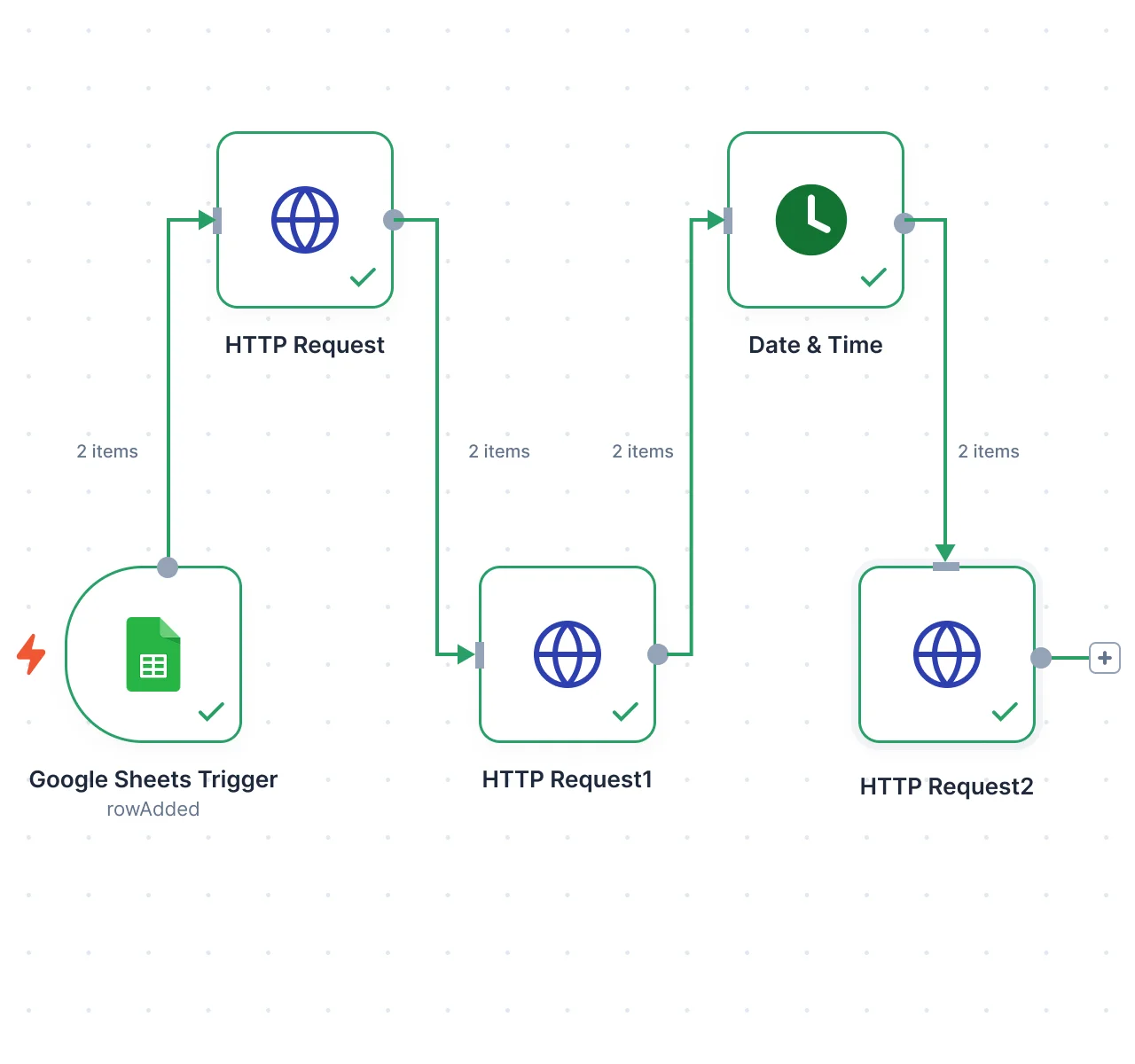
→ A Google Sheets node picks up a newly added row.
✓ n8n maps the cells into the JSON body, text, image URLs, and schedule, and creates the post in ContentStudio.
→ An RSS trigger passes a new article to an AI node.
✓ The AI node returns a platform-specific caption, which the next HTTP Request node sends straight to ContentStudio.
→ A review platform fires a webhook into your workflow.
✓ n8n builds a testimonial body with attribution and schedules it through the ContentStudio posts endpoint.
Security & Trust
Because you build every request yourself, you decide exactly what n8n sends and when. Your API key stays in n8n's credential store, and you can revoke it in ContentStudio at any time.
A key you can revoke: Your workflow authenticates with a single ContentStudio API key sent in the X-API-Key header. Regenerate or revoke it in ContentStudio anytime, and the old key stops working immediately.
You shape every request: Nothing is hidden inside a pre-built action. You define the endpoint, headers, and JSON body for each call, so you always know exactly what data leaves your workflow and reaches ContentStudio.
Test before you deploy: n8n runs each node on demand with Execute Step, and the whole workflow with Execute Workflow. Confirm the post reached ContentStudio before you activate, so nothing goes live untested.
Store the key safely: Keep your API key in n8n's credentials rather than pasting it into shared workflows or screenshots. If it is ever exposed, regenerate it in ContentStudio and update your workflow.
Troubleshooting
When a workflow breaks, the cause is almost always the credential, the JSON in your posts node, or the workspace you pointed the request at. Start there.
Your API key is wrong or expired. Regenerate it in ContentStudio settings and update the X-API-Key header in your HTTP Request nodes, then run the step again.
Open the execution in n8n and check that the posts node returned a success response. If it did, the request likely hit the wrong workspace, so verify the workspace ID and account IDs in your JSON body.
The trigger data may not match the format ContentStudio expects. Add a step to reshape it into the JSON structure the posts endpoint needs before the request runs.
Always validate your JSON before sending. A single missing comma or quote can break the request, so check the body of your posts node if the call fails.
Use the format the API expects and confirm the timezone in both ContentStudio and n8n. Also verify the accounts you are posting to still exist and are connected.
FAQs
Connect the ContentStudio API to n8n and build workflows that trigger, create, and schedule posts across every major social network.