
How to promote affiliate links on social media in 2026
Oct 2, 202616 minutes

Written by
Esha ShabbirUpdated
YouTube channel growth comes from two things: getting people to click your video, and getting them to keep watching once they do. Channels that grow consistently optimize both, then use data from each upload to improve the next one.
The channels that grow are not the ones who got lucky with a viral video. They’re the ones who built a repeatable system, studied their analytics, and improved something specific each time they published. Consistent publishing is part of that system, which is why brand teams often build their workflow around a content calendar and a YouTube scheduler to protect the cadence.
This guide covers the mechanics and the decisions behind every major growth lever, from how the algorithm distributes videos to how you turn analytics into a testing system. Whether you’re building from zero or trying to break through a plateau, the goal is to build a channel that compounds rather than stalls.
YouTube channel growth is driven by click-through rate, average viewer retention, and total watch time. These three signals tell the algorithm whether your content is worth distributing more broadly. Channels that improve all three consistently outgrow those that focus on any single one.
Every time you publish, YouTube runs a quiet test. It shows your video to a sample of existing subscribers and a selection of viewers with similar watch histories. What that test group does in the first 24 to 48 hours tells YouTube how widely to push the video.
Click-through rate shows whether your packaging convinced someone to watch. Retention shows whether the content delivered on what the title and thumbnail promised. Total watch time, meaning the raw number of minutes accumulated across all viewers, determines how much attention you generated in aggregate. Engagement signals (likes, comments, shares, subscriptions) round out the picture by showing how emotionally the video landed.
Improve CTR and the video reaches more people. Improve retention, and those people watch longer. Improve both, and watch time climbs. The algorithm doesn’t respond to any of these in isolation. It weighs them together.
Several variables consistently separate channels that grow from those that plateau:
Growth is not about doing more of everything. It’s about identifying which of these variables is weakest for your channel right now, and fixing that one.
The YouTube algorithm distributes videos based on viewer satisfaction signals. It tracks whether people click, how long they watch, whether they engage, and whether they come back to the channel afterward. Videos that consistently score well on these signals get shown to larger and broader audiences over time.
The algorithm reads several signals simultaneously. Here’s how each one functions and why it matters:
| Signal | What it tracks | Why it affects growth |
| Click-through rate (CTR) | Percentage of people who click after seeing your video | Low CTR means even great content never gets watched |
| Average view duration | How many minutes the average viewer watches | Tells the algorithm if your video delivered on its promise |
| Total watch time | Cumulative minutes across all viewers | Heavier weight given to longer videos with strong retention |
| Engagement actions | Likes, comments, shares, new subscriptions | Signal that the video resonated emotionally or practically |
| Return viewing rate | Whether viewers come back to watch more of your catalog | Tells the algorithm your channel is worth recommending broadly |
The initial distribution window is not a myth. When you publish a video, YouTube shows it to a subset of your subscribers and a test audience of viewers with matching interests. If that initial group clicks at a rate above the benchmark for your niche and watches a meaningful share of the video, distribution expands to a broader audience.
If they scroll past or drop off early, distribution slows or stops. A video that underperforms in its first 48 hours often plateaus regardless of how strong the content is.
Two practical implications: publish at times your audience is most likely to be active, and make the opening seconds of every video strong enough to hold anyone who clicked.
Traffic source matters more than most creators realize. Search traffic weights keyword relevance and watch time from the initial viewers. Browse features weight your channel’s overall performance history and whether the video fits the viewer’s past habits. Suggested videos weight how well your content complements what the viewer just finished watching. The YouTube ranking signals are distinct from what earns search traffic, which is why channels that optimize only for keywords often plateau before Stage 2.
In Stage 1 of channel growth, most traffic comes from search. In Stage 2 and beyond, the mix shifts toward browse and suggested video traffic. Tracking this shift in your analytics tells you whether the algorithm has started to understand and trust your channel.
The algorithm builds an audience profile for your channel based on patterns across all your uploads. A channel with 30 videos in personal finance gives the algorithm a confident picture of who watches it. A channel with 30 videos spread across cooking, travel, and tech gives it an uncertain picture.
The practical effect: a niche-consistent channel gains algorithmic momentum faster. The algorithm learns who to show your content to and stops having to guess.
A realistic YouTube channel growth rate for a new channel is 10 to 100 subscribers per month in the first six months, depending on niche, upload frequency, and content quality. Growth typically accelerates after the first 500 to 1,000 subscribers as the algorithm begins recommending content more consistently. After analyzing over 5.3 million channels, research found the most common path to 1,000 subscribers requires 150 or more videos. Around 10% of channels get there in under 10, usually because they arrived with an existing audience from another platform.
Growth looks different at every stage. Here’s what typical progression looks like across the three main phases of a channel’s development:
| Channel stage | Subscriber range | Typical monthly growth | Primary traffic source |
| New channel | 0 to 1,000 | 10 to 100 subscribers/month | Search traffic and direct shares |
| Growing channel | 1,000 to 10,000 | 100 to 1,000 subscribers/month | Search plus algorithm recommendations |
| Established channel | 10,000+ | Varies widely by niche | Suggested video traffic and loyal audience |
These are averages, and they skew significantly by niche. YouTube channel growth data shows the variance is wide enough across categories that cross-niche comparisons are usually misleading.
A finance or marketing channel can grow faster because there’s strong search demand and commercially motivated viewers who subscribe deliberately. A gaming or entertainment channel may need more views per subscriber because viewers are casual rather than intentional.
Where you are in your channel’s growth determines what you should be focused on. The right strategy at Stage 1 is different from what works at Stage 3.
Thumbnails and titles determine click-through rate, which is the first signal the algorithm uses to decide how widely to distribute a video. A strong thumbnail stops the scroll. A strong title converts that stop into a click. Both need to deliver the same promise clearly enough that a viewer understands what they’re about to get in less than a second.
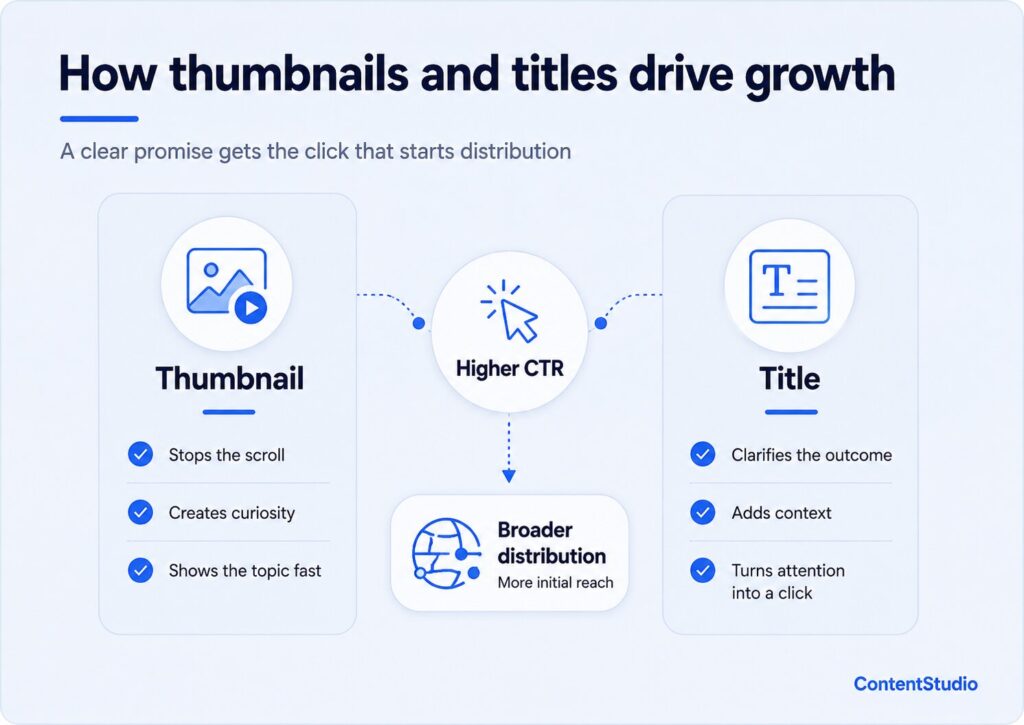
Your thumbnail competes with dozens of other videos on a mobile screen and has less than a second to register. The thumbnails that perform well share a few consistent traits.
High contrast against YouTube’s interface, across both light and dark mode. A single dominant subject, usually a face with a clear and legible emotional expression, or a single object that immediately communicates the video’s core idea. Minimal text, large enough to read on a phone without zooming. A focal point that’s obvious at a glance.
The single most reliable thumbnail element across niches is a close-up face showing curiosity, surprise, or skepticism. These outperform neutral expressions in the vast majority of A/B tests. There are exceptions in certain niches. Food, travel, and product review channels sometimes perform better with the subject (the dish, the destination, the product) as the dominant element rather than a face.
Your title has two jobs: signal relevance to the algorithm, and give the viewer a reason to click. Titles that do both well are specific, promise a clear outcome, and often signal firsthand experience.
“How I got 10,000 subscribers in 90 days” outperforms “YouTube growth tips” for four reasons: it’s specific, it promises a deliverable, it implies real experience, and it gives the viewer a concrete number to evaluate. Vague titles like “YouTube growth strategies” don’t tell the viewer what they’ll learn or why this video is different from the dozens of others with the same title.
Some title frameworks that produce reliable CTR across multiple niches:
The worst titles are the ones that could apply to any video on the topic. If your title would work equally well on 50 other videos, it’s not giving the algorithm or the viewer enough to work with.
YouTube allows native thumbnail A/B testing in YouTube Studio for channels that qualify. Upload two or three thumbnail variations for the same video and YouTube rotates them across impressions, then defaults to whichever version earns the highest CTR over the test period.
If your channel doesn’t yet qualify for that feature, run manual tests by uploading an older underperforming video with a new thumbnail and tracking whether CTR improves over the following two to four weeks. There’s a version of this that goes further: a deliberate system for growing YouTube video views can recover view counts that most creators write off as permanent losses.
Treat thumbnails as a permanent system, not a one-time decision. Thumbnail testing produces compounding returns because the lessons carry forward to every video you make afterward.
YouTube SEO improves channel growth by making your videos discoverable in YouTube’s search results and in the suggested video feeds for viewers who are already watching related content. It involves matching your titles, descriptions, and metadata to the exact phrases your target viewers type, so the algorithm can confidently serve your video to the right audience.
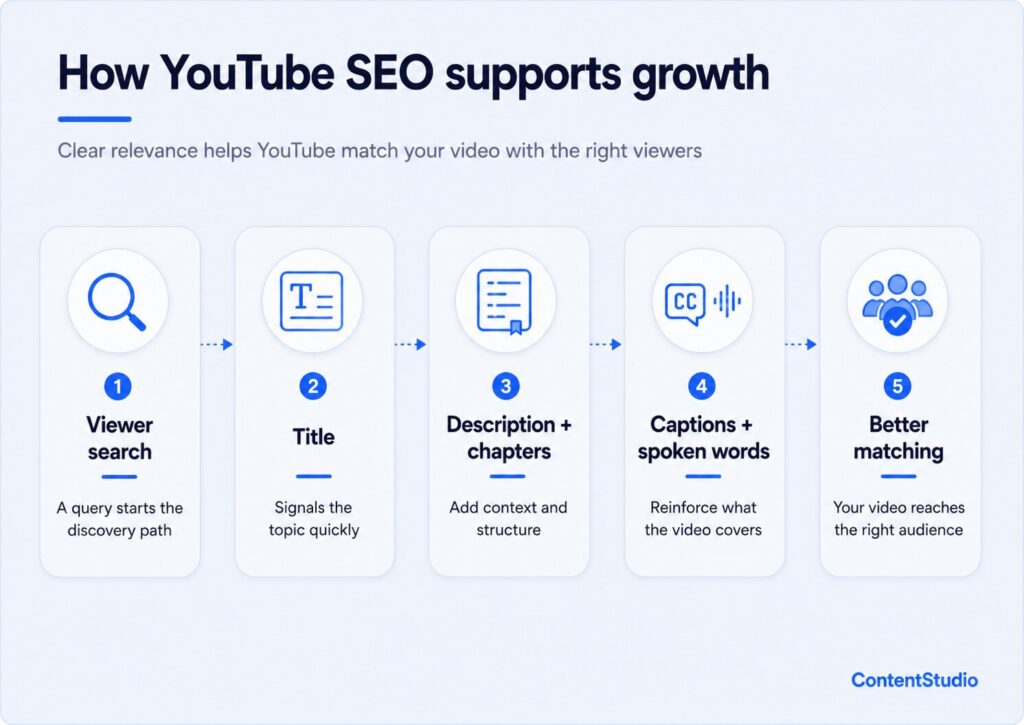
YouTube is the second largest search engine after Google, and the search behavior on it is distinct. Viewers on YouTube tend to search for process, not just information. They type “how to edit YouTube videos on iPhone” rather than “iPhone video editing.” They type “why is my YouTube channel not growing” rather than “YouTube growth.”
Start keyword research by listing the five to ten most common problems your target viewer experiences, then phrase each one the way a real person would type it into a search bar. Autocomplete is your friend here. Type the beginning of a query into YouTube’s search bar and let the suggestions show you exactly what people are searching for.
Where to look for keyword opportunities: long-tail phrases with clear, specific intent that larger channels haven’t fully addressed. These are rarely the highest-volume terms. They’re the specific questions that sit just below the obvious ones. Understanding how YouTube search ranks videos helps you identify which of those questions your channel can realistically compete for.
Not all keyword placements carry equal weight. Here’s the order of importance:
How you use YouTube hashtags and tags tells YouTube’s indexing system what your content covers. Tags aren’t a substitute for a strong title and description. They’re a secondary reinforcement signal. Three to five accurate, specific tags outperform a list of twenty broad ones.
Your video’s technical specs affect more than playback quality. Meeting YouTube video requirements prevents indexing problems that limit distribution in ways that are genuinely hard to diagnose later.
Closed captions are the most underused SEO lever on YouTube. Auto-generated captions are imperfect. Uploading an accurate manual caption file gives YouTube a better-quality transcript to index, improves accessibility for a wider audience, and can extend your video’s reach to viewers who watch without sound.
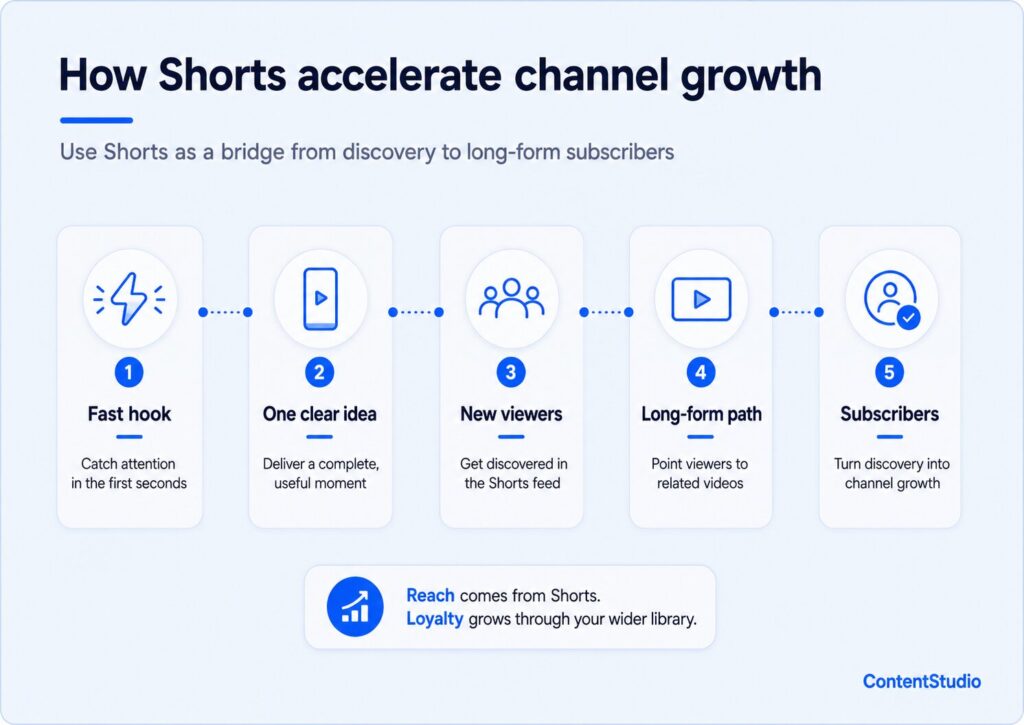
YouTube Shorts accelerate channel growth by putting your content in front of viewers who would never encounter your long-form videos. The Shorts feed is distributed aggressively across the home page and mobile interface, and smaller channels get reach exposure through it that they can’t achieve through standard uploads alone.
Shorts and long-form videos run through separate distribution systems. The Shorts feed algorithm prioritizes completion rate and fast rewatches over total watch time. A 15-second Short that 75 percent of viewers watch all the way through sends a much stronger signal than a 60-second Short that 30 percent finish.
This changes how you need to structure content for Shorts. The hook needs to land in the first one to two seconds, which is why YouTube Shorts format strategy is a separate skill from how you open a long-form video. Viewers in the Shorts feed swipe faster than they drop off in long-form. If the opening moment doesn’t immediately signal value, the swipe happens before the hook even registers.
The value delivery also needs to be tighter. A long-form video can build to a payoff over several minutes. A Short needs to deliver a complete thought, insight, or reaction within the clip. There’s no “stay for the end” dynamic in a feed built on rapid scrolling.
The strongest Shorts strategy for growing a channel isn’t to treat Shorts as an isolated content type. Use them as a funnel into your main content library instead.
A Short that shows the most compelling moment from a long-form video and explicitly points viewers to it works as a discovery mechanism. A Short that asks a question that only your long-form video answers creates a reason to click through to your channel and subscribe. The Short gets the reach; the long-form earns the subscription.
This strategy works because Shorts and long-form pull from overlapping but distinct audiences. Some viewers never watch long-form content on YouTube. Others use Shorts to discover channels and then follow those channels’ main content. Bridge content captures both.
If you’re using music in your Shorts, understand YouTube music copyright rules before you publish. A copyright claim on a Short can limit its distribution or demonetize it before it builds any traction. This is a growth problem as well as a monetization problem. Restricted Shorts get shown to fewer people.
If you create original audio for your Shorts, such as original music or a sound you want to protect, you should also know about licensing your YouTube Shorts, so your work is protected if others use or sample it.
Three to five Shorts per week is a workable cadence for a channel in growth mode. The constraint isn’t publishing frequency. It’s quality. A Short that drops off in the first two seconds harms your Shorts performance metrics and can suppress future distribution in the Shorts feed.
If you can produce four strong Shorts per week, do it. If you can only produce two without cutting corners on the opening hook, publish two. Consistency over time outperforms bursts followed by gaps.
Viewer retention measures what percentage of your video the average viewer watches. High retention tells YouTube that your content delivered on its title’s promise, which triggers wider distribution. Low retention signals a mismatch between what the title promised and what the video delivered. The algorithm responds by limiting how far the video reaches.
The single highest-leverage editing decision in any video is what happens in the first ten seconds. This is where the largest percentage of drop-offs occur. Viewers in that window are deciding whether to commit or leave.
A strong hook answers the viewer’s implicit question: “Why should I watch this instead of clicking on something else right now?” It can do this by immediately delivering the most interesting moment of the video, stating a specific and compelling outcome the viewer will get, or posing a question they urgently want answered.
A strong hook is not a logo animation. It’s not “Hey, welcome back to the channel.” It’s not a 45-second backstory about why you made the video. Every second of setup before the value lands is a second in which viewers decide to leave.
The test: watch your video from the beginning and ask honestly whether the first ten seconds give a stranger a clear reason to stay.
The audience retention graph in YouTube Studio shows you exactly where viewers drop off, where they stay, and where they rewatch. Learn to read it as a specific diagnostic, not just a performance metric.
Drop-offs in the first 20 to 30 percent of the video almost always indicate a hook problem or a title-to-opening mismatch. Gradual, steady drop-offs throughout the video indicate a pacing problem. Filler, long pauses, or sections that run too long are the usual culprits. A sharp drop at a specific timestamp almost always indicates something specific that happened at that moment: a transition that confused viewers, a topic shift that lost them, or an ad placement that interrupted the flow.
After identifying the drop-off point, go to that timestamp and watch what happens there. The fix for that specific issue goes into your next video’s production checklist, not retroactively into the existing one.
These two metrics are related but different, and conflating them leads to bad decisions about video length.
Average view duration measures how many minutes and seconds the average viewer watches. Retention percentage measures what share of your total video length the average viewer completes. A 10-minute video with a 6-minute average view duration has 60 percent retention. A 2-minute video with a 90-second average duration has 75 percent retention.
Shorter videos with higher retention percentages don’t always outperform longer videos with lower retention percentages. A 15-minute video where viewers average 9 minutes generates significantly more total watch time per viewer than a 2-minute video where viewers average 90 seconds.
Community engagement accelerates channel growth by building a loyal audience that watches your videos quickly after publishing, comments consistently, and recommends your channel to others. That early engagement cluster is a powerful signal to the algorithm that your content is worth distributing more broadly.
When you publish a video, the fastest engagers are almost always your most loyal viewers. They’ve set notifications, they watch within hours, they leave comments and share. That behavior sends a concentrated cluster of positive signals to the algorithm in a short window.
Channels with genuinely engaged communities get a head start on distribution every time they publish. It’s not that the algorithm favors large channels. Engaged communities consistently produce the early performance that triggers broader distribution. A channel with 5,000 highly engaged subscribers can outperform a 30,000-subscriber channel with passive viewers in the initial distribution window.
Community engagement doesn’t happen by itself, and YouTube community engagement has more to do with how you show up outside the video than with the content itself.
Reply to every comment in the first 48 hours after publishing. This isn’t just goodwill. It sends engagement signals to the algorithm and surfaces in subscribers’ notifications, which can bring them back to the thread. Ask specific questions at the end of videos. “What was the first thing you tested on your own channel?” generates more replies than “Let me know your thoughts.” Specificity invites a real answer.
Use the Community tab to stay present between uploads. Polls, questions, behind-the-scenes previews of upcoming content, and direct replies to subscriber questions all keep your audience engaged between videos. Posting once or twice a week there keeps the subscriber relationship warm without requiring a new video every day, and YouTube Community tab activity is measurably more likely to watch and engage when the next upload goes live.
Every video you publish should be promoted somewhere other than YouTube on its release day. Your email list, LinkedIn, Instagram stories, and posts on X (Twitter) are all valid surfaces. The goal isn’t to copy the video. Give your existing audience in other places a specific reason to watch.
A short text post that says “New video: the one mistake that cost me 3 months of growth on YouTube, and what I changed” gives a reader a reason to click. “New video is up” gives them nothing.
External traffic to your YouTube videos is a positive signal to the algorithm. It shows that your content is being discovered and shared from sources outside YouTube’s own recommendation engine, which suggests broader relevance.
YouTube analytics shows you where your viewers come from, how long they stay, and which videos are driving subscriber growth. The most important reports to track are traffic source data, audience retention curves, and top-performing content by subscriber gain. These three together tell you what to make more of and what to stop making.
You don’t need to track every metric in YouTube Studio. These three tell you the most important things about your channel’s health and where to focus next.
Checking analytics daily creates noise. A simple rhythm that surfaces the signal:
The channels that grow fastest use their analytics as an active experiment log rather than a report card. Each video is a hypothesis. A thumbnail test, a different hook structure, a new title format. Run one change at a time. If you change the thumbnail, title, and the hook structure on the same video, you can’t attribute results to any specific variable.
Track each test for at least 30 days before drawing conclusions. Then lock in the change that worked and move to the next variable. Over six months of this, you build a body of knowledge specific to your channel and audience that no generic YouTube growth guide can give you.
A content strategy for YouTube channel growth means publishing a consistent volume of relevant content on a reliable schedule, planned far enough in advance that production is never rushed. It starts with defining exactly who the channel serves, mapping the specific questions that audience asks, and then building a content ladder that moves viewers from discovery through to loyalty.
One of the most useful frameworks for sustainable YouTube growth is building a content ladder. This is a library of videos that answers progressively more specific questions within your niche, each level building on the one before it.
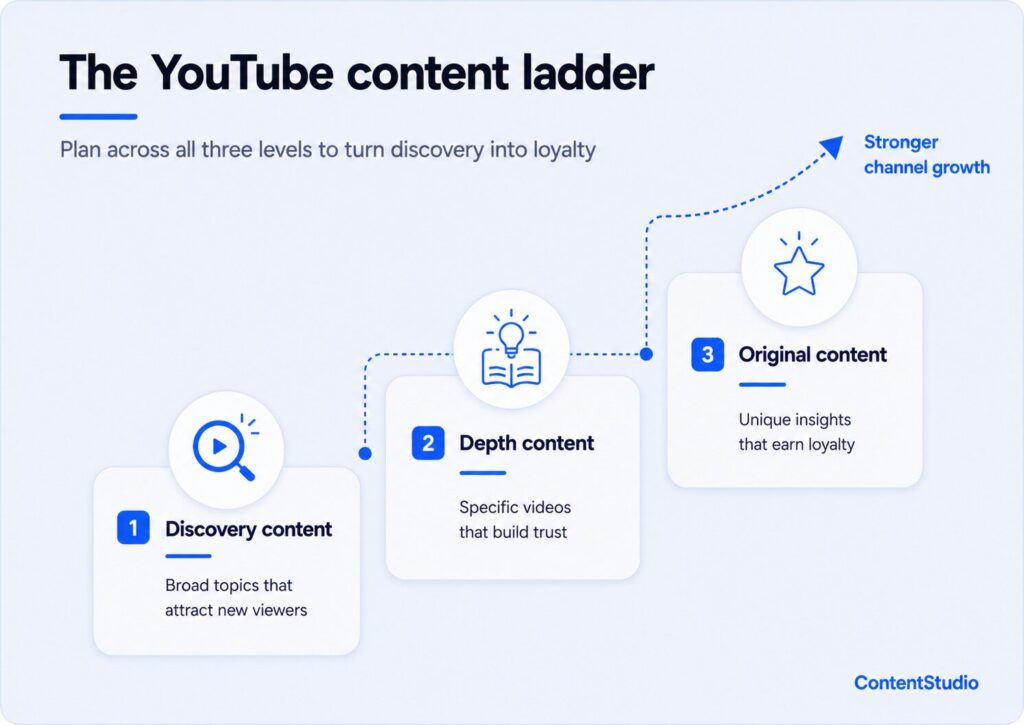
Most channels spend all their time at the base of the ladder because it’s the most obvious entry point. Channels that reach 10,000 and beyond build consistently across all three tiers. For brands specifically, the content ladder gives a YouTube strategy for brands a clear structure, connecting video output to product launches and marketing goals rather than running as a separate publishing schedule.
A content calendar solves the problem of making upload decisions reactively. Set aside two hours at the start of each month to plan the next four to six weeks of content. Map topics to upload dates. Flag any videos that require interviews, extra production time, or external coordination. Assign scripting, filming, and editing to specific calendar blocks.
A social media management platform with YouTube publishing capabilities lets you assign tasks across team members, map content across channels, and set upload dates weeks in advance so nothing falls through the gaps during busy production weeks. This matters especially for brand channels where multiple people touch every video before it goes live.
Batching production is the second lever. Instead of scripting, filming, and editing one video at a time, group similar tasks. Script three videos in one sitting. Film two or three in a single session. Edit a full week of content before uploading any of it. Channels that batch effectively maintain consistency longer because they always have a buffer of completed content ready to publish, regardless of what happens in any given week.
Short-term planning is weekly and monthly. Long-term strategy is quarterly.
Once per quarter, pull your top ten videos by subscriber gain. Note the topics, the formats, and the structural patterns. Then plan the next quarter with those insights built into the editorial direction. Over time, this process makes your content strategy progressively more precise.
This is also the right moment to look at your current analytics for signs you should move between growth stages. If search traffic is still dominant at six months in, you may need to rethink your posting frequency or niche focus. If browse and suggested traffic are climbing, it’s a signal to increase production pace and capitalize on the algorithm momentum you’ve built.
Monetization and growth are related but separate goals. Chasing revenue before building a genuine audience almost always backfires. It leads to content decisions that hurt retention, which suppresses growth, which undermines the monetization it was meant to enable. The stronger approach is to build a loyal audience around content your viewers genuinely want, then layer in revenue streams that serve that audience.
YouTube’s Partner Program has two tiers. At 500 subscribers with either 3,000 watch hours or 3 million Shorts views in the past 90 days, creators can access channel memberships, Super Thanks, and Super Chat. Full ad revenue requires 1,000 subscribers and either 4,000 watch hours in the past 12 months or 10 million Shorts views in the past 90 days.
Ad revenue at 1,000 subscribers is rarely meaningful on its own. The channels that see substantial ad income are typically well past 10,000 subscribers with strong viewer retention, operating in high-CPM niches. YouTube monetization benchmarks vary enough that planning around any single average figure is usually misleading.
The revenue streams that work best for growing channels are the ones that serve the audience rather than interrupt it.
The most common monetization error is optimizing for ad revenue CPM before building an engaged audience. Creators in this pattern gravitate toward high-CPM niches (finance, tech, real estate) and produce content primarily to capture those ad rates, regardless of whether the content fits their channel or their viewers.
The result is almost always lower retention because the content doesn’t match what the channel built its audience around. When retention drops, the algorithm distributes less. Growth slows. The CPM-chasing content that was supposed to generate income has instead undercut the growth that would have made any monetization meaningful.
Build the audience around content your viewers genuinely want. Revenue follows engaged audiences. It doesn’t precede them.
YouTube channel growth rewards the same behavior every time: show up consistently, package your content well, and pay attention to what the data is telling you after each upload. The channels that compound are the ones that treat every video as information, not just output.
The gap between a channel that stalls and one that grows isn’t usually talent or resources. It’s whether the person behind it is willing to test, adjust, and keep going past the point where most people quit.
New channels typically add 10 to 100 subscribers per month in the first six months, depending on niche, publishing frequency, and content quality. Growth accelerates notably after 500 to 1,000 subscribers, as the algorithm builds a clearer audience profile and begins recommending content more broadly.
The biggest factors are click-through rate, average viewer retention, upload consistency, niche focus, and thumbnail and title quality. Channels that consistently improve CTR and retention grow faster than those that increase upload frequency without improving those core metrics.
For most channels, monthly growth of 1 to 3 percent is typical. Above 5 percent is considered strong. The platform-wide average sits around 2.5 percent per month. These numbers vary by niche, and percentage growth means less at very small channel sizes where the subscriber base is too small to produce a stable rate.
YouTube Shorts primarily expand reach and channel discovery. They expose your content to new audiences in the Shorts feed who would not have found your channel through search or long-form suggestions. Growth impact is strongest when Shorts lead viewers to your long-form content, where they’re more likely to subscribe.
The most common causes are unclear niche focus, weak thumbnails producing low CTR, opening hooks that cause early drop-offs, or inconsistent publishing. Check your audience retention graph in YouTube Studio first. It almost always points directly to the specific problem.
The 7-second rule describes how quickly viewers decide whether to keep watching or leave after clicking a video. Viewers who don’t see a reason to stay within the first 7 to 10 seconds typically drop off. A hook that immediately delivers value, states a specific outcome, or presents a compelling question addresses this directly.
Pick a specific niche, publish consistently on questions your target viewer searches for, and improve one thing with every upload. Search-optimized content in a focused niche is the most reliable path to the first 1,000 subscribers.
Research analyzing over 5.3 million YouTube channels found the most common path to 1,000 subscribers requires 150 or more videos. The range is wide: channels with strong keyword targeting and tight packaging get there faster. Channels with scattered topics and weak thumbnails take significantly longer.
Plan 0 Days of Content in 0 Minutes
Create, schedule, publish and analyze your content across all your social media channels from one simple dashboard.
4.7 on Capterra • 16,500+ marketers trust ContentStudio
Esha Shabbir is a content marketer at ContentStudio, specializing in social media strategy, SEO-led content, and editorial workflows for marketing teams. She writes practical, research-backed content that helps marketers understand what to publish, how to organize their content, and how to build a more consistent social media presence.
View all posts by Esha ShabbirRecommended for you
How to promote affiliate links on social media in 2026

Multi-location social media management workflow guide

Best SaaS affiliate programs for social media marketers in 2026

19 best social media management tools to plan, schedule, and grow in 2026