How to choose a social media management tool (2027 guide)
Nov 3, 202621 minutes

Written by
Saif AliPublished

One clean product photo is now enough to build a full set of video ads, each doing a different job: showing the product, selling a lifestyle, proving a result, solving a problem, and sounding like a real customer.
The setup that makes this work is Claude Code connected to ContentStudio. Claude handles the creative planning, generates the videos in ContentStudio’s AI Studio, writes the captions, and schedules the posts. You stay in the director’s chair and approve each stage before it moves on.
This guide explains how the workflow is put together and how to run it yourself, step by step. We used a sunblock for a skincare brand as the example, but the same approach works for any physical product.
It runs on three inputs and one rule.
The rule is that the work happens in phases, and Claude stops after each one for your approval. Plan first, then one test video, then the rest, then captions and scheduling. Video is slow and costly to regenerate, so catching a wrong direction at the plan stage saves you from repeating it five times.
The brief is the reference Claude checks every decision against, so send it first, on its own, before the job itself.
A useful brief covers four things: who the brand is and who it’s for, the voice, the visual look (colours, lighting, mood), and the rules. The rules do the most work. A banned-words list keeps captions and scripts on-brand, and a claims policy matters a lot for regulated products like skincare, supplements, or finance. Without one, an AI can happily write a claim you’re not allowed to make.
Keep the brief and the prompt as separate tabs in one document. The brief stays the same across projects, while the prompt changes with each job.
Want to see the first part of this series? Watch how the same photo became a full static campaign.
Think of the prompt as a production brief, not a request. Ours had four parts:
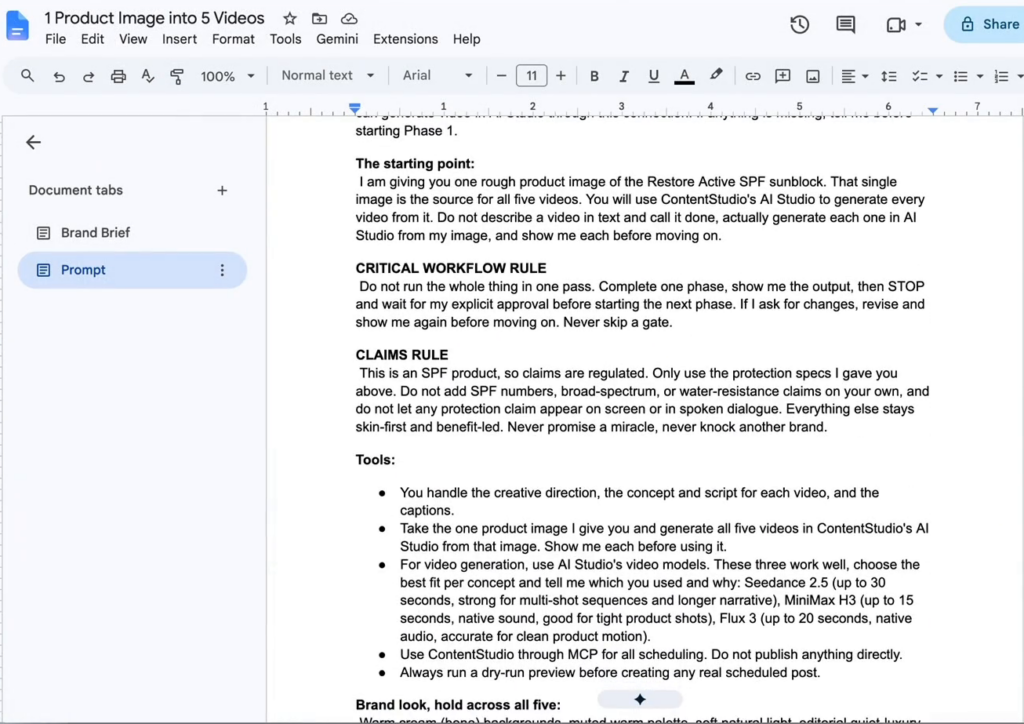
Paste the prompt and attach the product image in the same message, so Claude treats the image as part of the job.
A good setup doesn’t guess. Before planning anything, Claude reads the brief and the prompt together and asks about anything unclear or contradictory, with options to pick from.
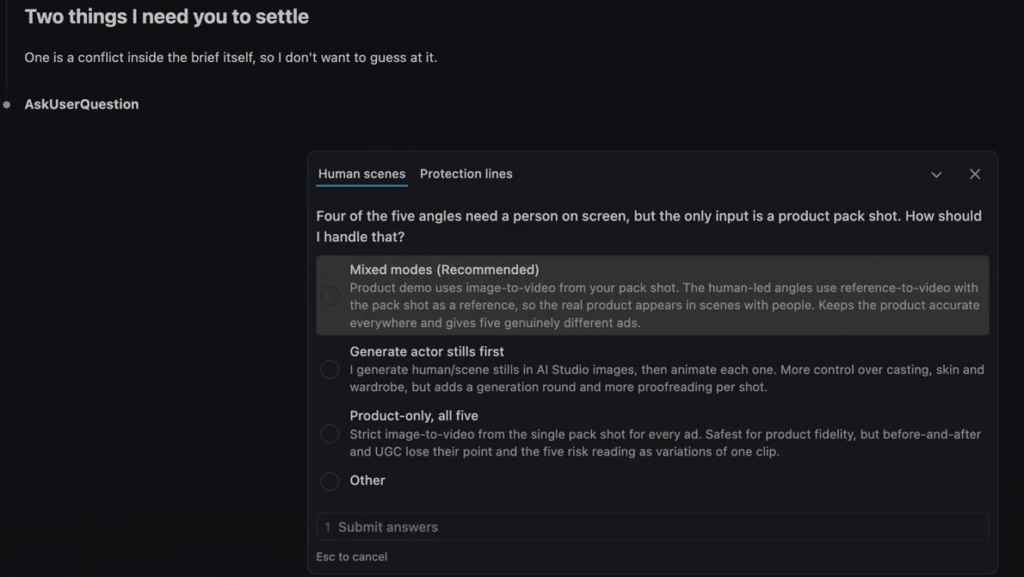
In our run, two questions came up. One was practical: four of the five ads need a person on screen, but we only supplied a product shot, so how should it handle that? The other exposed a conflict in our own brief about which protection claims were allowed. Both took seconds to answer, and both would have been expensive to discover in a finished video.
Expect Claude to push back on the prompt too. If a model you named can’t do what you asked, a good agent will check the tool and tell you, which is why it’s better to list models as preferences rather than fixed instructions.
The whole campaign inherits whatever is in that one image, so it’s worth getting right.
Give each ad a different job. These five formats cover most of what a product campaign needs:
The part that makes this possible is how the videos get generated. When the product appears on its own, AI Studio can animate the photo directly with image-to-video.
When a scene needs a person holding or applying the product, Claude uses reference-to-video instead, which treats your photo as a reference so the real product shows up inside a new scene.
In the Phase 1 plan, Claude lays out each concept, the model it will use, and why, then waits for your sign-off.
Once the plan is approved, Claude generates only the first video and stops. That test tells you whether the look is right before four more clips copy it.
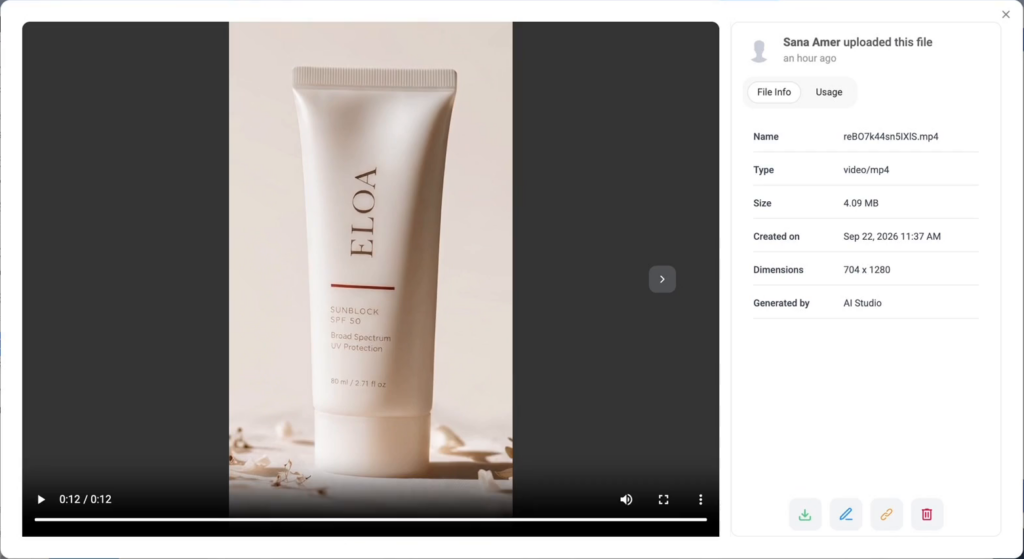
Every video goes straight into your ContentStudio media library. When you review one, check product accuracy first (shape, label, logo), then whether the motion and lighting match the brand, then anything on screen that sounds like a claim.
After you approve the first one, Claude generates the rest. Review each of those too. AI video can still slip on product details, especially in shots with hands and movement, and one of our ads came back with the wrong packaging. Claude flagged it rather than scheduling it, which is exactly why the review step is there.
With the videos done, Claude moves to captions and scheduling as the next phase. It writes a caption for each ad in the brand’s voice, matched to that ad’s angle, runs a dry-run preview, and then creates the posts in ContentStudio.
Not every post needs the same level of review. Low-risk ads, like a clean product demo, can be scheduled to publish automatically. Anything with a person speaking or wording close to a claim can go through ContentStudio’s approval workflow instead, where it waits until a teammate signs off.
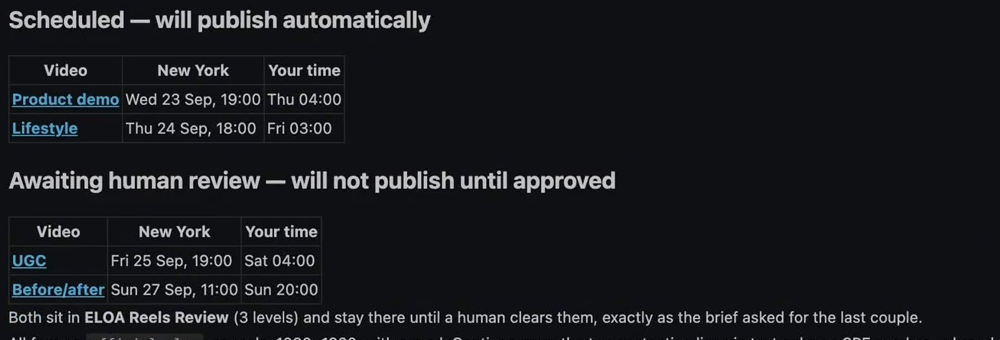
One small habit worth building: ask Claude to report the schedule in both your time zone and your audience’s. It’s an easy way to catch a post set for the wrong hour.
Open the Planner in feed view to see each Reel the way your audience will, with its caption and status. Teammates reviewing the posts can leave comments right beside them.
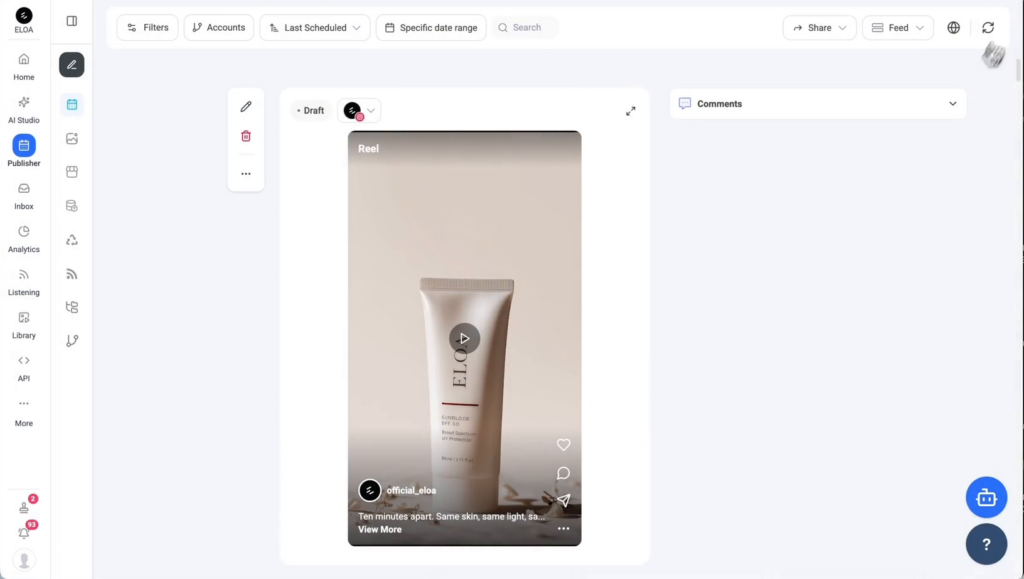
A generated Reel in the ContentStudio Planner feed view, ready for final review.
Play each video and read its caption against it. Mismatches that are easy to miss in a terminal are obvious here.
For a set of social video ads, largely yes. Five ads used to mean a photographer, a set, a video team, and days of production. Here, they came from one still image in a single sitting.
What changes is your role. Instead of filming, you’re directing: answering the right questions, approving the plan, and catching mistakes before they go live. Claude does the heavy lifting, and you still make the final calls.
Yes. AI video tools can animate a product photo directly, or use it as a reference to place the real product inside new scenes with people. With Claude Code and ContentStudio’s AI Studio, one clean pack shot can produce several different ad formats, from product demos to UGC-style clips.
Image-to-video animates your photo as it is, so it works best when the product is alone in the frame. Reference-to-video treats your photo as a guide and generates a new scene around it. That’s what makes it possible to show someone holding or applying the product.
Not really. You’ll install the ContentStudio CLI or connect the MCP server once. After that, you work in plain language: paste a brief, write a prompt, and approve each stage. Claude handles the commands in the background.
AI Studio gives you access to several video models, including Flux 3, Kling v3 Pro, Seedance 2.5, and MiniMax H3. Each has different strengths in length, resolution, and audio. Claude can check what each model supports and pick the right one for each ad.
In this workflow, generation for all five ads was estimated at around nine minutes for a clean pass. Plan for extra time to review each video and regenerate any that miss. Even with approvals at every stage, the whole thing fits into a single sitting.
Not if you set it up with approval gates. The prompt tells Claude to stop after every phase and never publish directly. ContentStudio’s approval workflow also lets you hold specific posts until a teammate signs off, so nothing goes live unchecked.
It can be, as long as your brand brief includes a clear claims policy. Spell out what the product can and can’t claim, and tell Claude to keep regulated wording out of videos. Then route any claim-adjacent ads through human review before they publish.
Yes. The videos are generated in vertical 9:16, which suits Instagram Reels, TikTok, and YouTube Shorts. You can schedule them to any channel connected in ContentStudio, with captions adjusted for each platform.
Plan 0 Days of Content in 0 Minutes
Create, schedule, publish and analyze your content across all your social media channels from one simple dashboard.
4.7 on Capterra • 16,500+ marketers trust ContentStudio
Saif Ali is a Content Marketing Strategist at ContentStudio with over five years of experience across SaaS, IT, and digital marketing. He specializes in SEO-led content, AI content creation, and social media strategy, and leads editorial review at ContentStudio, fact-checking and refining articles for accuracy, SEO, and a consistent brand voice.
View all posts by Saif AliRecommended for you
How to choose a social media management tool (2027 guide)
How to build an executive’s LinkedIn content workflow with Claude Code
Social media MCP server: How to automate posting with ContentStudio
How to automate social media with n8n: A practical guide