



How to turn one product photo into 5 video Ads with Claude Code
Sep 24, 202610 minutes

Written by
Saif AliUpdated
Ask any executive if LinkedIn matters, and they’ll say yes. Ask how often they post, and you’ll get a pause. Ideas are rarely the problem. A CEO running a 60-person company has more opinions about hiring, pricing, and customers than she could post in a year.
What she doesn’t have is two free hours a week to write. And every draft someone else writes for her comes back sounding like a press release, so she rewrites it or lets it sit. The profile goes quiet for another month.
This guide walks through an executive LinkedIn content workflow that fixes both problems. The executive records one short voice memo a week. Claude Code turns it into drafts that sound like them, ContentStudio holds the schedule, and the executive approves every post before it goes out under their name.
Executive LinkedIn programs don’t fail in week one. They fail around week six, and usually for the same few reasons.
The drafts don’t sound like them: A ghostwriter or a generic AI tool writes in the standard LinkedIn voice. The executive spots it right away, rewrites half the post, and starts wondering why they’re paying for help.
Approvals get stuck: Drafts go out by email, feedback comes back on WhatsApp, and someone edits in a Google Doc. By the time a post is approved, the moment it was about has passed.
The good material is spoken, not written: Executives rarely sit down to write. Their best ideas come out on sales calls, in all-hands meetings, on podcasts, and in quick conversations between meetings. If your process starts with “send me some ideas,” you won’t get many.
The stakes are higher: A brand account can survive a clumsy post. An executive’s name is on everything, so a revenue figure that wasn’t public, a client named without permission, or a promised launch date can turn into a real problem.
A workflow that holds up has to deal with all four. It needs a clear record of how the executive talks, an easy way to capture what they say, approval before anything goes live, and one place to keep the schedule.
Here’s the whole setup at a glance. Claude handles most of it. The executive shows up at two points: recording the weekly memo and approving the posts.
| Stage | What happens | Who does it |
|---|---|---|
| 1. Voice profile | Claude studies past posts and transcripts and writes down how the executive talks | Claude, once, checked by the executive |
| 2. Weekly capture | A short voice memo or call transcript goes into the project folder | Executive |
| 3. Plan | Claude proposes the month’s posts, each tied to something the executive said | Claude, approved by you |
| 4. Draft | Claude writes the posts and flags any fact that needs checking | Claude, reviewed by you |
| 5. Visuals | Carousels and quote cards are generated in AI Studio | Claude and AI Studio |
| 6. Schedule and approve | Posts land on the executive’s LinkedIn profile in ContentStudio and wait for sign-off | Claude schedules, executive approves |
| 7. Monthly review | Results feed back into the voice profile | You and Claude |
Setup takes about ten minutes, and you only do it once.
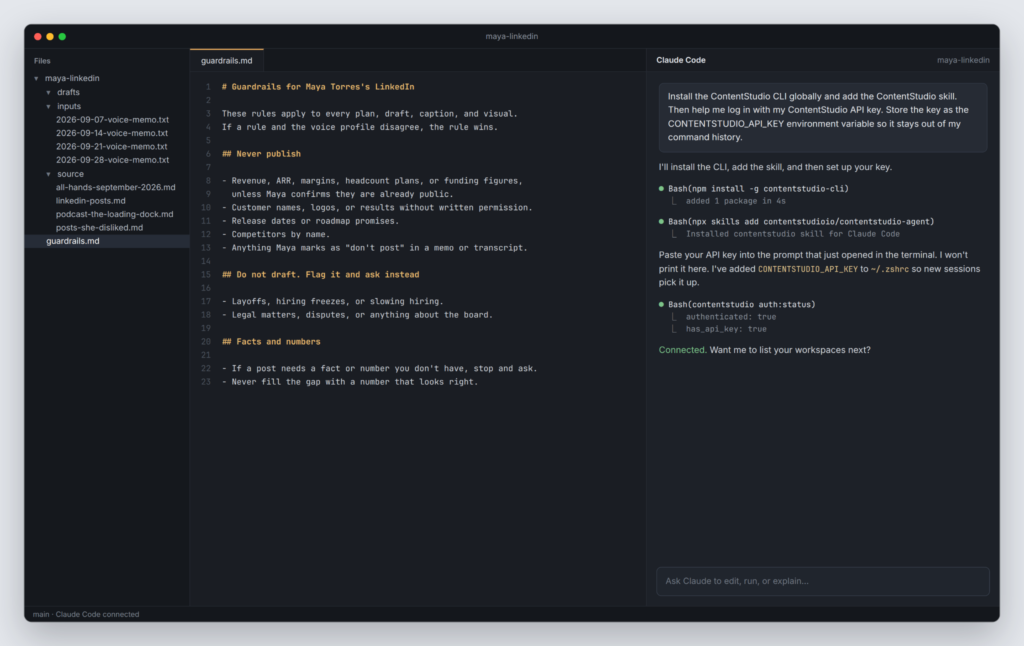
Why Claude Code and not the Claude chat app? Chat is fine for a one-off post. But an executive program runs for months, and Claude Code reads and writes files on your computer.
The voice profile, the guardrails, and every past transcript sit in that folder, so each week Claude starts from the same reference instead of a blank conversation.
This step decides whether the posts sound like the executive or like everyone else on LinkedIn. Spend the most time here.
Collect 10 to 20 of the executive’s best past posts, ideally ones they wrote themselves. Add one or two transcripts of them speaking, such as a podcast episode, a conference talk, or an all-hands recording. The spoken material matters more than you’d expect. Most people write stiffly and talk naturally, and you want the natural version.
Put everything in the source folder and give Claude this prompt:
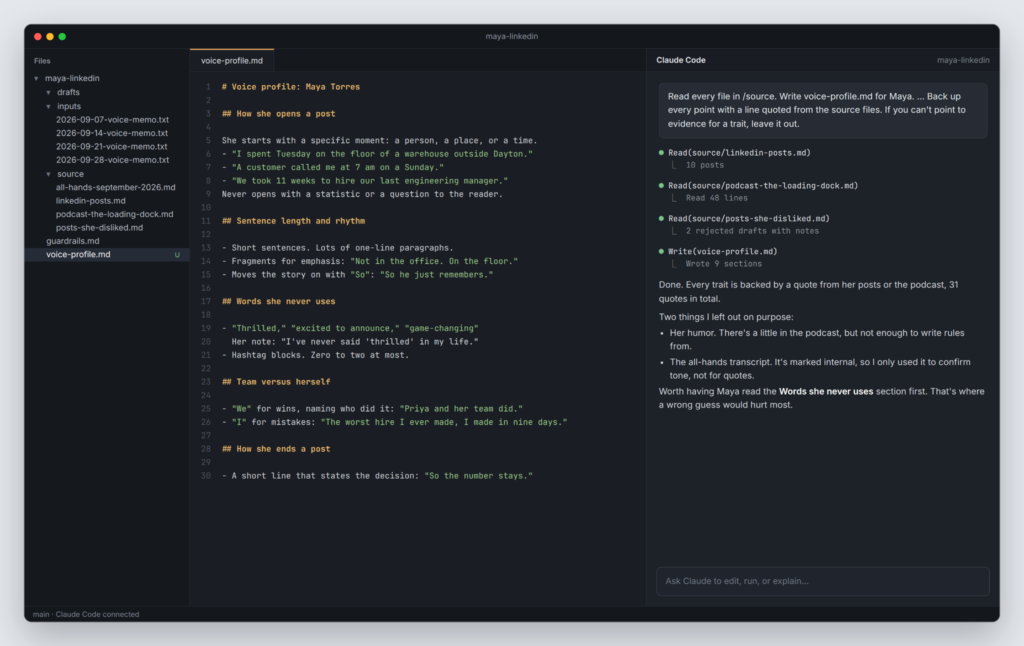
“Read every file in /source. Write voice-profile.md for Maya. Cover how she opens a post, her sentence length and rhythm, words and phrases she uses often, words and phrases she never uses, the topics she clearly knows well, opinions she holds strongly, how she talks about her team versus herself, and how she ends a post. Back up every point with a line quoted from the source files. If you can’t point to evidence for a trait, leave it out.“
That last line does a lot of work. Without it, Claude will fill the profile with traits that sound right for “a CEO” but aren’t actually true of Maya.
A useful profile reads like notes from someone who has listened to her for a while:
– Opens with a specific moment, usually a customer call or a warehouse
visit. Never with a statistic.
– Short sentences. Often starts a paragraph with “So.”
– Says “we” about wins and “I” about mistakes.
– Never says “excited to announce” or “thrilled.” Rarely uses emojis.
– Strong views on hiring slowly and on not discounting to close a deal.
Then send the profile to the executive and ask for five minutes. They cross out anything that’s wrong and add anything that’s missing. Their corrections are the most valuable input in the whole workflow, and it’s the only document you’ll ever ask them to review.
Note: ContentStudio’s Brand Knowledge feature stores a brand profile for each workspace, including voice and tone. Add a short version of the voice profile there too, so anything generated in AI Studio follows the same voice.
The voice profile tells Claude how the executive talks. The guardrails file tells it what it can’t say in public. Keep it short and specific:
– No revenue, ARR, headcount, or funding figures unless already public.
– No customer names without written permission. Describe them instead
(“a mid-size 3PL in Ohio”).
– No release dates or roadmap promises.
– No comments about competitors by name.
– Layoffs, hiring freezes, legal matters, or anything about the board:
do not draft. Flag it and ask.
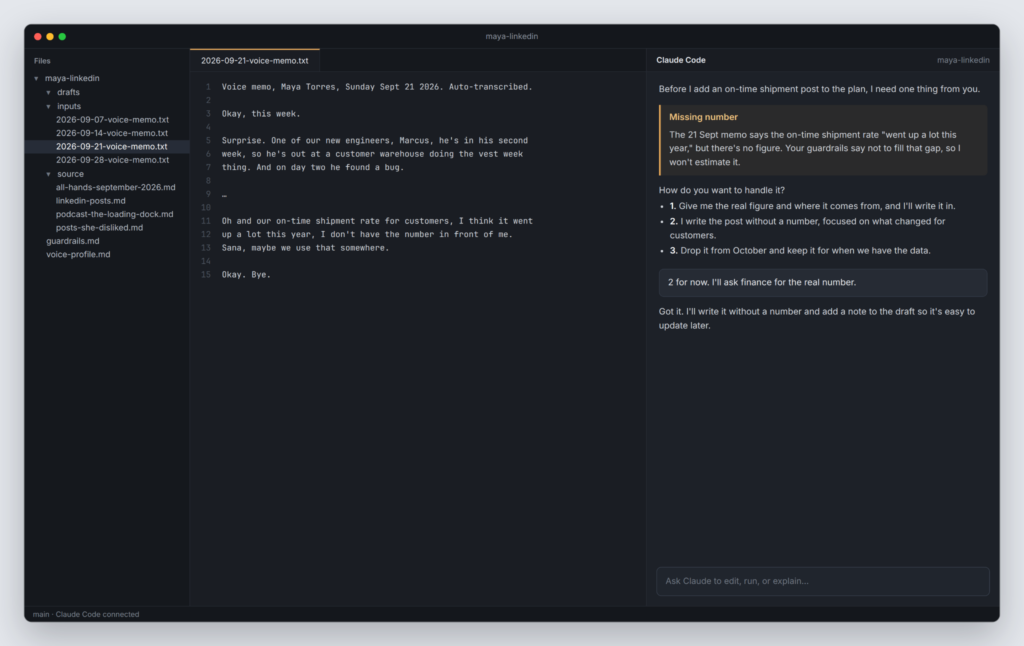
– If a post needs a fact you don’t have, ask for it. Never fill the gap
with a number that looks right.
That last rule matters more than it looks. When we turned a single product image into a full campaign, Claude stopped and asked for a price instead of making one up. You want the same behavior here, and on someone’s personal profile, a made-up number does more damage.
This is the only recurring thing you ask of the executive, so keep it easy.
Once a week, they record a 10 to 15 minute voice memo on their phone that answers three questions:
No writing, no outlines. Transcribe the memo (most phones and meeting tools can do it) and save the text in the inputs folder with the date in the file name.
Material the executive already produces works too. A recorded sales call, an all-hands talk, a podcast appearance, or an internal memo can all go in the folder. One honest 15-minute recording usually holds enough for three or four posts.
Now give Claude the actual job. The key instruction is to work in phases and stop after each one. Without it, Claude would go from transcript to scheduled posts in one run, and you’d be checking its work after the fact.
You are running Maya’s LinkedIn for October. Use voice-profile.md and
guardrails.md for every decision.
Work in phases. After each phase, show me the result and stop until I
approve.
Phase 1: Read everything in /inputs. Propose 12 posts for the month,
three per week. For each one, give the hook, the main point, the format
(text, carousel, or image), and the exact line from the transcript it
comes from.
Phase 2: Write the approved posts. The first two lines have to work on
their own, since LinkedIn hides the rest behind “see more.” Flag any
sentence that states a fact or number I should check.
Phase 3: Create visuals for the carousel and image posts in ContentStudio
AI Studio. Only use photos of Maya that are already in the media library.
Never generate an image of her.
Phase 4: Show me a dry run of the schedule. After I approve, create the
posts on Maya’s LinkedIn profile in ContentStudio at her best-performing
time slots and send every post to the approval workflow. Do not publish
anything directly.
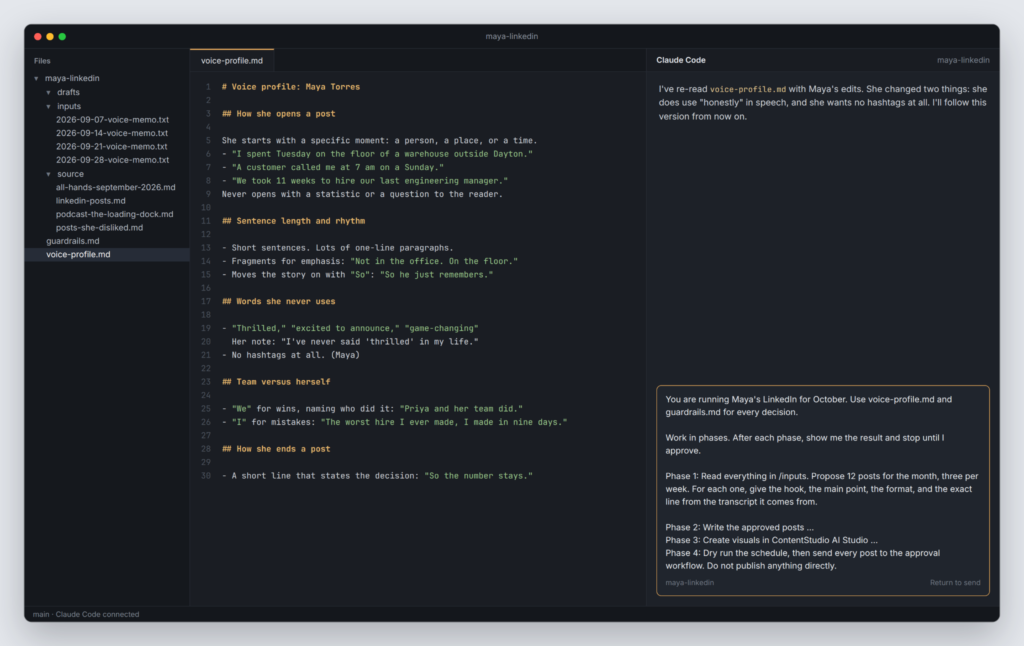
Look at the transcript line in Phase 1. Every post has to trace back to something the executive actually said, which keeps the opinions theirs. If Claude can’t point to a source line, the post doesn’t make the plan.
Also read: The five stages of a Claude social media workflow
You’re the editor at this stage, and the executive’s time is what you’re protecting. Catch problems now, so they only see posts that are close to ready.
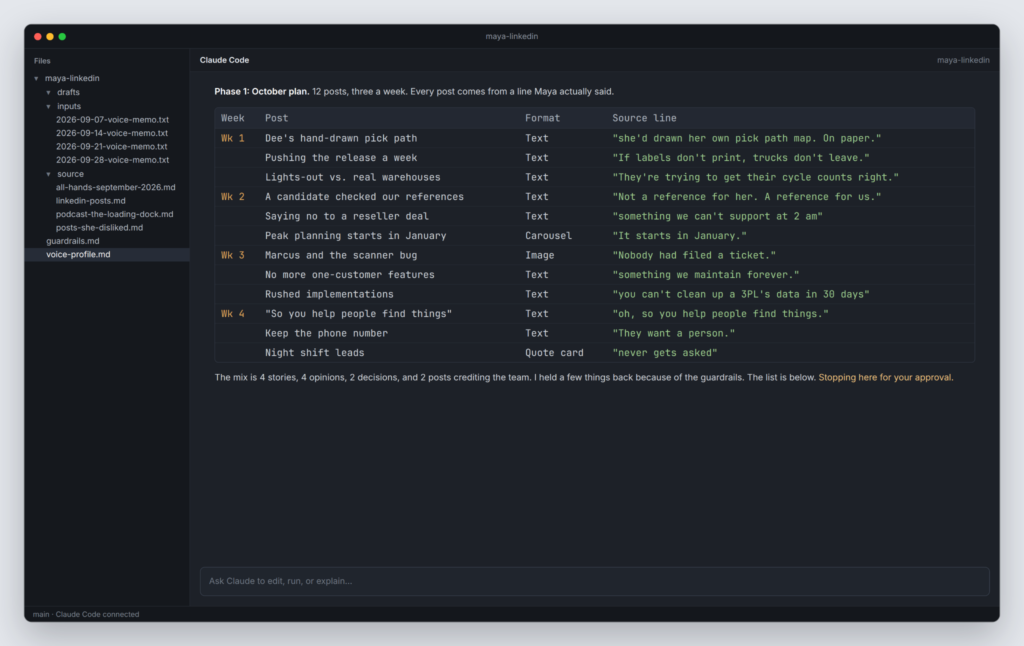
When you review the plan, check the mix. If eight of the twelve posts are wins, the month reads like a highlight reel. A good month has a few stories, a couple of opinions, a lesson learned the hard way, and at least one post that credits the team. Cut anything the executive wouldn’t defend in a meeting.
When you review the drafts, read each one out loud and ask:
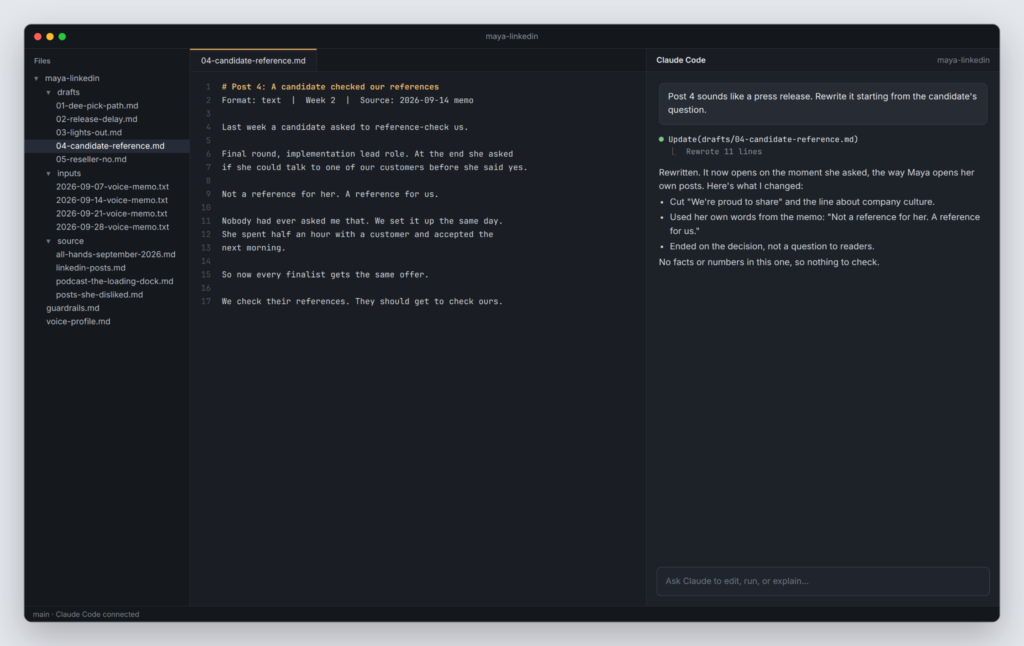
Ask for changes the way you’d brief a writer. “Post 4 sounds like a press release. Rewrite it starting from the warehouse story.” Or, “Post 9 makes the same point as post 2. Replace it with something from the pricing conversation.” Claude updates the draft, and you move on.
Not every post needs an image. Plenty of strong executive posts are just text, especially opinions and stories. Some ideas land better as visuals, though, like a carousel walking through a five-step hiring process or a quote card for a line worth sharing.
For those, Claude sends the job to ContentStudio’s AI Studio, which generates the slides and graphics using the colors and fonts saved in Brand Knowledge. Everything it makes lands in the ContentStudio media library, so you can check it before it’s attached to a post.
One firm rule: never use AI to generate a photo of the executive. People can tell, and a fake headshot undercuts the reason for posting as a real person in the first place.
Upload a handful of real photos to the media library once, such as event shots, office photos, and a good headshot, and Claude can attach them where they fit.
Once the drafts and visuals are approved, Claude shows you a dry run of the schedule: which post goes out on which day, and at what time. Ask it to list the times in the executive’s time zone as well. It’s an easy way to catch a post set for 3 am.
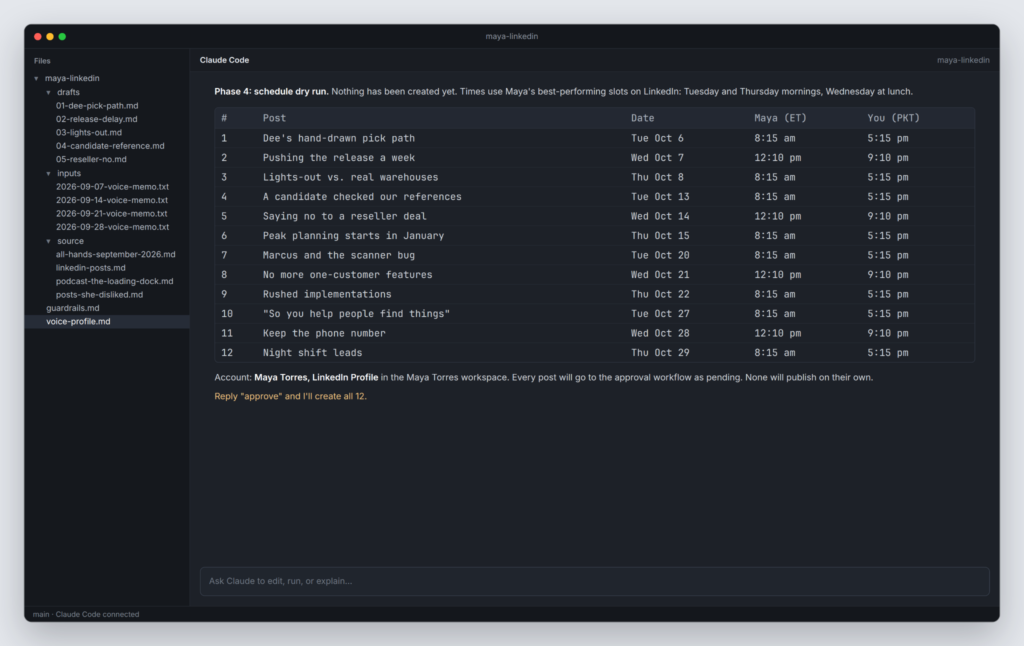
After you confirm, Claude creates the posts on the executive’s LinkedIn profile in ContentStudio through the LinkedIn scheduler, using the account’s best time slots. Every post goes into the approval workflow instead of straight into the queue.
The executive, or their chief of staff, then reviews the posts in ContentStudio. They can approve a post, reject it, or leave a comment. The feedback stays attached to the post instead of getting lost in email threads.
When posts come back with comments, you don’t need to fix them by hand. Ask Claude:
Fetch Maya’s posts that were sent back for changes, apply her comments, and resubmit them for approval.
Before the week starts, open the Planner in the content calendar and look over the month. You’ll see each post with its caption, visual, and status, which makes empty days and doubled-up slots easy to spot.
At the end of each month, check how the posts did in ContentStudio’s analytics. Look past the likes. A comment from a customer, a candidate, or an investor the executive wants to reach is worth more than a pile of reactions from strangers.
Pick the three posts that did best and the three that fell flat, paste them into Claude Code, and ask:
Compare these two groups of posts. Update voice-profile.md with anything that explains the difference, such as hooks, topics, length, or format. Show me the changes before saving.
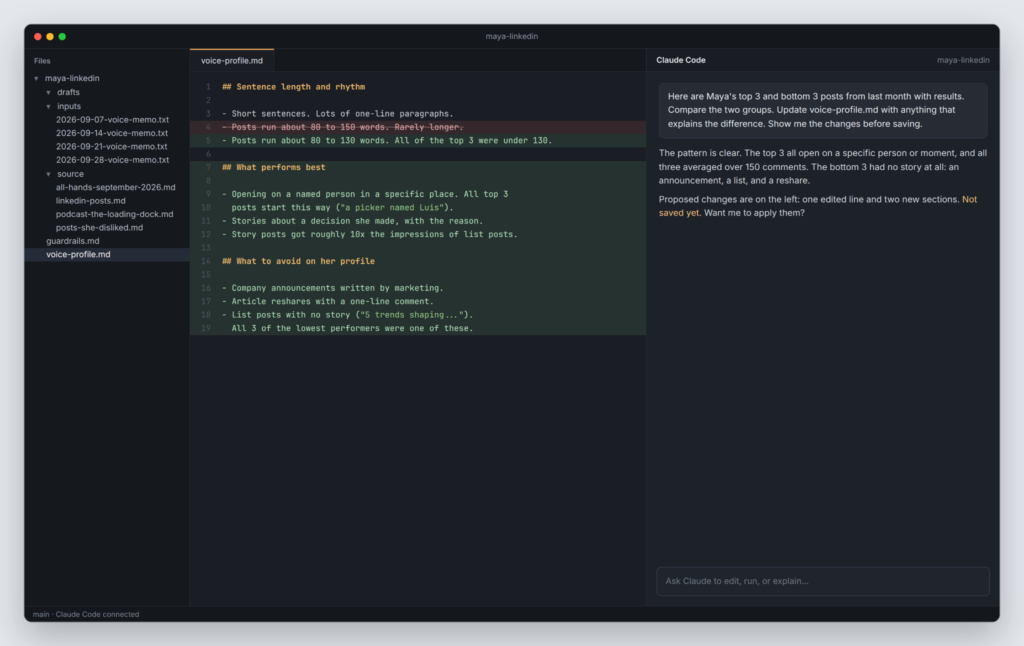
The profile gets a little sharper every month, and the drafts need fewer edits. That’s where the real time savings build up.
If you manage LinkedIn for a leadership team, or for several clients at an agency, the same workflow scales with one rule: keep everything separate.
Each executive gets their own ContentStudio workspace, project folder, and voice profile. When you start a session, Claude asks which workspace to work in, and the folder tells it whose voice to use. Never let two executives share a folder. Voices blend faster than you’d think, and a CFO who suddenly writes like the CEO is easy to spot.
An executive LinkedIn content workflow works when it asks very little of the executive and still sounds like them. In this setup, they spend about 15 minutes a week on a voice memo and a few more approving posts.
Claude Code handles the planning, drafting, and scheduling, guided by a voice profile and guardrails written for that one person. Nothing goes live without their sign-off.
Start your free ContentStudio trial and build your first executive LinkedIn workflow with Claude Code.
It’s a repeatable process for planning, writing, approving, and publishing LinkedIn posts for an executive. In this setup, the executive records a short weekly voice memo, Claude Code turns it into drafts based on a voice profile, and ContentStudio schedules the posts once the executive approves them.
Yes, if you give it enough to work from. Build a voice profile from the executive’s past posts and transcripts of them speaking, then have them correct it once. Drafting from their own words each week keeps the posts close to how they actually talk.
Claude Code works with files on your computer, so the voice profile, guardrails, and transcripts stay in one folder that Claude reads every session. The chat app can also connect to ContentStudio and works well for one-off posts, but a program that runs for months is easier to manage with files.
Not with this setup. The job prompt tells Claude to stop after every phase and never publish directly, and every post goes through ContentStudio’s approval workflow. Nothing goes live until the executive or their chief of staff approves it.
About 15 minutes recording a voice memo, plus a few minutes approving posts in ContentStudio. The only bigger ask comes at the start, when they spend five minutes correcting their voice profile.
Ghostwriting is common on LinkedIn, and it holds up when the ideas and the final call belong to the executive. In this workflow, every post traces back to something they said, and they approve each one before it’s published.
Yes. Give each executive a separate ContentStudio workspace, project folder, and voice profile. Keeping them apart stops voices from blending and keeps each approval with the right person.
No. You install the Claude Code extension in VS Code and ask Claude to set up the ContentStudio CLI for you. After that, everything happens in plain language: you write prompts, review drafts, and approve posts.
Plan 0 Days of Content in 0 Minutes
Create, schedule, publish and analyze your content across all your social media channels from one simple dashboard.
4.7 on Capterra • 16,500+ marketers trust ContentStudio
Saif Ali is a Content Marketing Strategist at ContentStudio with over five years of experience across SaaS, IT, and digital marketing. He specializes in SEO-led content, AI content creation, and social media strategy, and leads editorial review at ContentStudio, fact-checking and refining articles for accuracy, SEO, and a consistent brand voice.
View all posts by Saif AliRecommended for you
How to turn one product photo into 5 video Ads with Claude Code
Social media MCP server: How to automate posting with ContentStudio
How to automate social media with n8n: A practical guide

How to turn a product image into a full campaign with Claude Code








