How to add events to Google My Business?
Jun 29, 20267 minutes

Written by
Arooj IshtiaqPublished
Most local businesses claim their Google Business Profile and then leave it alone with no updates, no offers, no photos, and no response to reviews. Meanwhile, a competitor three streets away is actively using the same free platform to pull in customers who are actively searching for exactly what both businesses sell. That gap, between businesses that just exist on Google and those that actively market through it, is where Google Business Profile marketing makes its case.
Google My Business marketing, now carried out through Google Business Profile, helps local customers discover a business, understand its offer, and decide what to do next. An effective profile connects accurate information with useful campaigns and reliable service. The broader social media marketing around the business should support that work by keeping promotions, visuals, and customer communication consistent across channels.
The goal is not simply to publish more posts. It is to give the right people a relevant reason to call, visit, book, order, or learn more, and then to evaluate whether that activity supports the business.
Google Business Profile marketing, or GBP, is the planned use of a Google Business Profile to attract and serve customers through Google Search and Maps. The platform is free for eligible businesses and supports business information, reviews, posts, photos, and other features that vary by category, location, and eligibility.
A marketing program brings those elements together with intention. Business information establishes relevance. Photos and reviews help people evaluate the option in front of them. Updates explain what is new. Offers create a defined commercial opportunity. Events give people a reason to participate. Contact and transaction options make the next action possible.
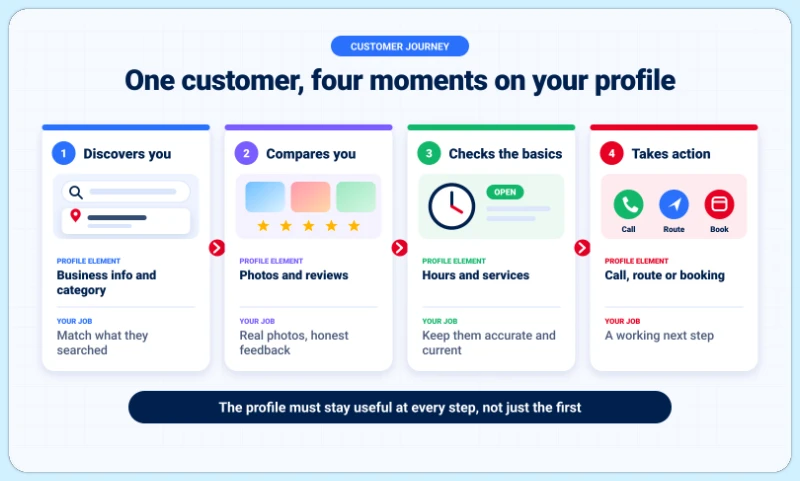
A profile can play several roles during the same customer decision. Someone might first discover a business through a search result, return later to compare reviews, and then check its hours before visiting. The profile needs to remain useful across all of those interactions, not just the first one.
Maintenance keeps the facts correct. Marketing connects those facts with a customer need at the right moment.
Updating holiday hours is necessary maintenance. Promoting an actual holiday service with clear availability and a relevant booking route is marketing. Both matter. A campaign becomes less effective when the business cannot deliver what its profile promises.
A useful plan starts with the outcome the business wants to support. “More visibility” is often too broad to act on. A business may need more qualified inquiries, attendance at a specific event, sales of an available product, or appointments for a particular service. The objective shapes everything else.
| Objective | What the customer needs | Evidence of progress |
|---|---|---|
| Generate service inquiries | Clear scope, service area, availability, and contact information | Relevant inquiries and completed jobs |
| Encourage store visits | Accurate location, hours, current products, and practical visit info | Suitable visits and in-store activity |
| Support bookings | A useful service explanation and working appointment route | Completed appointments |
| Promote an event | Dates, participation details, location, and registration information | Registrations and attendance |
| Increase offer response | Clear terms, eligibility, availability, and redemption instructions | Valid redemptions and sales |
| Build confidence | Authentic images, customer feedback, and helpful responses | Customer feedback and reduced uncertainty |
These relationships help with planning. They do not mean every profile action automatically creates a sale.
A single campaign should have a main job. “Encourage nearby homeowners to inquire about an available maintenance service during a defined period” gives the team a clearer direction than trying to increase views, calls, bookings, reviews, and revenue simultaneously.
The campaign brief should identify the intended customer, the relevant need, the message, the appropriate post or profile feature, the destination or contact route, the person handling the response, and the evidence used to evaluate it.
Promotions often depend on stock, staff, booking capacity, and opening hours. Using a Google Business Profile scheduler helps organize supported updates, offers, and events alongside the rest of a publishing calendar. It is especially useful when several people review content or multiple locations participate in the same campaign.
Google also provides native scheduling, recurring posts, and multi-profile sharing. The reason to use an additional platform is coordination and workflow efficiency, not an assumption that Google rewards third-party tools or that software purchases a ranking advantage.
Campaign content can attract attention, but customers still need dependable information to act on it. Before increasing promotion, confirm that the profile accurately describes the real business.
That means confirming the actual business name, appropriate categories, a genuine location or service area, accurate customer-facing hours, a working contact route, and the services or products currently available. Google generally requires qualifying in-person contact with customers. An online-only operation does not become eligible simply because a profile would be useful for marketing.
Work on optimizing your Google Business Profile when the foundations are inaccurate or incomplete. More promotional posts should not compensate for incorrect information; they compound the problem by attracting customers to a business that cannot deliver what its profile describes.
A customer should be able to determine whether the business is relevant without calling for every basic detail. Useful information can include the type of work handled, the customers or situations served, important availability limits, what someone should expect when visiting, and which action makes sense next. Vague claims such as “the best service for everyone” help no one make a decision. Specific, accurate information does.
Photos show the business more clearly than promotional copy alone. Useful examples include the entrance customers need to find, the space they will use, current products, real equipment, approved examples of completed work, and relevant team activity. Visuals should accurately represent the business. A generated image should not masquerade as a real storefront, employee, or customer result. Google prohibits misleading representations.
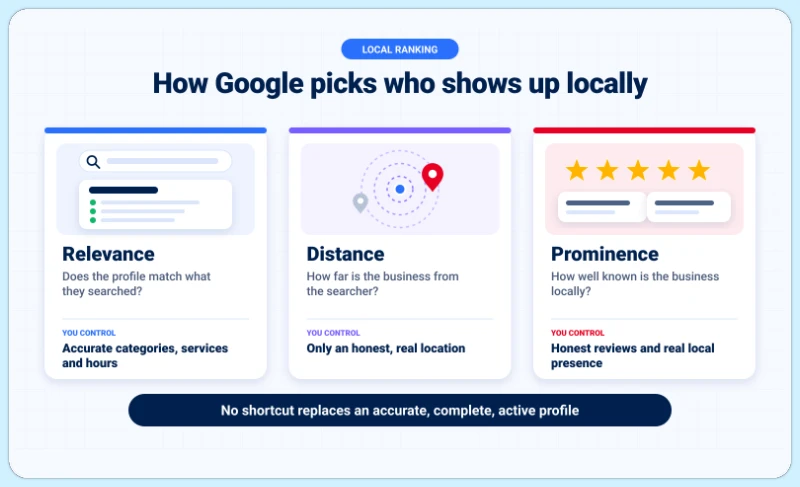
Google says local results mainly depend on relevance, distance, and prominence. Complete information helps Google understand the business, while reviews and other evidence contribute to how well-known it appears in the local area. Those factors explain why marketing should begin with the actual business rather than a list of ranking tricks. A full, accurate, active profile is the foundation; shortcuts are not a substitute.
Two businesses can need different improvements. One receives limited relevant exposure. Another receives attention but few suitable actions. Efforts to attract more visitors to a Google Business Profile should identify which situation applies before choosing a tactic.
If customers cannot understand the offer, more exposure may simply create more confusion. If the information and destination work but relevant discovery remains limited, the investigation should focus on profile representation and wider local presence.
Google does not offer a way to request or pay for better organic local ranking. A useful content calendar supports communication. It does not establish that daily posts guarantee better positions, that every post needs a location keyword, that more service areas create equal visibility in every town, or that a particular hashtag count improves local ranking. Campaign content should earn its place by helping the customer make a decision.
A useful campaign starts with a genuine reason for someone to care right now. That reason might be seasonal demand, a new service, an available appointment window, a real event, or a product that solves a current problem. Manufacturing urgency around a made-up occasion rarely produces the same result as connecting the message to something the customer is already thinking about.
Seasonality should reflect the actual business rather than a generic list of marketing dates. A garden center preparing customers for planting season, a repair business explaining maintenance availability, a retailer introducing an actual seasonal collection, and a training provider opening registration for a scheduled workshop are all examples of seasonal campaigns that earn their relevance. The campaign should connect the information with availability and a next step.
A service campaign can reduce uncertainty before an inquiry arrives. It may explain who the service suits, what it includes, which situations require a different solution, what information the business needs from the customer, and how to request the next step. The purpose is not only to generate more contacts. It is to help suitable people contact the business with realistic expectations, which makes those contacts more valuable.
Product content should connect an available item with a use case. A useful post can explain a feature, show a real example, or clarify a selection decision. Promoting unavailable stock or implying that every location carries the same items damages trust and creates wasted contacts. Retail and product-display features also have their own eligibility conditions within Google Business Profile.
Relevant Google Business Profile posts help customers understand a current announcement, opportunity, or event. Google documents three native post types: Update, Offer, and Event. Photos and videos can appear within supported posts, while a call-to-action button is an element within a post rather than a separate native post category.
| Post type | Marketing role | Essential question |
|---|---|---|
| Update | Explain something relevant or new | Why does the customer need this information? |
| Offer | Present a defined promotional opportunity | Can the customer understand and use the deal? |
| Event | Invite participation in a real activity | Can someone decide whether and how to attend? |
An update might explain a new service, highlight an available product, clarify a common customer question, or announce a meaningful operational change. A generic message such as “We care about quality” gives little help with a decision. A specific explanation of what the service includes, who it suits, and how to inquire is considerably more useful.
Learning how to schedule Google Business posts with a call to action keeps promotions aligned with actual availability and staff capacity. Before releasing an offer, confirm its purpose, participating locations, start and end dates, included products or services, eligibility and exclusions, the redemption route, and who can resolve customer questions.
An offer should not create demand the business cannot fulfill. Discounts also should not be the only reason to contact the business. Demonstrations, useful information, and a clear service proposition can support marketing without a price reduction.
Workshops, demonstrations, open houses, and relevant community activities can provide a clear reason to participate. When adding events to Google Business Profile, the title, dates, location context, and participation requirements should all be consistent.
Customers should understand what will happen, who the event is for, whether booking is required, whether a fee applies, and where to find the details. An event post does not guarantee attendance or inclusion in every event-related Google result.
Google says posts older than six months are archived unless a date range is set. The commercial review matters more than the archive rule. A recurring post should stop or change when its price, stock, terms, event, or relevance changes. Setting a review trigger at the halfway point of any promotion prevents outdated promises from staying live after the business has moved on.
A campaign should not stop at the post. The destination the profile points to is as important as the message itself, and a broken or mismatched destination wastes whatever interest the content generated.
| Campaign | Suitable next step |
|---|---|
| Service explanation | The relevant service information or inquiry route |
| Appointment promotion | An appropriate booking option |
| Product announcement | Accurate product or availability information |
| Event | Registration or complete participation details |
| Offer | The terms and redemption route |
Before publishing, check whether the destination opens correctly, works on a phone, and lets the customer find the promised information. Forms and booking controls should work. Offer details should match. Someone should be ready to handle the response. A post about one service should not send someone through an unrelated homepage journey when a more relevant destination exists.
Not every customer is ready to book immediately. Some need to understand suitability, pricing conditions, or the process first. The destination can answer those questions without forcing a form on someone who is still evaluating.
For customers who are ready to act, unnecessary steps create friction. Google says an Update button should direct people somewhere they can complete the action, while Offers include their own View Offer button.
Reviews influence how people assess a business. Google also identifies review information as part of local prominence. A consistent process for requesting and responding to reviews should support honest feedback rather than manufacture an image. The goal is real evidence that helps real customers make real decisions.
Google prohibits incentives for reviews, including discounts, payment, free goods, or services. It also prohibits selectively soliciting positive feedback and discouraging negative reviews. A request for an “honest review” does not make an incentive acceptable. The business can provide a neutral link or QR code at a suitable customer touchpoint, and the customer should remain free to describe the experience in their own words.
A helpful response acknowledges the experience and addresses the relevant issue. It should not repeat a location keyword unnecessarily, reveal private customer information, become a sales pitch, pressure the person to change the rating, or make a remedy conditional on review removal. Responses that are clearly genuine and specific build more trust than templated replies that could fit any customer.
Feedback can reveal a marketing problem more quickly than any analytics dashboard. When customers repeatedly misunderstand a service, the business may need clearer information before the next campaign. The strongest reputation process connects marketing with operations. An attractive promotion followed by poor availability or an unanswered call creates a mismatch that no review response can fully repair.
The profile should support the wider campaign without copying every social post word for word. A customer finding the business through Google may need immediate practical information. Someone following the brand on Instagram may already know it and want a different kind of update.
Keeping both in sync is part of broader social media management for small businesses, where the same promotion runs across multiple surfaces without creating contradictions.
The participating channels should agree on dates, prices and conditions, availability, location, booking or redemption information, and the business’s current contact details. Different wording is acceptable. Contradictory facts are not.
An approved product photo or event image can support several channels. The accompanying message should still fit the placement. A practical social media content approach reduces duplicated work while preserving the differences that make each channel useful. The aim is a coordinated operation, not an identical caption everywhere.
The people answering calls or serving customers should know what the profile promises. A short internal campaign note can cover the active message, offer or event conditions, the intended audience, common questions, capacity limits, and the person handling exceptions. That prevents the marketing team from launching something the service team cannot support.
A central campaign can provide shared creative, but each location needs a factual review. Local checks include opening hours, product or service availability, appointment capacity, event participation, contact routes, and offer eligibility. A branch should not publish a promotion it cannot fulfill. Central teams can approve the core message and assets, while local teams confirm the operational details. This also means avoiding extra profiles or misleading locations simply to expand coverage. Google requires profiles to reflect eligible, real-world operations.
The profile shows customer interactions, but it does not record the complete customer journey. Google says performance reporting is available for verified profiles, not every metric applies to every business, and the data can include both organic results and Google Ads. Reading the native fields correctly, and comparing them to operational evidence, is what separates useful measurement from a busy-looking dashboard.
For teams managing content across multiple channels, a social media content calendar that includes GBP alongside other platforms makes it easier to review what was published, when, and what followed.
| Metric | What it can show | What it does not prove |
|---|---|---|
| Profile views | Recorded profile-viewing activity | Every appearance of the business across Google |
| Searches | Available discovery terms | Complete demand for every service |
| Calls | Call-button clicks | Answered calls or completed jobs |
| Directions | Requests for directions | Confirmed visits |
| Website clicks | Clicks on the website link | Identical session or conversion totals |
| Bookings | Completed bookings in supported reporting | Every appointment from every route |
| Offer activity | Available views and clicks | Confirmed redemption or profit |
Useful business records that sit alongside the profile data include answered and missed calls, suitable inquiries, completed appointments, event registrations and attendance, offer redemptions, orders and returns, and completed jobs.
More call-button clicks with no increase in completed work may reveal a response or qualification problem. Increasing publication volume would not automatically solve it.
When reviewing results, consider changes in seasonality, opening hours, advertising, stock, service capacity, offer availability, and reporting timing. Google says search-term data updates monthly and can take up to five days to appear. That field is not a daily campaign monitor.
A useful review explains what the campaign intended, what was published, which activity was recorded, which business outcomes followed, what remains uncertain, and what the team will change. The outcome should be a decision, not just a larger dashboard.
These scenarios illustrate planning choices. They are not customer case studies or guaranteed results.
The objective is attracting suitable participants to a scheduled workshop. The campaign connects accurate hours, an event with complete details, real images, a working registration destination, staff awareness, and a capacity and cancellation process. The business evaluates registrations and attendance alongside profile activity. If people click but do not register, the team inspects the destination and event proposition before assuming a visibility problem.
The objective is generating inquiries about supported work within the actual service area. The campaign connects accurate service information, a clear explanation of supported appliances, appropriate contact details, real work examples where suitable, a response process, and a neutral feedback invitation.
The business distinguishes call-button clicks from answered calls, suitable inquiries, and completed jobs. More contacts are not necessarily better when they concern unsupported services.
A marketing program should reflect the business’s actual capacity. Overbuilding a publishing schedule that nobody can sustain is a common mistake, and it typically results in either missed commitments or low-quality content published under pressure.
| Review point | What to check |
|---|---|
| When information changes | Hours, services, address, contact details |
| Before a campaign starts | Terms, capacity, assets, destination, approval |
| During an active promotion | Availability, questions, publication status |
| After completion | Expired content, outcomes, customer feedback |
| Periodically | Access, recurring content, reporting definitions |
There is no need to turn this into a daily posting requirement. A focused program with accurate information and reliable follow-through is more useful than a full calendar of disconnected updates.
The next campaign should begin with one customer need and one useful business outcome. Confirm the profile’s core information, choose the appropriate message, test the destination, and tell the response team what is being promoted. The publication process should follow those decisions, not precede them.
When results are weak, identify the actual gap before adding more content. The gap is usually in the destination, the offer clarity, the response process, or the audience match, not the posting frequency.
Google Business marketing works best as part of the customer experience. The profile helps someone make a well-informed choice, and the business delivers what that choice led them to expect. ContentStudio’s Google Business Profile tools can support the scheduling, coordination, and consistency side of that work, so the team’s energy goes into the decisions rather than the logistics.
Google lets an eligible business enter an opening date up to one year ahead. After verification, the profile can appear 90 days before opening, allowing the business to share appropriate posts, photos, and business information. Keeping the future opening date accurate matters because customers may otherwise assume the business is already operating.
Google says reviews generally transfer when a business moves and keeps the same name, although certain categories have exceptions. Updating the existing profile rather than creating a replacement is the correct approach when only the address has changed. When reviews do not transfer correctly, contacting Google support is the right next step rather than asking customers to recreate them.
Those figures are not available through the competitor’s private Business Profile performance reports, which require access through an associated Google Account. Public information such as reviews, services, photos, and offers can be compared, but third-party estimates should not be presented as the competitor’s actual calls, bookings, or revenue.
Requesting access to the existing profile rather than creating a duplicate is the correct starting point. For storefront and hybrid businesses, Google documents an ownership-request process that gives the current owner three days to respond. When no response arrives, an option to claim or verify the profile may become available, though Google does not guarantee that option in every case.
Arooj Ishtiaq is a Content Marketing Strategist with 5+ years of experience writing about social media, SaaS, and AI. At ContentStudio, she creates practical guides, tutorials, and how-to content that help marketers navigate social media trends, sharpen their strategies, and get more from their content.
View all posts by Arooj IshtiaqRecommended for you
How to add events to Google My Business?
How to schedule repeat posts on Google My Business
YouTube marketing guide to content, campaigns, and results
Black Friday vs. Cyber Monday: The real difference for software buyers