How to optimize your LinkedIn profile?
Oct 19, 202629 minutes

Written by
Esha ShabbirUpdated
LinkedIn marketing works best when businesses share useful insights, build professional relationships, and help the right audience solve real problems. A company Page alone cannot do all that. Businesses need a clear strategy that connects their content with audience needs, builds credibility, and guides people toward meaningful action.
That requires more than publishing posts. An effective LinkedIn marketing strategy brings together audience research, content planning, writing, approvals, community management, advertising, and performance tracking. These activities often involve different people, which makes coordination essential.
A well-defined social media management workflow helps teams assign responsibilities, maintain consistency, and connect each post or campaign to a business goal. Without that structure, content can attract the wrong audience, while campaigns may generate leads that never turn into meaningful sales conversations.
This guide explains how to build a LinkedIn marketing strategy for your business, coordinate company Pages and employee advocacy, choose effective content formats, plan advertising campaigns, and measure results that matter.
Key takeaways
LinkedIn gives businesses access to professionals who use the platform to follow industry developments, exchange ideas, build relationships, and evaluate potential solutions. This professional context makes it particularly useful for B2B marketing, recruitment, thought leadership, and reaching decision-makers.
However, professional audiences do not automatically translate into qualified leads or sales. Results depend on how well your content addresses their needs, how relevant your targeting is, and what you offer after someone engages.
Here is where LinkedIn marketing can make a difference:
To turn these opportunities into a repeatable process, teams need a reliable way to organize content and coordinate publishing. A LinkedIn scheduler can help teams plan posts, schedule approved content, and maintain a consistent publishing calendar. It supports execution, while audience research, editorial judgment, and performance analysis determine what the team should publish and why.
Organic LinkedIn marketing builds a public record of your expertise, your conversations, and your organization over time. Paid promotion adds distribution on top of that, through objectives, audiences, budgets, and placements you choose.
The two support each other, but one does not validate the other. A popular organic post can point to an angle worth testing, while a paid offer can work well for a narrow audience without attracting many public reactions at all.
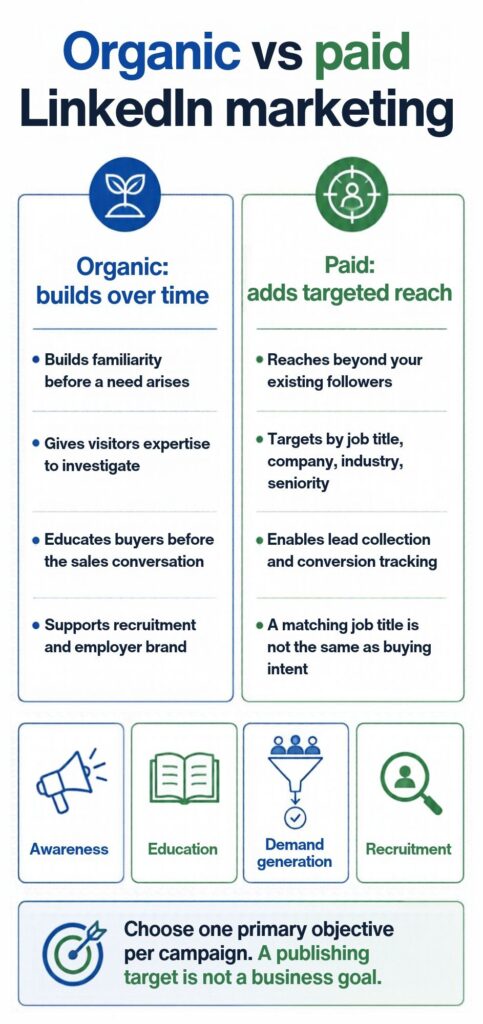
A LinkedIn marketing strategy works when it starts with four things: a clear goal, a defined audience, a choice between organic and paid, and a way to measure progress.
Get those four things clear before you post anything, and every tactical decision that follows becomes easier.
LinkedIn’s capabilities map to specific outcomes, and the goal you pick shapes everything that follows.
Pick one primary goal. A strategy trying to do all of these at once usually delivers none of them well.
You need more than job titles and industries. The more useful question is: what specific problem is this person trying to solve, and where are they in the process?
Someone researching “how to reduce churn” is in a different headspace than someone actively evaluating software. Both might be VP-level SaaS professionals. The content that reaches one won’t necessarily reach the other.
Build your audience around the problem and the moment, not just the role.
A practical way to do this is to look at your best existing customers or clients.
The answers to those questions are what your LinkedIn content should speak to directly.
If you’re early and don’t have customers to study yet, LinkedIn Groups in your target industry are worth browsing. The questions people ask in those groups, unprompted and unfiltered, are a direct window into what your audience is actually thinking about.
Start with organic. It builds authority slowly and compounds over time. Add paid when you have a specific campaign, event, or time-sensitive offer that can’t wait for organic traction to build.
For most teams, the right move is to run organic consistently from day one and layer in paid once a specific piece of content has proven it resonates and deserves wider reach.
Think of it in 30-day blocks.
The first 30 days establish your rhythm and baseline metrics. Don’t optimise yet. You’re just building the habit and gathering data.
The second 30 days reveal which formats and topics generate the most engagement. You’ll start seeing patterns. A certain type of post consistently outperforms others. A topic that drives more comments than anything else.
By day 90, check whether the right audience is accumulating. Look at who’s commenting, who’s following, who’s visiting your profile after a post performs well. If those people don’t match the profile of who you want to reach, adjust the content angle, not the posting frequency.
The LinkedIn algorithm in 2026 distributes a post to a small test audience first, then expands reach based on early engagement signals. Comments carry the most weight, followed by reposts with commentary, reactions, dwell time, and saves. The first 60 to 90 minutes after publishing are when the algorithm decides whether your post goes wider.
When you publish, LinkedIn doesn’t show your post to everyone at once. It goes to a small sample, typically a few hundred people, and measures what they do with it.
Strong engagement in that window triggers broader distribution. Weak engagement keeps the post contained. That’s why the first 60 to 90 minutes after publishing matter so much.
The signals LinkedIn weights most heavily, roughly in order:
Comments carry the most weight because they indicate a post sparked real thought, not just a reflex click. A post with ten thoughtful comments will consistently outperform a post with a hundred reactions and no discussion.
Two things suppress reach without most people realising. Putting an external link in the post body is one of them. LinkedIn deprioritises content that sends people off the platform. Put the link in the first comment instead, and reference it in the post.
The second is posting and then going quiet. Not replying to early comments kills the momentum the algorithm needs to expand distribution. Reply to every comment in that first window, and add something real when you do, not just a thanks.
What matters more than posting time is what happens after you post. Reply to every comment in the first 60 to 90 minutes. That response activity is part of what signals to the algorithm that the post deserves wider distribution.
Once you understand the mechanics of how the LinkedIn algorithm works, format choice and timing start to make a lot more sense.
Not all formats perform equally, and the hierarchy has shifted as LinkedIn has invested in specific content types.
| Format | Strength | Best used for |
| Document posts (PDF carousels) | Highest dwell time | Frameworks, processes, data breakdowns |
| Text posts | Strong comment velocity | Opinions, observations, position-taking |
| Video (under 90 seconds) | Watch time, feed prominence | Behind-the-scenes, quick insights, demos |
| Articles and newsletters | Google-indexed, compound traffic | Long-form expertise, evergreen content |
| Polls | High click rate, low authority signal | Audience research, conversation starters |
Document posts consistently earn the most reach per piece of effort. A reader swiping through ten slides spends far more time on your post than someone who reads a paragraph, and LinkedIn registers that dwell time as a positive signal.
Getting the structure and flow right is what makes a LinkedIn carousel post worth swiping through to the end.
Your profile and company page set a ceiling on your organic reach before you’ve posted anything. Get them right once, and you don’t have to think about them again.
Five things determine how well a company page performs in LinkedIn search and Google:
Keep your page’s banner and logo current too. Outdated visuals are a small thing that signals inattention to anyone landing on your page for the first time.
LinkedIn’s algorithm consistently gives personal profile content wider reach than equivalent company page content. The platform is built around people, not brands.
Your headline is the most visible part of your profile. Most people write their job title. That’s a missed opportunity.
Compare these two:
The second earns a profile click while the first doesn’t.
Your About section is where most profiles waste the most space. Write it in first person. Lead with the problem you solve or the kind of work you do. Close with a specific call to action: a newsletter link, a booking link, or simply an invitation to connect with context about why someone should.
Third-person bios written in a formal register don’t earn connection requests. First-person, specific, and direct does. If you’re stuck on the wording, a LinkedIn bio generator can help you get a working draft down quickly.
The Featured section is the one place LinkedIn lets you pin a link with context at the top of your profile. Use it for your most useful piece of content, a lead magnet, or a direct booking link. Profiles that leave it empty are leaving a permanent, high-visibility CTA slot completely unused.
LinkedIn is a search engine, and LinkedIn SEO follows its own rules. Keywords in your headline, About section, and job titles determine whether you appear when someone searches for your expertise.
Use the phrases your target audience actually searches. Not the language your company uses internally. If your buyers search “social media management tool for agencies,” those words belong in your About section and specialties.
Profile completeness is also an algorithmic signal. Photo, banner, headline, About section, experience, skills, and a few recommendations. Each completed section improves how often you appear in search results.
The content formats that work best on LinkedIn in 2026 are document posts for education, text posts for opinion, short video for insights and demos, and newsletters for long-form authority.
Three to five posts a week is the sustainable range for most teams. The format matters less than the consistency.
Each format serves a different purpose. Mixing them based on what you’re trying to say, rather than defaulting to one, is what keeps a content strategy from going stale.
No format is a universal reach winner. The right one is whichever makes the information easier to understand or use, and the table below shows when each tends to fit and what to check before publishing.
| Format | Useful when | Important review |
|---|---|---|
| Text post | An idea needs a concise explanation | Specificity and readability |
| Image | A visual example supports the point | Accuracy and accessibility |
| Document post | The reader needs a sequence or framework | Slide flow and standalone meaning |
| Video | Demonstration or spoken explanation adds value | Pacing, captions, and purpose |
| Article | The subject needs sustained explanation | Evidence and structure |
| Newsletter | A recurring topic supports subscriptions | Eligibility and editorial consistency |
| Poll | A defined question invites participation | Wording and sample bias |
| Event or Live content | Shared attendance adds value | Eligibility, promotion, and follow-up |
A strong LinkedIn content strategy starts with two or three core topics that connect your audience’s interests with your brand’s expertise. Consistent coverage of these topics helps your content stay relevant and gives people a clear reason to follow your business.
LinkedIn’s 3-2-1 content framework offers a practical way to balance your weekly publishing. It recommends three pieces of industry-related content, two focused on community or company culture, and one that promotes your product or service. This mix keeps your feed informative and engaging without turning every post into a sales pitch.
Over time, useful content on a consistent set of topics helps your audience recognize your expertise. That recognition is the foundation of thought leadership. Rather than simply claiming authority, you build credibility by sharing relevant insights and demonstrating a clear understanding of your industry.
Each content pillar can also support different formats. A data-backed insight might work well as a text post, a step-by-step process could become a carousel, and a practical lesson might suit a LinkedIn newsletter. Relevant hashtags can further support discoverability by helping categorize your content and connect it with interested audiences.
A well-planned LinkedIn content strategy brings these elements together, helping your team turn a few core topics into a steady stream of useful content without repeating the same ideas.
Most LinkedIn marketing guides recommend publishing three to five times per week, but a consistent schedule matters more than posting frequency alone. Three useful posts shared regularly can deliver more value than five posts a week followed by a month of silence.
A steady flow of content starts with a bank of relevant ideas. Audience questions, industry insights, and common customer challenges can all provide useful topics. For additional inspiration, these AI prompts for LinkedIn posts can help you develop content ideas without relying on the same formats every time.
Content batching makes this process easier to manage. A dedicated session once or twice a week gives you time to draft, review, and prepare several posts in advance. A publishing calendar, supported by tools that let you schedule LinkedIn posts, can then help maintain consistency during busy weeks.
Generic recommendations, such as posting every Tuesday at 10 AM, are less useful than insights from your own audience. LinkedIn Analytics provides follower demographics and performance data that can help you understand your audience’s location and engagement patterns. A few weeks of testing different posting times will give you a clearer basis for deciding when to publish. Your own results should guide those decisions rather than a universal benchmark.
Of all the platforms you could invest in for B2B, LinkedIn is the one where the context does half the work. People aren’t there to be entertained. They’re thinking about work, tracking industry conversations, and quietly evaluating solutions to problems they’re already dealing with.
The brands that do well here understand one thing: people trust people, not pages. Founder-led content is particularly effective here. When a founder or senior leader posts about the problems your buyers deal with, it carries weight a brand post can’t replicate. The audience knows there’s a real person behind it.
Running personal profiles and a company page in parallel gives you both. The page builds credibility. The people build relationships.
Here’s how each layer works in practice:
For outbound, the warm approach is the only one worth taking. Engage with your prospects’ content before you reach out. Comment on what they share, show up in the conversations they’re already having, and give before you ask. When you do send a message, reference something specific. That detail signals you’ve been paying attention, and it’s usually the difference between a reply and silence.
As these conversations grow, a LinkedIn CRM helps your team keep prospect details, notes, and follow-up tasks in one place. Reps can pick up each conversation with the right context and a clear next step.
Quick note: Teams running a more structured LinkedIn B2B marketing approach with account-based targeting and Sales Navigator will find a much deeper breakdown in the dedicated guide.
LinkedIn video has its own dedicated feed now. It’s a scrollable, vertical surface that surfaces personalized recommendations to users independently of the main feed. That means video content has two chances to reach your audience where other formats only have one.
Here is what works on LinkedIn video, based on how the platform and its audience behave:
If you are already running Sponsored Content, testing a video variant of your strongest text or document post is a low-effort way to see whether the format works for your audience before building a full video workflow.
The most useful LinkedIn marketing metrics are reach (not impressions), engagement rate by post type, profile views after a strong post, follower growth trend, and CTR on posts with links. Company pages with engagement rates above 2% are in good shape. Personal profiles in a defined niche often see 3–8% on posts that land well.
Understanding the difference between LinkedIn impressions and reach is the starting point.
Impressions count every time your post loads in a feed, including repeat views by the same person. Reach counts unique viewers.
A post with 5,000 impressions and 1,200 reach means roughly 1,200 people saw it. For strategy, reach is the more useful number.
High impressions with low reach usually mean your content is cycling through the same small audience rather than breaking into new networks. That pattern is a sign the post didn’t generate enough early engagement to trigger broader algorithmic distribution. It reached your immediate followers and stopped there.
When you see that pattern consistently, the fix isn’t posting more often. It’s content that generates enough comments and reposts to push the algorithm to expand the audience.
LinkedIn calculates engagement rate as reactions, comments, reposts, and clicks combined, divided by impressions.
Company pages averaging above 2% are in good shape. Personal profiles posting consistently in a defined niche tend to see higher rates, often between 3% and 8% on posts that land well. If you want a fuller picture of how those numbers break down across industries and company sizes, the LinkedIn statistics page has that data in one place.
If your rate is sitting below those benchmarks, the cause is usually content that isn’t specific enough. A post written for a broad audience earns broad, shallow engagement. That kind of engagement doesn’t signal much to the algorithm and doesn’t reach beyond the people who already follow you.
Break your engagement rate down by post type rather than looking at an overall average. One or two formats will almost always outperform the rest. That pattern is worth paying attention to and letting it shape how you allocate your content effort going forward.
The more useful thing to track is the trend over time. A rising engagement rate on a steadily growing follower base is the best signal you can get. It means the right people are finding your content and it’s earning their attention consistently.
Beyond engagement, these are the numbers that tell you whether LinkedIn is producing anything real. Tracking LinkedIn performance metrics with the right focus is what separates useful data from noise.
One practical thing to set up early: UTM parameters on every link you share from LinkedIn. LinkedIn’s native analytics won’t tell you what those visitors did after they landed on your site. UTMs feed that data into Google Analytics or whatever you’re using, so you can close the loop between LinkedIn activity and actual conversions. Without it, you’re measuring reach and engagement but have no visibility into what any of it produces downstream.
Organic LinkedIn builds authority over time. Ads accelerate reach to a defined audience immediately. The two work best together. Organic warms the audience; paid amplifies what’s already proven to resonate.
LinkedIn offers several ad formats, and each one works best for a different campaign goal.
LinkedIn’s targeting is one of the main reasons its CPCs are higher than most other platforms. You can build audiences using job title, job function, seniority, industry, company size, company name, location, years of experience, skills, education, and group membership.
For B2B campaigns, the strongest audience combinations usually pair job function with seniority and company size. For example, you can target Marketing Directors and VPs at companies with 200 to 1,000 employees. That level of professional targeting is difficult to recreate on most other ad platforms.
LinkedIn also supports retargeting, which lets you show ads to people who have already interacted with your brand. This can include website visitors, video viewers, people who opened a Lead Gen Form, or users who engaged with your company page. These audiences often perform better than cold audiences because they have already shown some level of interest.
A useful retargeting sequence is to start with Sponsored Content for a cold audience and promote something genuinely helpful without making a hard pitch. Then, retarget the people who engaged with that content using a Lead Gen Form campaign. The second campaign reaches people who have already found your content worth paying attention to, which usually makes them more likely to convert.
LinkedIn marketing costs range from $0 to several thousand dollars a month depending on your approach. Organic LinkedIn costs time, not money. Paid advertising has a minimum daily budget of $10 per campaign, but most B2B teams find $50 per day gives the algorithm enough data to optimise within two weeks.
LinkedIn ads cost around $2 to $3 per click and $5 to $8 per 1,000 impressions. If you are using Sponsored Messaging, expect to pay between $0.26 and $0.50 per message sent. Costs vary based on your audience, industry, and how competitive your targeting is.
The higher cost reflects the targeting precision. You are paying for a verified professional audience, not just a large one.
Start with a single campaign and run it for at least two weeks before making optimisation calls. LinkedIn’s algorithm needs time to learn which users within your target audience convert. Changing targeting or creative before it has enough data produces misleading signals.
Run one audience with two creative variants per test. Don’t change targeting and creative simultaneously. You won’t know which variable drove the difference.
The five LinkedIn marketing mistakes that consistently undermine performance are posting only promotional content, ignoring comments in the first hour, posting erratically, writing for everyone instead of a specific audience, and treating the company page and personal profile as the same channel. Each one is fixable, and most of them are fixable this week.
You do not need a large tech stack for LinkedIn marketing. A few tools, used consistently, can cover most of the work.
LinkedIn’s own tools cover the basics:
Posting in real time every day sounds manageable until it isn’t. A scheduling tool means you’re not dependent on having a good idea and the time to write it on the same day.
Sit down when you’re in the right headspace, create a week’s worth of posts, and let them go out on a set schedule. Your audience gets consistency. You get your time back.
For teams managing LinkedIn alongside other social channels, ContentStudio brings the whole workflow into one place, from planning and drafting to scheduling and reviewing performance, without context-switching between tools.
Avoid tools that automate fake or low-quality engagement. This includes auto-comment tools, automated connection sequences, and engagement pods. These can violate LinkedIn’s terms of service, trigger spam detection, and put your account at risk.
They also hurt credibility. Artificial engagement may create short-term activity, but it does not build a real audience. LinkedIn’s algorithm is also getting better at identifying and discounting this kind of behavior.
Build your audience the slower way. It takes longer, but it compounds.
The LinkedIn accounts seeing real results in 2026 are not always the ones posting the most. They are the ones that know who they are speaking to, stay close to a few topics they understand well, and build a simple system they can keep following.
Start small. Choose one format. Publish three posts a week. Reply to comments while the conversation is still fresh. Pay attention to the posts people save, not just the ones they like. Give that system enough time to work before you change it.
Results on LinkedIn build slowly, but that is what makes them harder to copy. An audience built on useful ideas, clear positioning, and genuine expertise will always be stronger than one built on content that gets attention but does not create trust.
LinkedIn rewards consistency more than shortcuts. That is what makes it worth investing in.
Document posts, strong text posts, short videos, newsletters, and articles can all perform well on LinkedIn. The best format depends on your goal, whether that is reach, discussion, lead generation, or authority-building. In most cases, useful and specific content performs better than generic advice.
Three to five times per week is a good range for most teams. Posting more often only helps if you can maintain quality and stay consistent. A realistic cadence you can keep for months is better than a busy schedule that stops after a few weeks.
The 4-1-1 rule is a content balance guideline: for every one self-promotional post you publish, share one piece of relevant industry news and four posts that genuinely help your audience, whether that is an insight, a framework, or an answer to a question they are already asking. It prevents your LinkedIn content from reading like a product feed.
The 5-3-2 rule is a community convention for balancing your LinkedIn content mix. For every 10 posts: five come from third-party sources relevant to your audience, three are your own original content, and two are personal posts. It is not an official LinkedIn guideline but a widely used framework for accounts that tend to over-promote.
The 95-5 rule comes from the LinkedIn B2B Institute and refers to the reality that only 5% of your potential buyers are ready to purchase at any given moment. The other 95% are not in the market yet. For LinkedIn marketing, this means the majority of your content should build awareness and trust with future buyers, not just target people who are ready to act now.
No. A standard company Page can be created for free. Premium subscriptions, advertising, Career Pages, and sales products serve different purposes, so choose them for a specific requirement and not on the assumption that Premium is necessary for ordinary Page publishing.
They can use different attribution windows, event definitions, identities, and tracking methods. Document those differences and verify the setup before assuming one report is wrong, since LinkedIn’s conversion configuration includes click and view windows and attribution rules.
Esha Shabbir is a content marketer at ContentStudio, specializing in social media strategy, SEO-led content, and editorial workflows for marketing teams. She writes practical, research-backed content that helps marketers understand what to publish, how to organize their content, and how to build a more consistent social media presence.
View all posts by Esha ShabbirRecommended for you
How to optimize your LinkedIn profile?
LinkedIn carousel posts: How to create document carousels that people want to read
Best times to post on LinkedIn: Day, industry & location
How to Use LinkedIn Hashtags Without Overdoing It