How to create a social media planner
Jul 8, 202623 minutes

Written by
Arooj IshtiaqPublished
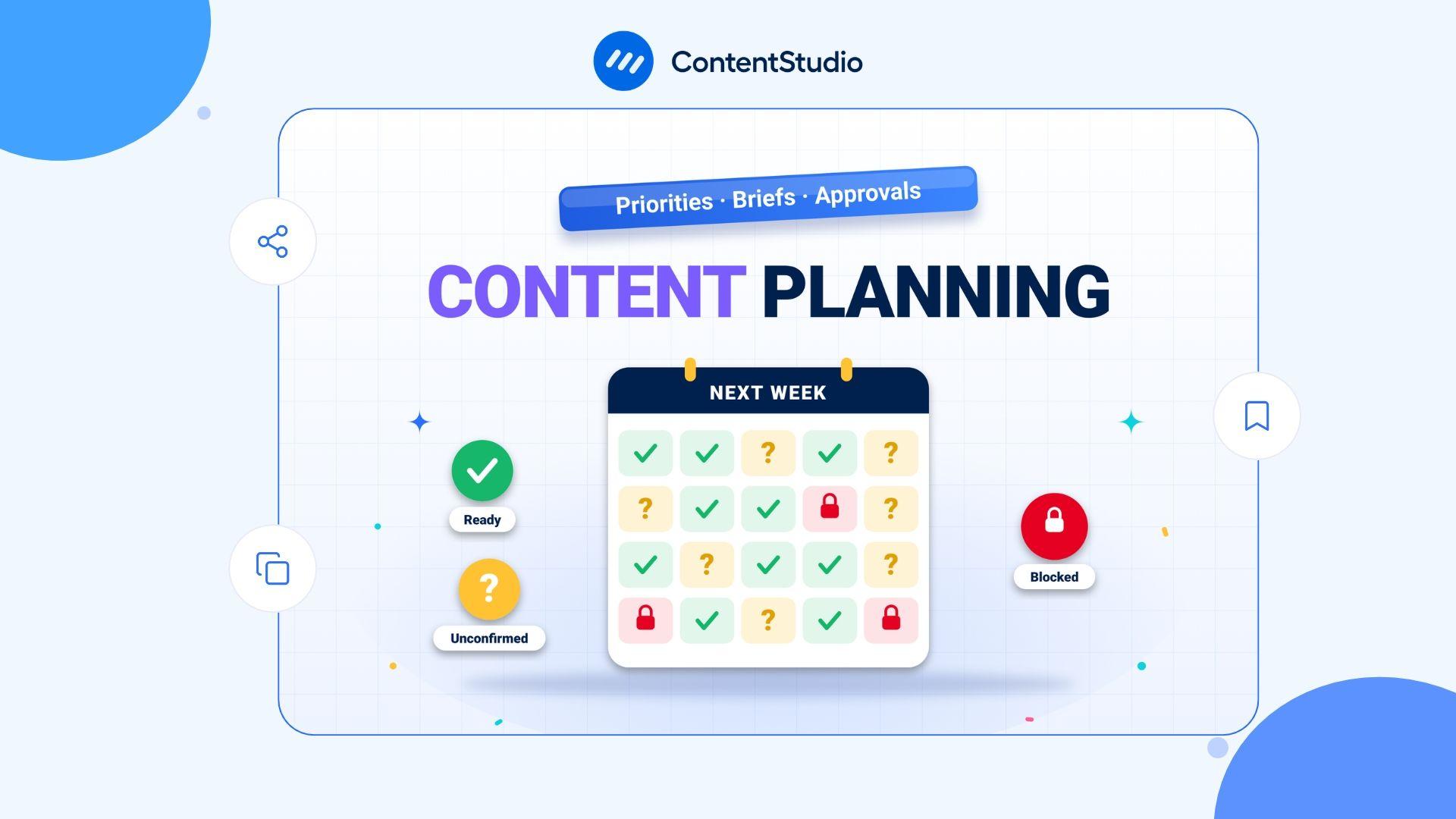
The calendar looks full, but next week is still uncertain. The copy is waiting on feedback, the designer cannot find the approved image, and nobody knows whether the offer will be live when the post goes out. That is not a scheduling problem. It is a planning problem, and adding more posts to the calendar will not fix it.
A reliable social media content planning process does something a calendar cannot do on its own. It connects ideas to priorities, people, assets, approvals, and publication in a sequence the team can actually follow. Done well, it turns a recurring weekly scramble into a predictable operation.
This guide explains how to build that process, from deciding what deserves to be made to reviewing whether it worked, using a shared social media content calendar that keeps the whole team on the same page.
Social media content planning is the ongoing process of deciding what to publish, organizing the work needed to create it, and coordinating when and where content goes live. It connects strategy with execution by turning broader goals into manageable weekly and monthly activities.
The distinction is simple:
A social media scheduler helps manage the publishing side of this process by organizing posts and coordinating their release across platforms.
These terms are often used interchangeably, but they serve different purposes. Defining each one clearly helps teams understand their responsibilities, avoid operational confusion, and keep content production aligned with business goals.
| Term | Working purpose |
|---|---|
| Content strategy | Establishes the audience, goals, channel roles, and editorial direction |
| Content planning | Manages the recurring decisions and work needed to deliver that direction |
| Content plan | Documents the selected activities, resources, responsibilities, and intended outcomes |
| Content calendar | Displays publication and production timing |
| Content planner | Provides the workspace or system used to organize the work |
| Scheduling | Arranges delivery at a selected time or through an approved queue |
A calendar can be accurate while the process behind it is entirely broken. A post can have a publication date, a slot in the grid, and a thumbnail ready, and still have no approved claim, no working destination, and no one responsible for handling the comments when it goes live. Planning closes those gaps before they become live problems.
Many teams do the work of content planning without ever formalizing it, which means every planning session starts from scratch. Priorities get relitigated. Assumptions go unrecorded. The most recent or most senior request tends to displace more useful work.
A proper planning process solves this by establishing, in advance, the agreed direction, the intake route for new requests, the criteria for prioritization, and the evidence needed to evaluate whether the work is doing anything useful for the business.
Good planning does not reopen every strategic question every week. Its job is to translate an agreed direction into specific decisions about the work. That requires having the strategic inputs documented and accessible before the planning session begins, so the team is deciding what to make and when, not reconsidering why they are on a given platform or who their audience is.
The inputs a planning process should be able to reference without debate are the priority audiences, the current business objectives, the channel responsibilities, the approved subject areas, the brand and editorial expectations, the available resources, and the evidence the team will use to evaluate the activity.
When those are agreed and documented, planning can move quickly. When they are not, planning turns into a strategy meeting, and the actual work does not get decided.
Social content rarely exists in isolation. A product launch depends on a website update that may not be finished. An event campaign requires confirmed speakers who may not have responded. A customer story needs permission that is still pending. When social planning treats these dependencies as someone else’s problem rather than its own, the team ends up promising content that another part of the business has not completed.
The more useful approach is to map the dependencies at the planning stage and record any assumption that is not yet confirmed.
A launch date that is uncertain, a product that is not available in every market, a landing page still in development, a customer result awaiting verification: all of these should be written down with the name of the person who can resolve them and the deadline by which a decision is needed. That makes the uncertainty visible and manageable rather than allowing it to surface silently during final approval.
Without a common intake route, content requests arrive through whatever channel is most convenient for the requester:
The result is that the most recent or most senior request tends to get attention regardless of whether it is the most important, and the planning team spends significant time reconstructing context that should have been provided at submission.
A simple intake process asks every requester to identify the audience, the purpose, the reason it matters now, the proposed message, where the facts or assets come from, whether the deadline is fixed or flexible, who can answer follow-up questions, and what must be ready before production can start.
The backlog is a place to hold possibilities. The production plan is a commitment to spend time and resources. These should be two distinct lists, not one long queue where everything is treated as equally imminent.
An idea can be worth saving without being worth starting:
Keeping the backlog honest means the team always knows how much work is actually committed and how much is still conditional.
A long backlog is not an indication that the team needs a larger output target. It is usually an indication that too many ideas are being saved without enough judgment being applied to which ones actually deserve to be made. Prioritization is where planning does its most commercially valuable work: deciding what gets attention and what waits.
Before committing an item to production, the planning process should be able to confirm that it:
A simple high, medium, or low assessment is often sufficient. An elaborate scoring system is not automatically more reliable than a well-applied judgment call.
Agreed content pillars for social media help the team assess whether a proposed item belongs in the plan. They should not force equal output from every theme or require a post to exist simply because a category has an empty slot. A campaign period may temporarily require more explanation of a new feature.
A customer service spike may require more support content. The planning question is whether the mix serves the current situation, not whether it satisfies a percentage that was set six months ago.
A date on a calendar is not automatically a reason to publish. Seasonal occasions are worth evaluating by the same criteria as any other content idea: does the occasion fit the audience, the business, and the production time available?
A retailer considering Halloween social media post ideas, for example, should confirm that Halloween is relevant to its specific audience and that the content has a commercial or educational purpose, not just that the date is approaching and the slot is empty. A relevant seasonal opportunity can absolutely deserve priority. An unrelated observance should not displace necessary customer information.
The same logic applies to promotional content. A clear offer or accurate product explanation can be genuinely useful to the right audience. What the team should assess is whether the content makes an appropriate promise, reaches a suitable audience, provides enough context for the viewer to act on it, leads to a relevant next step, and can actually be fulfilled by the time it runs.
A publishing target is not realistic unless the team can actually complete the work behind it. The most common source of chronic planning failure is setting volume without accounting for all the work that volume requires. Writing and design are the visible parts of content production.
Research, briefing, fact-checking, rights review, approval, revision, publication checks, response handling, and maintenance are equally real costs that disappear when only output quantity is tracked.
The constraint in a content operation is frequently not the person writing the posts. It is the person who needs to approve them. Producing more drafts does not resolve a review bottleneck. It creates a pile of work waiting for a signature, and that pile tends to grow until something important gets missed or something low-quality gets waved through under deadline pressure.
Identifying the actual bottleneck, whether it is an approver, a specialist reviewer, a rights clearance process, or an external dependency, and building the schedule around it rather than around an optimistic output target, is one of the highest-value things a planning process can do.
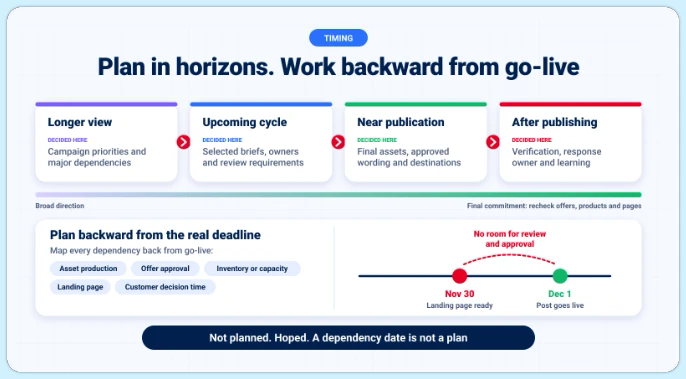
Not every social content planning decision needs the same level of detail at the same time. A useful operating model separates broad direction from final commitment across three or four planning horizons:
The further ahead a publication sits, the more important it is to identify what still needs rechecking before it goes live, because offers change, products get updated, and landing pages get redesigned.
For campaigns tied to a specific date, the planning date that matters is not the publication date but the point at which all dependencies are confirmed.
A holiday campaign, a product launch, or a seasonal promotion needs the asset production, offer approval, inventory or capacity, landing page readiness, and customer decision time all mapped backward from the day the post needs to be live.
A post scheduled for December 1 that depends on a page that will not be ready until November 30 is not planned. It is hoped.
Once an idea has been prioritized and capacity confirmed, the next step is converting it into a brief specific enough for production to start without a follow-up meeting. A brief that says “make something engaging about our product” is not a brief. It is a prompt that transfers the planning decision to whoever happens to be assigned the work.
A useful brief establishes the audience situation, the specific message, the useful promise, the source material, the required evidence, the proposed format, the destination or next step, the deliverables, the review responsibilities, and the deadline and expiry conditions.
The purpose is not to create paperwork. It is to make sure that everyone involved in producing, reviewing, and approving the content is working from the same understanding of what it is supposed to do and for whom.
The limitations of a piece of content are often as important as the headline claim, and they are consistently underspecified in briefs. A customer result that applies to one client under specific conditions should not be presented as a general outcome. A price that excludes certain items needs that exclusion visible. An offer that ends on a confirmed date needs that date stated.
An availability that differs by region needs to be acknowledged. Capturing these conditions during briefing prevents the late-stage rework that happens when a legal or compliance reviewer reads the draft and finds something that cannot go out as written.
When several approved briefs share a similar production setup, a photographer, a set of visual assets, a tone of voice, an interview subject, content batching can organize the session to reduce the cost of context-switching between unrelated formats. The planning decision concerns which work belongs together and what must be ready before the session begins.
A batch is not a reason to delay a necessary correction, and it should not be used to push a weak asset through because the slot needs filling.
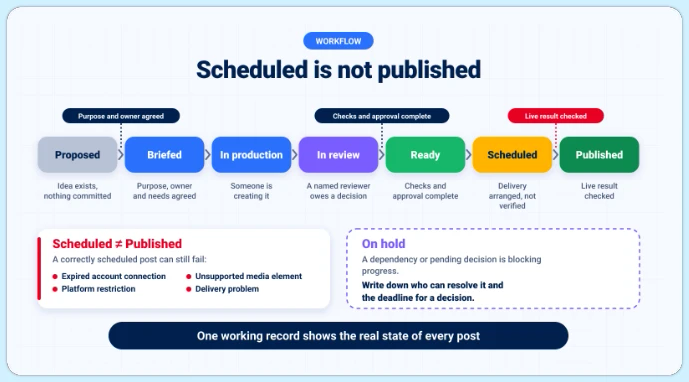
Production becomes unreliable when the latest decision lives in a message thread, the asset lives in a personal folder, and the calendar shows a scheduled date for a post that has not been approved. The team needs one authoritative working record that shows not just when content is planned to publish but what state it is actually in.
| State | What it means |
|---|---|
| Proposed | An idea exists, but resources are not yet committed |
| Briefed | The purpose, requirements, and owner are clear and agreed |
| In production | Someone is actively creating the deliverable |
| In review | The current version awaits a defined decision from a named reviewer |
| Ready | Required checks and approval are complete |
| Scheduled | Delivery is arranged, but the published result has not yet been verified |
| Published | The live result has been checked and confirmed |
| On hold | A dependency or pending decision is blocking progress |
The distinction between “scheduled” and “published” is worth preserving explicitly. A post can be scheduled correctly and still fail to publish because of an expired account connection, an unsupported media element, a platform restriction, or a delivery problem. The person responsible for the post should verify the actual result, not assume that a scheduled state means a live one.
“Looks good” can mean several different things depending on who says it. A designer approving the appearance is not confirming the claim. A product owner confirming the feature is not approving the promotional price. A client approving the concept is not approving the final copy.
The planning process should specify what each reviewer is actually deciding, not assume that a positive response covers the full scope of what needs checking. The review types worth separating are editorial accuracy, factual support, commercial accuracy, rights and permissions, brand compliance, and release readiness.
Review time also needs to be built into the schedule as real elapsed time, not as a line item that shrinks when production runs late. A reviewer needs the current version, a clear request, the relevant evidence, and a decision deadline. Silence should not become approval by default.
Scheduling arranges delivery at a selected time. It does not guarantee that the content is accurate, approved, or suitable for the account it is going to.
Before a post enters the schedule, the team should confirm the correct account, the intended format, final approved copy and media, required permissions and disclosures, working destinations, accurate commercial terms, timing and expiry, a response owner, and a fallback if publication fails.
A controlled social media publishing workflow preserves those decisions through to delivery rather than treating scheduling as the final step.
Automation works best for repetitive, predictable publishing tasks, such as:
Tools like ContentStudio Smart Scheduling can also help teams organize publishing times and distribute content more efficiently across social platforms.
However, automation cannot replace human judgment. Every automated workflow needs a clearly defined content source, quality standards, review requirements, account permissions, stopping conditions, and an assigned person responsible for monitoring or pausing it. Without these safeguards, social media automation does not eliminate operational risks. It simply makes them harder to spot.
Evergreen content requires particular attention. A post that was accurate when first published may become outdated after a pricing change, product discontinuation, landing page update, or change in the information behind a claim. Repeatedly publishing the same content does not make it relevant or accurate.
Before adding content to a recurring queue, review its claims, prices, links, product availability, permissions, and publication dates to ensure everything is still current.
Audience activity data and historical performance can inform posting time decisions. They do not guarantee a specific engagement outcome. A live event reminder, an evergreen explanation, and a customer service update have different timing requirements that are more relevant than a platform-level best-time recommendation.
The planning record should preserve the time zone and the reason for any time-sensitive release, so that if a post needs to be adjusted or rescheduled, the context for the original decision is not lost.
AI can usefully help turn source material into options, produce alternative angles, draft from approved information, and identify missing briefing details. Its useful domain is preparation and variation within a defined brief. What it cannot do is verify a claim, confirm product accuracy, establish that a demonstrated result is real, or check whether the business holds the rights to the asset it is using.
Generated output requires the same review process as anything else, and the reviewer should specifically check whether the output has invented a source, removed a necessary limitation, misstated a product, or created a misleading endorsement. A generated headline does not make an obsolete fact current.
A process can run on time while producing weak work. Strong content can be undermined by avoidable operational delays. Both deserve attention in the review, and they should be examined separately before conclusions are drawn about either.
The operational review asks:
An intentional safety pause and a preventable missed deadline are different events and should be recorded as such.
Content performance should be reviewed against the objective the content was given, not against a generic engagement benchmark. A post intended to explain a difficult issue should not be judged only by likes. A campaign intended to generate inquiries needs evidence beyond impressions.
The review should end with a planning decision, not a summary. Possible decisions include improving the brief format, changing the approval route, reducing work in progress, retiring a recurring item, updating an asset, changing a destination, or revisiting the underlying strategy because the original assumption no longer holds.
“Do more of the highest-engagement format” is only sufficient if the cause of performance genuinely is the format rather than the topic, the audience, the distribution, or the purpose.
The following scenario is illustrative rather than a customer case study. Its purpose is to show concretely what a planning process contributes beyond a completed calendar.
A training provider wants to promote a public workshop. The content depends on confirmed workshop details, a working registration page, approved speaker information, suitable copy and visuals, a commercial review, and someone responsible for handling participant questions after the posts go live. The registration page is delayed by a week.
In a team without a planning process, the original publication date tends to hold because the calendar is full and there is no agreed procedure for what happens when a dependency is not met. The post goes out linking to a page that does not yet exist, or it goes out with a note that registration “will open soon,” which fails the audience and undermines the campaign.
In a team with a planning process, the delay surfaces before the post is scheduled, and the team makes an explicit decision:
That explicit decision is what a planning process contributes. The calendar alone cannot make it.
Most planning failures are visible before they happen. The patterns below appear frequently enough across teams and organizations that naming them before the cycle begins is more useful than discovering them during a post-mortem.
A social media content planning process is not a one-time setup. It is an operating discipline that improves with each cycle as the team gets better at estimating capacity, writing briefs that need fewer revisions, managing dependencies before they become launch-day problems, and reviewing results in a way that changes what happens next.
The teams that operate most consistently are not the ones with the most complex tools or the largest production budgets. They are the ones that have made planning decisions visible, recorded assumptions explicitly, and built review into the cycle as a real activity rather than an optional debrief.
That combination, clear priorities, honest capacity, documented decisions, and a review that feeds back into planning, is what turns a social media operation from reactive to reliable.
Start with one planning cycle run properly from intake to review, using the same workspace for every decision the team makes. The discipline compounds.
The next planning session should not end with another thread of unresolved decisions and a calendar full of dates that have not been confirmed as ready.
Start a seven-day ContentStudio trial and run one real campaign through the complete path from brief to publication with the people who will actually use it. Use the trial to verify the account setup, the review process, and the final published result before committing to a full cycle.
No credit card is required. The goal is a planning process that works, not a larger collection of scheduled posts that have not been properly checked.
Start with verified business information, documented audience questions, and a clear learning goal, not another account’s benchmarks. Run a small pilot, such as one content type on one channel for four to six weeks, and write down your assumptions beforehand so the first review can test them, not just report what happened.
Yes, as long as it captures a clear decision from an authorized person and is stored with the exact copy, asset, and conditions it covers. Email approvals tend to drift from what’s actually published, so treat any later change to the headline, image, or date as needing fresh approval.
A named successor needs the current priorities, working records, approval history, permissions, and maintenance responsibilities, not just a folder of finished assets. Pause or review any automated or recurring content until the handover is complete; unattended queues are a common source of outdated posts.
Yes, but as a separate workstream with its own brief, review, and consent process. Each contributor controls their own account, so a company campaign doesn’t authorize posting on their behalf — share the core message and let contributors adapt it, since identical copy across many profiles reads as inauthentic.
Decide which audiences and posts actually need localization rather than translating everything by default. Treat each translation as its own deliverable — reviewed for meaning, offers, dates, and cultural fit by a named local reviewer against a clear source version — so a post doesn’t end up linguistically correct but commercially wrong.
Arooj Ishtiaq is a Content Marketing Strategist with 5+ years of experience writing about social media, SaaS, and AI. At ContentStudio, she creates practical guides, tutorials, and how-to content that help marketers navigate social media trends, sharpen their strategies, and get more from their content.
View all posts by Arooj IshtiaqRecommended for you
How to create a social media planner

How to build an effective social media strategy: 2026 guide
15 best social media scheduling tools for 2026
How to automate bulk social media posting & scheduling using CSV uploads?