ContentStudio API plan is now available. Create automations using Claude, Zapier, n8n, make, etc. Explore plan!

ContentStudio
Product

Platform

Publish

Plan and schedule content

AI Studio

AI-generated captions, images

Analyze

Measure social media KPIs

Engage

Social media customer care

Social Listening

New

Follow every conversation

Discover

Manage and read feeds

Top features

Workspaces

Clip maker

Calendar/Planner

Smart scheduling

Content library

White-label

New

AI Library

Bulk scheduling

Approval workflow

Client management

White-label reseller

New

AI video generator

Competitor analytics

Automation

Google Ads Analytics

New

Meta Ads Analytics

New

See all features

right-arrow-icon
contentstudio-tour

ContentStudio overview tour

Discover how ContentStudio simplifies workflows, helps in scaling up and delivers the results you need.

Solutions

By Business Type

For solo creators

For agencies

For small business

For marketing teams

For enterprise

By network

Facebook

Facebook

Instagram

Instagram

X (Twitter)

X (Twitter)

Google Business Profile

Google Business Profile

LinkedIn

LinkedIn

TikTok

TikTok

Bluesky

Bluesky

Meta Threads

Meta Threads

YouTube

YouTube

Pinterest

Pinterest

Telegram

Telegram

CUSTOMER STORYnew-tab-icon

How Webeing scaled client results using smarter workflows with ContentStudio

40%

increase in productivity with ContentStudio

Resources

Info Hub

Blog

Help docs

Glossary

Integrations

Case studies

n8n templates

Free Tools

Facebook video downloader

New

X (Twitter) video downloader

New

AI caption generator

Facebook post generator

LinkedIn video downloader

TikTok hashtag generator

YouTube title generator

TikTok caption generator

X (Twitter) hashtag generator

See All

right-arrow-icon
Video libraryContentStudio academy
video library

Access our complete collection of step-by-step tutorials covering all ContentStudio features.

APIPricing

Book a demo


Sign in

  1. Home
  2. ›Blog
  3. ›Facebook Marketing Strategy
  4. ›Facebook Background Text Posts

How to schedule Facebook background text posts

Samana Batool

Written by

Samana Batool

Updated

Jul 20, 2026
4 minutes

Share this post

X logoLinkedIn logoFacebook logo
ContentStudio Google Preferred Sources badge
schedule Facebook background text posts
Black Friday

Get Up to50% OffThis Black Friday

Join the waitlist and get early access to our Black Friday deal

Early Access Offer

Unlock up to 50% off before it goes public

No credit card required

★★★★★

4.7 on Capterra • 16,500+ users

Staying on top of your social media presence can be a challenge. This is why scheduling your social media posts, such as Facebook background text posts, in advance is a game-changer!

It saves you time, allows for thoughtful content creation, and ensures consistent engagement with your audience.

But have you considered the visual impact of your posts?

Facebook background text posts offer a visually striking way to grab attention and make your message stand out. Combining captivating text with a visually appealing background allows you to create content that resonates and gets shared.

So, let’s discuss why you should use ContentStudio’s Facebook scheduler to schedule background text posts and the exact process for doing so. 

Facebook Marketing

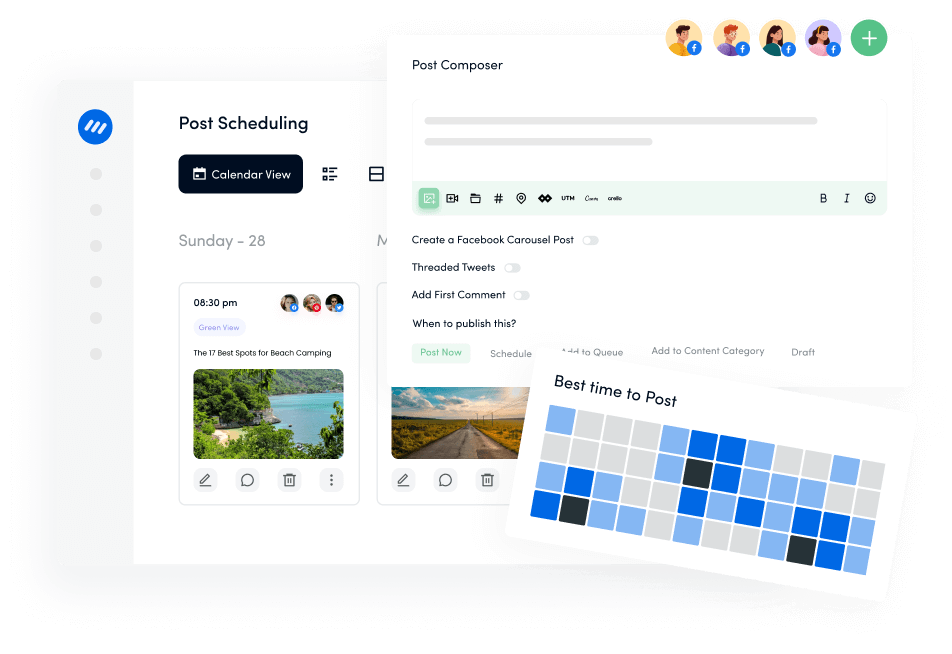
Manage and grow your brand on Facebook. Create, schedule, and publish posts, videos, and Reels to Facebook pages and groups.

Get Started for FREE
facebook-marketing

Why use ContentStudio to schedule Facebook background text posts?

Scheduling posts on Facebook provides several key benefits that can significantly impact your social media performance. 

Here’s why you should use ContentStudio to craft and schedule eye-catching Facebook background text posts:

  • Consistency in posting: Ensures a steady flow of content, keeping your audience engaged and maintaining your page’s activity.
  • Better audience engagement: Targets your audience when they are most active, increasing the likelihood of interaction with your posts.
  • Time management: Saves time by allowing you to plan and prepare content in advance, freeing you from daily posting tasks.
  • Specific advantages of background text posts: Bold text and colorful backgrounds capture attention, making your messages stand out in the news feed.

How to schedule Facebook background text posts with ContentStudio?

publish content across all your social networks is a great platform to manage your entire Facebook account, including the groups and pages. It allows you to schedule Facebook background text posts to make your Facebook pages more vibrant and attract people with engaging posts.

Here’s how you can schedule Facebook background text posts with ContentStudio:

Step # 1 – Open ContentStudio and log-in

Open the official website of ContentStudio and select Sign in if you already have an account. 

Contentstudio

Otherwise, click Start your free trial to create a new account or sign in with your Google, X, or Facebook account. 

create a new account

Step # 2 – Connect your Facebook group/page 

Click on your profile icon in the ContentStudio’s dashboard and select Social Accounts.

select Social Accounts

This section contains the complete list of connected social media accounts. If your Facebook group or page is not already connected, simply choose the option Add Facebook Group or Connect a new Facebook page. 

Add Facebook Group or Connect a new Facebook page

Allow the connection between ContentStudio and Facebook page/group to ensure you can start posting and scheduling content. 

Allow the connection

Select the page or group you want to connect with ContentStudio.

Select the page or group you want to connect with ContentStudio

Once the connection process is complete, you can see your connected account under the Social Accounts. 

see your connected account

Step # 3 – Create your Facebook background text post

Hover over the Compose located in the header and open Social Post to start creating your Facebook background text post.

Social Post

Select your connected Facebook group or page to which you want to upload your Facebook post with the background. 

Select your connected Facebook group

Select Facebook Text Background from under the Post Composer.

Select Facebook Text Background

You have many different options of background colors and types to choose from. You can select a basic solid color or a more funky emoji-styled background. 

Also read: How to Remove Background From Image?

options of background colors

Once you have selected a suitable background, you can either write the text for the post yourself or use ContentStudio’s AI writing assistant to write an engaging post text with a background. 

write the text for the post

Once your post is ready, you can view the final version under the Post Preview section. 

Post Preview

Step # 4 – Schedule your Facebook background text post

After you have prepared your Facebook background text post, it’s finally time to schedule it for a suitable post time. 

Click the Schedule radio button under the Posting Schedule section to open a detailed scheduling window.

Click on the Schedule

You can select a suitable date and time under the schedule window. 

select a suitable date and time

In addition to selecting any date and time of your choice, you can also use the Best time to post option to ensure your Facebook background text post is scheduled to post at a time when it is likely to get the highest engagement level. 

Find out: Best time to post on Facebook in 2024

Best time to Post

Click on Schedule to let ContentStudio automatically publish our text background post on the selected publishing date and time. 

schedule post

Conclusion

Overall, the entire process of scheduling Facebook background text posts with ContentStudio is quick and easy. ContentStudio allows you to manage the entire process from start to finish. You don’t have to use any additional tools. Instead, you can choose an appealing background, write engaging text with the help of AI, and measure your post’s engagement metrics with ContentStudio. 

Ultimately, by following these steps, you’ll be well on your way to crafting Facebook text posts with backgrounds that grab attention, spark engagement, and achieve your social media goals. 

So, experiment, get creative, and let your visually stunning content shine!

Related: How to schedule Facebook text posts?

FAQs

Can I change the background color of my Facebook post after publishing it?

Unfortunately, no. Once you publish a Facebook background text post, you cannot edit the background color or design. It’s important to finalize your design choices before publishing them. 

Why should I create Facebook text posts with the background?

There are several benefits to using background colors or images in your Facebook text posts, including greater visibility, more engagement, and bringing brand consistency. 

How to add background to a Facebook post?

You can add visually appealing backgrounds to your Facebook posts with ContentStudio. It allows you to compose your text message and choose a background color to schedule or publish the post directly to Facebook.

How to change the background of a Facebook story?

Facebook Stories does offer built-in background options. When creating a story, you can choose a solid background color from a palette or select a background image from your camera roll. However, you cannot customize the background of an existing story after it’s been published.

Share this article

X logoXLinkedIn logoLinkedInFacebook logoFacebookWhatsAppRedditEmail
Black Friday

Get Up to50% OffThis Black Friday

Join the waitlist and get early access to our Black Friday deal

Early Access Offer

Unlock up to 50% off before it goes public

No credit card required

★★★★★

4.7 on Capterra • 16,500+ users

Samana Batool

Samana Batool

Samana Batool is a Social Media and Content Marketing Specialist at ContentStudio who turns complex tactics into user-friendly strategies. She covers social media management, content strategy, posting schedules, and agency growth, plus tool comparisons like Hootsuite versus Sprout Social, and reviews content for clarity and practical accuracy, drawing on hands-on digital marketing experience.

View all posts by Samana Batool

Recommended for you

Facebook ads analytics: How to track and improve your performance

Facebook Marketing

Facebook ads analytics: How to track and improve your performance

Sep 17, 2026
17 minutes
70 ChatGPT prompts for Facebook to drive reach and engagement

Facebook Marketing

70 ChatGPT prompts for Facebook to drive reach and engagement

Oct 1, 2026
19 minutes
Facebook cover photo size: The complete 2026 guide
Facebook Marketing

Facebook cover photo size: The complete 2026 guide

Aug 7, 2026
8 minutes
Ultimate guide to schedule Facebook posts, Reels & Stories

Facebook Marketing

Ultimate guide to schedule Facebook posts, Reels & Stories

Jul 8, 2026
17 minutes
CtaBackground
CtaBackground
Facebook
Instagram
Twitter
YouTube
Pinterest
TikTok

Powerful social media management software

Start your free trial
Book a demo

7-day free trial - No credit card required.

diamond-icondiamond-icon

Grow faster on social, every single week

Get insights, emerging platform trends, AI strategies, and product updates trusted by 100,000+ marketers.

Lawrence Giordano
Thomas Smith
Anthony Garcia
Matt Li Haoming
Angela R.
100,000+ marketers subscribed

ContentStudio

5.3K subscribers

  • •Step-by-step tutorial and how-tos
  • •Product deep dives and launch demos
Subscribe on YouTube

One scheduler for every social network

Social Media Schedulers→
Facebook logoFacebookX (Twitter) logoX (Twitter)Instagram logoInstagramLinkedin logoLinkedinYoutube logoYoutubeTiktok logoTiktokPinterest logoPinterestBluesky logoBlueskyThreads logoThreads

Product

  • Publishing
  • AI Studio
  • Analytics
  • Inbox
  • Social Listening
  • Discover

Features

  • Content Calendar
  • Smart Scheduling
  • Automation
  • Content Composer
  • Approval Workflow
  • AI Library
  • See all features

Developers

  • Integrations
  • API
  • MCP Server
  • ContentStudio CLI
  • Zapier
  • Make
  • n8n

AI Agents

  • ChatGPT
  • Claude
  • Gemini
  • Grok Bot
  • Hermes Agent
  • Cursor
  • Codex
  • OpenClaw

Upgrade from

  • Hootsuite
  • Buffer
  • Sprout Social
  • Sendible
  • Agorapulse
  • Metricool
  • SocialPilot
  • See all

Resources

  • Blog
  • Help Docs
  • Changelog
  • Glossary
  • Free Tools
  • Case Studies
  • Mobile App
  • Chrome Extension

Company

  • About Us
  • Plans & Pricing
  • Reviews
  • Careers
  • Write for Us
  • Affiliate Program
  • Brand Assets
  • Contact Us
contentstudio-logo
Download on the App StoreGet it on Google Play
Facebook iconX (Twitter) iconInstagram iconLinkedIn iconYouTube iconTikTok icon
4.74.7 star rating, 25,000+ reviews on Capterra and G2

16,500+ brands trust ContentStudio

SSL Secured
GDPR Compliant
CCPA Compliant

© 2026 ContentStudio. All Rights Reserved.

Privacy|Terms|GDPR|System status|Security policy|Child safety|Sitemap