


Google Ads metrics: What to track and what each one tells you
Sep 23, 202614 minutes

Written by
Saif AliPublished
Black Friday, Cyber Monday, Giving Tuesday, Christmas, and New Year all land inside the same five weeks. If you manage social for more than one brand, that’s dozens of posts with fixed dates, tight approval windows, and zero room for a wrong discount code.
Most holiday social media calendar guides stop at the plan. They give you the dates and tell you to schedule ahead. The hard part is everything after that: turning a spreadsheet of ideas into captions, matching creatives to posts, getting sign-off, and queuing it all on the right networks before the rush.
This guide covers that part. You’ll plan the calendar once, then build, approve, and schedule the entire run from a chat window using OpenClaw and the ContentStudio OpenClaw integration. No dashboard tab-switching in the middle of December.
A holiday calendar is a short list of fixed dates with a predictable run of posts around each one. That repeatable shape is exactly why it suits a chat agent.
| Date | Day | Holiday | Typical angle |
| Oct 31 | Sat | Halloween | Themed creative, early teasers |
| Nov 11 | Wed | Singles’ Day | Flash sales, global audiences |
| Nov 26 | Thu | Thanksgiving (US) | Gratitude posts, sale previews |
| Nov 27 | Fri | Black Friday | Main offer launch |
| Nov 28 | Sat | Small Business Saturday | Local and community angle |
| Nov 30 | Mon | Cyber Monday | Online-only deals, extensions |
| Dec 1 | Tue | Giving Tuesday | Causes, donations, partners |
| Dec 14 | Mon | Green Monday | Late-shopper deals |
| Dec 24–25 | Thu–Fri | Christmas Eve and Day | Greetings, gift cards |
| Dec 26 | Sat | Boxing Day | Clearance, after-holiday sales |
| Dec 31 – Jan 1 | Thu–Fri | New Year’s Eve and Day | Year recaps, thank-yous |
Run that across Black Friday and Cyber Monday on three networks, and you’re already at 30 posts. Add Christmas and New Year, and you can pass 50 for a single brand.
The agent handles execution, so the planning still sits with you:
You need four things in place, and all of them are one-time work.
Here’s what setup looks like in the terminal:
openclaw skills install @contentstudio-official/contentstudio
npm install -g contentstudio-cli
contentstudio auth:login –api-key cs_…
The examples below use Telegram and a sample candle brand, Hearth & Co. The same flow works on WhatsApp, Discord, and any other chat app connected to OpenClaw.
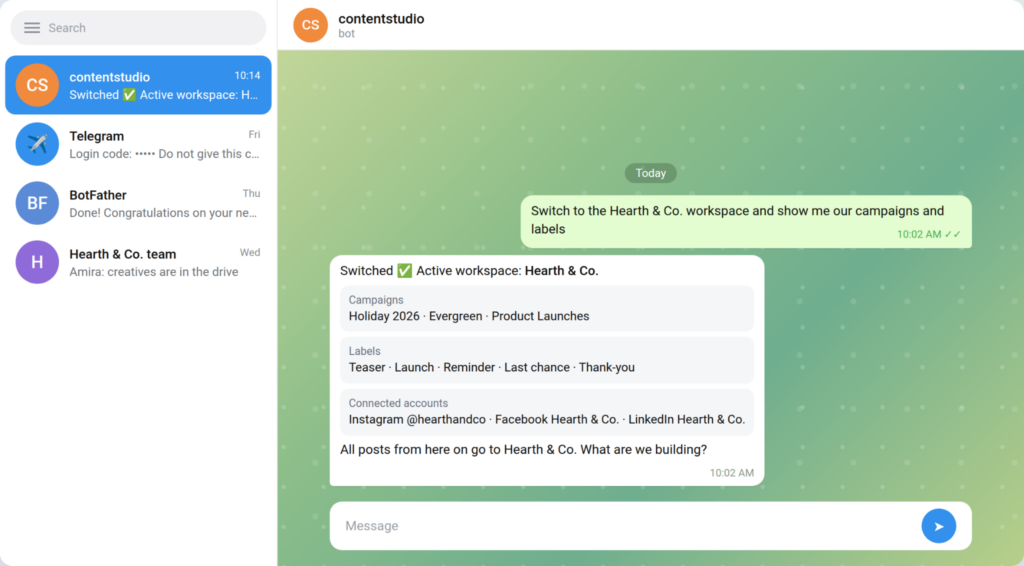
Start every session by telling the agent which brand you’re working on. This one message prevents the worst holiday mistake an agency can make: a client’s Black Friday post going out on another client’s account.
The agent confirms the active workspace, then lists your campaigns, labels, and connected accounts. Now you know exactly where every post will land.
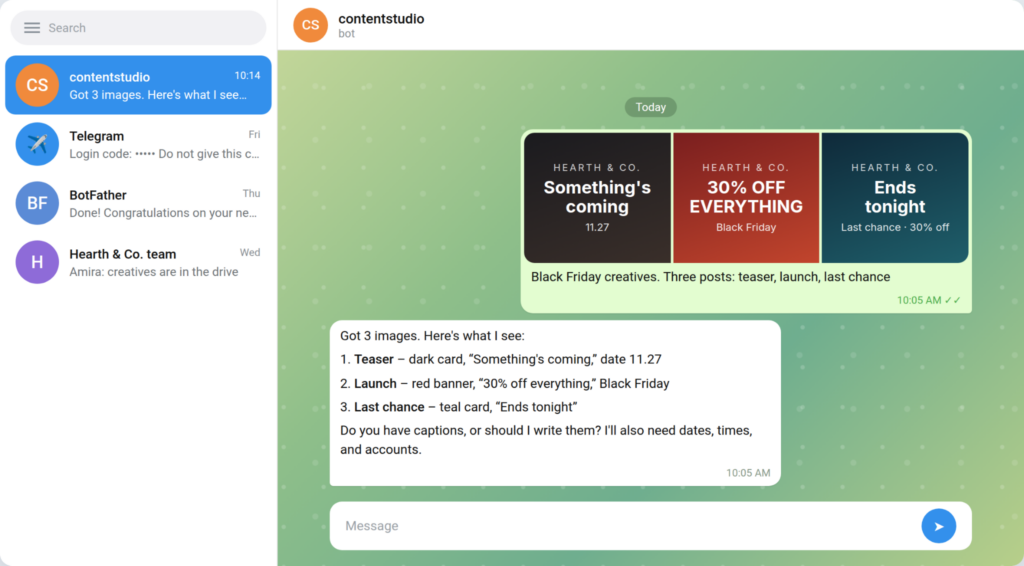
Send the images straight into the chat and say what each one is for. The agent reads every file and describes it back to you. With three similar-looking sale graphics, that check saves you from pairing the “Ends tonight” image with the teaser post.
If your creatives live in a shared drive or CDN, send a link instead:
Import the Black Friday banner from https://example.com/bf-banner.jpg and use it for the launch post.
Text-only posts work too. Shipping-cutoff reminders often don’t need an image at all.
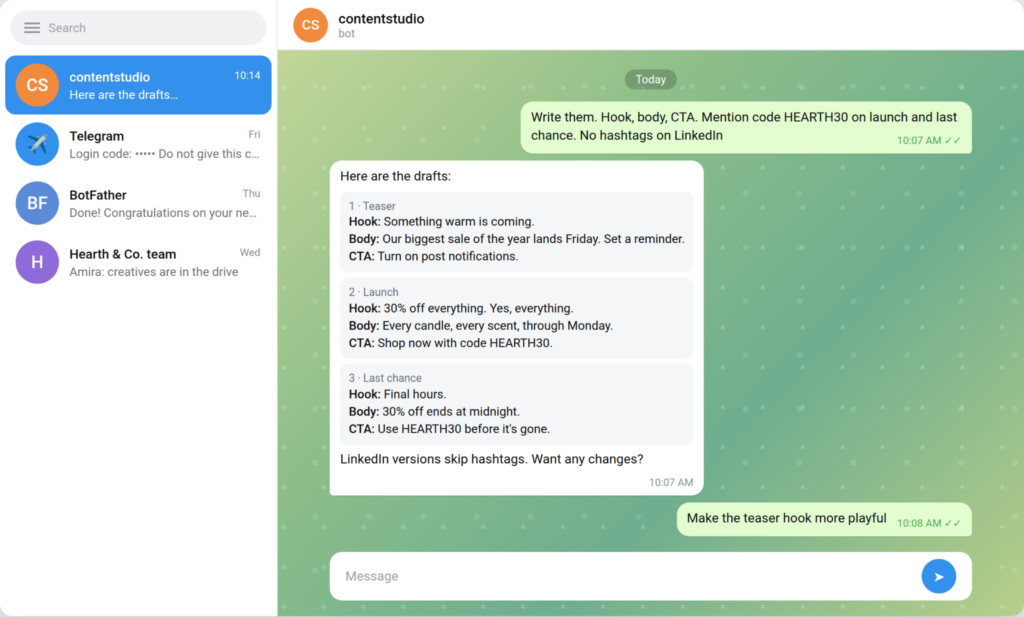
Paste your own copy, or ask the agent to write it. It drafts a hook, body, and call to action for each post. Give it the details that matter for holiday posts, like discount codes and end times, so they show up in the right captions.
Write them. Hook, body, CTA. Mention code HEARTH30 on launch and last chance. No hashtags on LinkedIn.
Then shape the drafts in plain language. “Make the teaser more playful” or “Add urgency to the last-chance post” both work. Treat what comes back as a first pass. Your brand voice still needs your eyes, especially on promo copy.
This is where the chat beats the composer. Give the agent every date, time, network, and the campaign in one message:
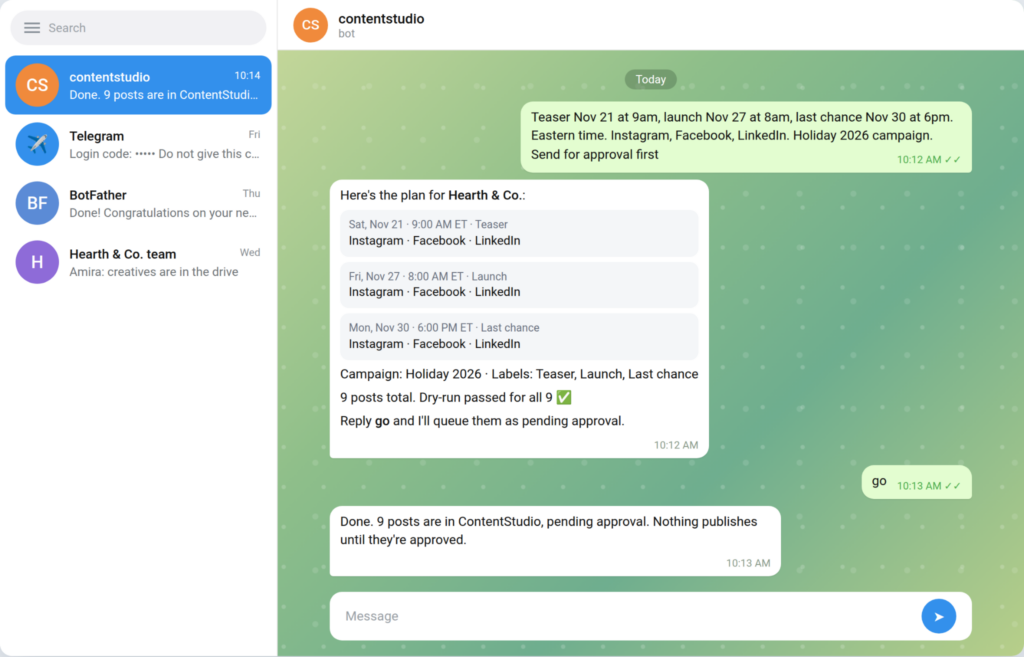
Teaser Nov 21 at 9am, launch Nov 27 at 8am, last chance Nov 30 at 6pm. Eastern time. Instagram, Facebook, LinkedIn. Holiday 2026 campaign. Send for approval first.
The agent lays out the full plan: three phases, three networks, nine posts. It runs a dry-run on each one before anything reaches ContentStudio. You read the plan, reply “go,” and all nine are queued.
Two details matter more during the holidays than any other time of year:
Holiday posts carry prices and codes, so they deserve a second look. When you send posts for approval, nothing publishes until someone signs off.
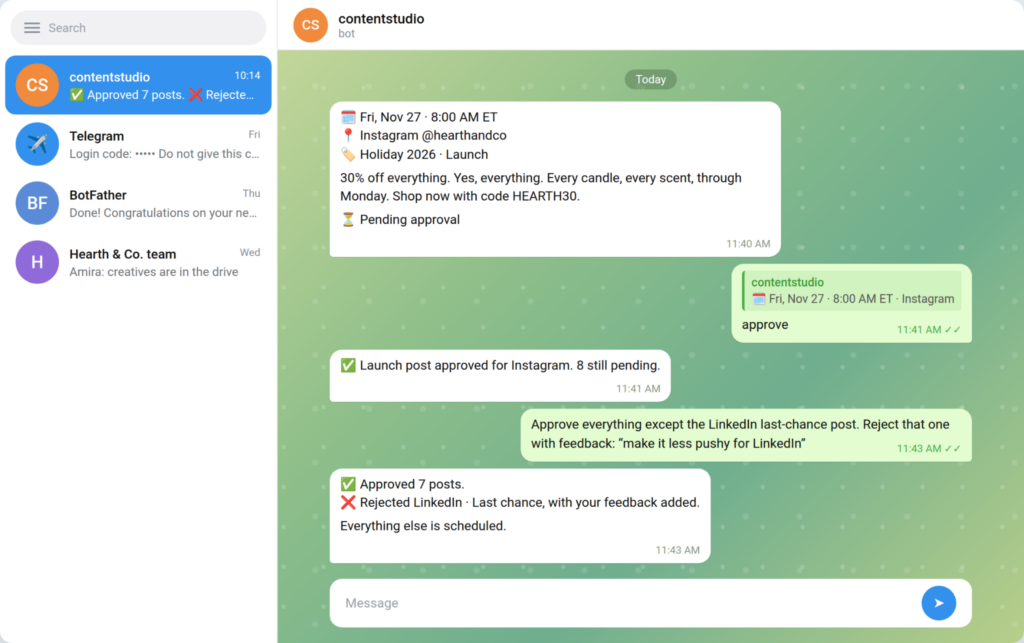
The approver doesn’t need a dashboard login. They ask the agent what’s pending, then reply directly to a post’s message with “approve” or “reject.” The agent matches the reply to the right post using its image, scheduled time, and account. No post IDs involved.
Batch decisions work in one message, with feedback attached:
Approve everything except the LinkedIn last-chance post. Reject that one with feedback: “make it less pushy for LinkedIn.”
Anyone on your OpenClaw allowlist can approve from their own chat. A client can clear their holiday posts from their phone in the time it takes to finish a coffee.
Back in ContentStudio, the whole run sits in your Planner under the Holiday 2026 campaign, color-coded by status.
Holiday plans change. A sale gets extended. A product sells out. A shipping cutoff moves. You can update a queued post from the same chat:
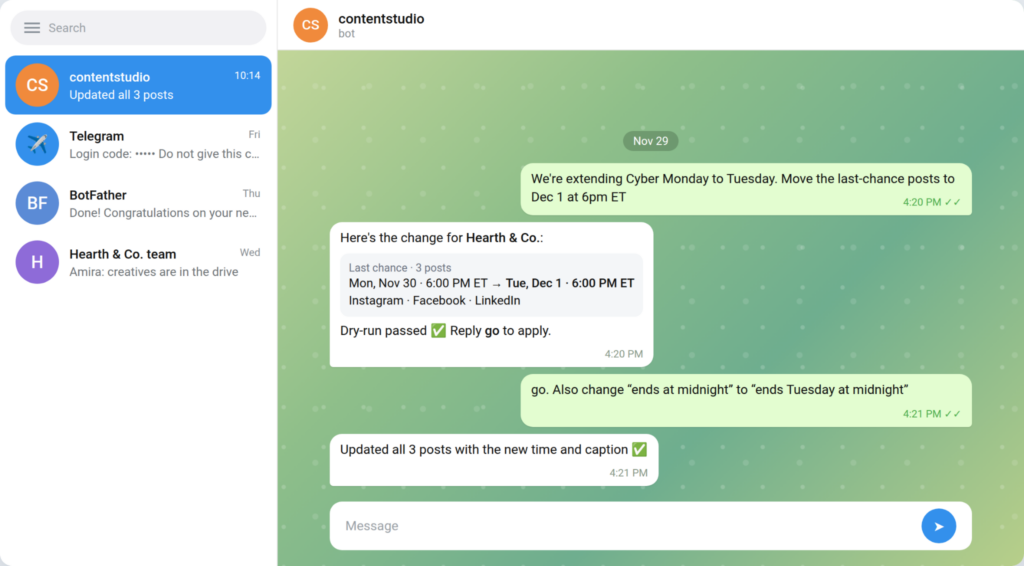
We’re extending Cyber Monday to Tuesday. Move the last-chance posts to Dec 1 at 6pm ET.
The agent shows the before and after, dry-runs the change, and waits for your go-ahead. Read that preview properly. The dry-run only protects you if you look at it.
Say you run social for four retail clients, and Monday, Nov 16, is batch day.
You open Telegram and switch to client one. The agent confirms the workspace. You drop in the eight creatives the client sent, and the agent describes each one so you can match them to phases. You ask for captions with the client’s code in the launch and last-chance posts, then trim two that run long.
You send the plan in one message: teaser, launch, reminder, and last chance across Instagram, Facebook, and LinkedIn, all under the client’s Holiday 2026 campaign. The agent dry-runs every post and queues the batch as pending approval. The client reviews from their own chat that afternoon, approves most, and rejects one with a note. You fix it, they approve, and it’s done.
Then you switch workspaces and repeat for client two. Four brands’ Black Friday weeks, built in one chat window, with approvals done before Thanksgiving. For the full system behind this, see how to build an AI content pipeline with OpenClaw and ContentStudio.
| The agent handles | You handle |
| Confirming the workspace before every change | Knowing which client a post belongs to |
| Drafting captions with your codes and dates | The offer, the discount, and the final wording |
| Attaching creatives or importing them from a URL | Designing the holiday creatives |
| Filing posts under your campaign and labels | Creating the campaign and labels in ContentStudio |
| Bulk scheduling across 10+ networks | Picking the dates, times, and timezone |
| Routing posts for approval | Deciding yes or no on each post |
| Dry-running every create and update | Actually reading the dry-run |
The split is deliberate. The agent takes the repetitive assembly and leaves the judgment to you. For more of what you can hand off year-round, see 8 social media tasks you can automate with OpenClaw.
Your holiday calendar doesn’t need more planning. It needs faster execution. Map the dates and offers once, then let OpenClaw and ContentStudio handle the drafting, approvals, and scheduling from a single chat. Every post lands in the right workspace and gets a dry-run before it goes out.
Start your 7-day free trial of ContentStudio and have your Black Friday week queued before November hits. No credit card required.
List the holidays that matter to your audience, then plan five phases around each big date: teaser, launch, reminder, last chance, and thank-you. Set one goal per phase, batch your creatives early, and leave two weeks for approvals before the first post goes out.
No. The agent reads your existing campaigns, labels, and content categories and files posts under them. Create the holiday campaign and labels in the ContentStudio web app first.
Yes. Give the agent the dates, times, networks, and campaign, and it queues the batch after a dry run on each post. For big runs, split the requests by holiday to stay clear of rate limits.
More than ten, including Instagram, Facebook, X, LinkedIn, TikTok, YouTube, Pinterest, Google Business Profile, Threads, Bluesky, and Tumblr. The full list is on the ContentStudio integrations page.
Tell the agent what changed, such as a new date or updated copy. It previews the change with a dry run and applies it once you confirm.
Plan 0 Days of Content in 0 Minutes
Create, schedule, publish and analyze your content across all your social media channels from one simple dashboard.
4.7 on Capterra • 16,500+ marketers trust ContentStudio
Saif Ali is a Content Marketing Strategist at ContentStudio with over five years of experience across SaaS, IT, and digital marketing. He specializes in SEO-led content, AI content creation, and social media strategy, and leads editorial review at ContentStudio, fact-checking and refining articles for accuracy, SEO, and a consistent brand voice.
View all posts by Saif AliRecommended for you
Google Ads metrics: What to track and what each one tells you

How to Make Money on Instagram in 2026 (9 Proven Ways)

Instagram marketing: The complete 2026 guide
The ultimate Instagram ads guide: Types, costs, and strategy for 2026








