
How to build an executive’s LinkedIn content workflow with Claude Code
Oct 1, 202615 minutes

Written by
Khadija AnwarUpdated
TikTok has taken the world by storm since 2019. With 834.3 million users per month creating and sharing engaging content, you may be wondering how to share TikTok videos with your friends or followers.
Plan, schedule, share, and analyze content for 15+ social media channels.

So, whether you’re a TikTok enthusiast or new to the platform, get ready to learn how to share TikTok videos and connect with the audience through this dynamic platform.
Also Read: How to Share Instagram Link?
Follow below mentioned steps to share TikTok Videos.
Step 1:
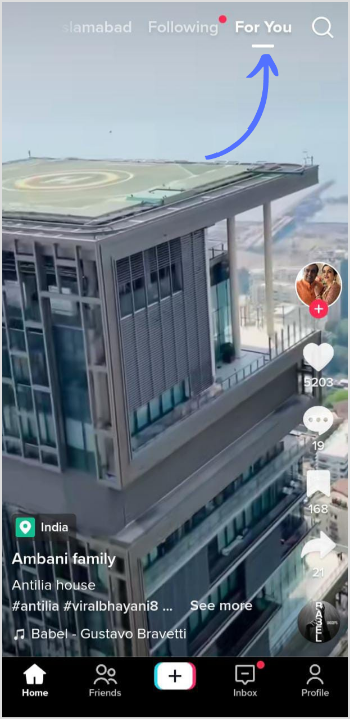
Login to your TikTok account with a username and password. Navigate to the video you want to share. You can find the video on your profile page, in your “For You” feed, or by searching for it using the TikTok search function.
Step 2:
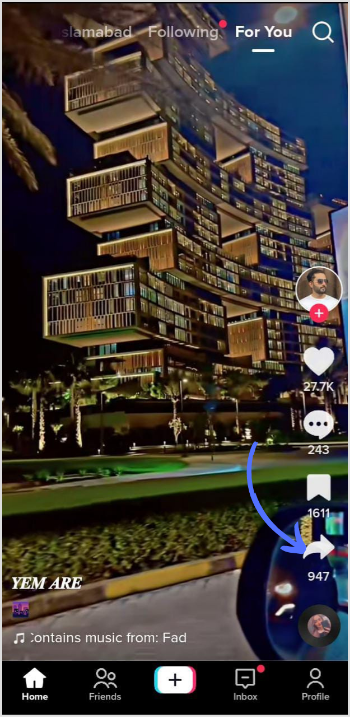
Once you’ve found the video, tap on the “Share” button, which looks like an arrow pointing to the right. You’ll find this button on the right-hand side of the video, below the “Comments” and “Likes” buttons.
Step 3:
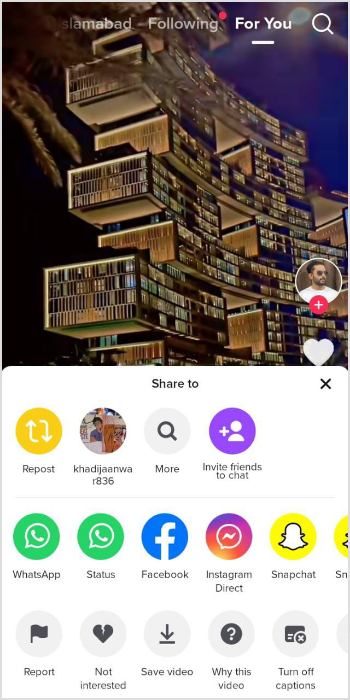
TikTok will display a list of sharing options on Instagram, Snapchat, Facebook, and Twitter as well as messaging apps like WhatsApp and Messenger. You can choose the platform according to your preference.
Step 4:
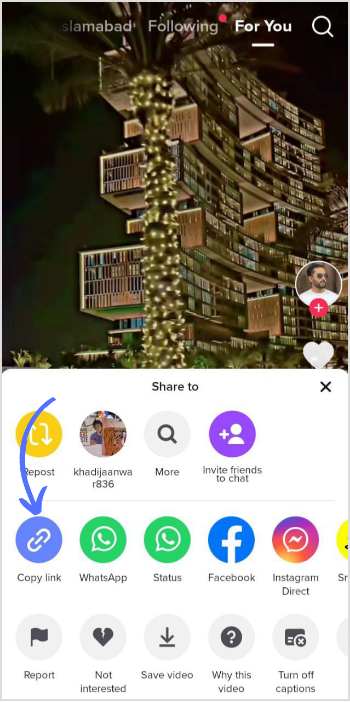
If you want to share the video via a link, you can tap on the “Copy Link” and share it via text message, email, or social media post.
Step 5:
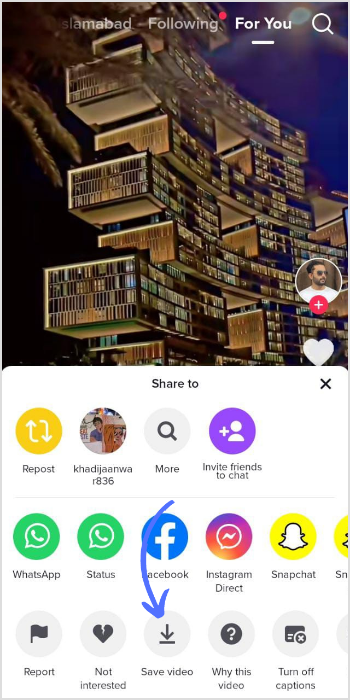
You can also download the video to your device by tapping on the “Save Video” option. This will save the video to your device’s camera roll, and you can then share it using any other method you prefer.
That’s it. By following a few simple steps, you can share your favorite TikTok Video with fam & friends.
Also Try: Free TikTok Downloader
Can I share someone else’s TikTok video?
As per TikTok’s terms of service and community guidelines, you are not allowed to share someone else’s TikTok video without their explicit permission.
Why can’t I repost on TikTok?
TikTok does not provide a built-in option for reposting or re-uploading videos from other users directly within the app. This is because TikTok values the original creators’ rights and encourages users to respect their content and creativity.
Plan 0 Days of Content in 0 Minutes
Create, schedule, publish and analyze your content across all your social media channels from one simple dashboard.
4.7 on Capterra • 16,500+ marketers trust ContentStudio
Khadija Anwar is a Senior Technical Writer at ContentStudio with over 500 published write-ups across the ContentStudio blog and beyond. She specializes in step-by-step platform guides and Help Center content across Facebook, Instagram, LinkedIn, YouTube, TikTok, and X, and reviews how-to articles to verify every step and platform detail is accurate and current.
View all posts by Khadija AnwarRecommended for you
How to build an executive’s LinkedIn content workflow with Claude Code

How to turn one product photo into 5 video Ads with Claude Code

Social media MCP server: How to automate posting with ContentStudio
How to automate social media with n8n: A practical guide