


Meta Business Suite guide: Setup, scheduling, inbox, and insights
Jun 13, 202518 minutes

Written by
Nawal MansoorUpdated
A practical guide to getting verified on Instagram, Facebook, or WhatsApp, including the latest Meta One changes.
Quick answer: Check the subscription available inside your account, confirm which profiles or business assets it covers, review the recurring cost, and complete the required verification process. Payment alone does not guarantee a badge.
A blue badge can make it easier for people to recognize your account. But paying for one is not quite as simple as choosing a plan and waiting for the checkmark to appear. The right subscription depends on whether you are applying as a creator or business, which account you want verified, and what Meta currently offers in your region.
There is another detail to check before you begin: Meta now says Meta Verified features are available through Meta One, a subscription service introduced in September 2026. You may still see Meta Verified plans and instructions alongside the newer offers.
For businesses, verification belongs within a wider social media management workflow. It can help people identify an authentic account, but useful content, secure access, and reliable customer communication still need attention.
Below, you will find the differences between the subscription routes, what to prepare, and the steps to follow on Instagram, Facebook, and WhatsApp.
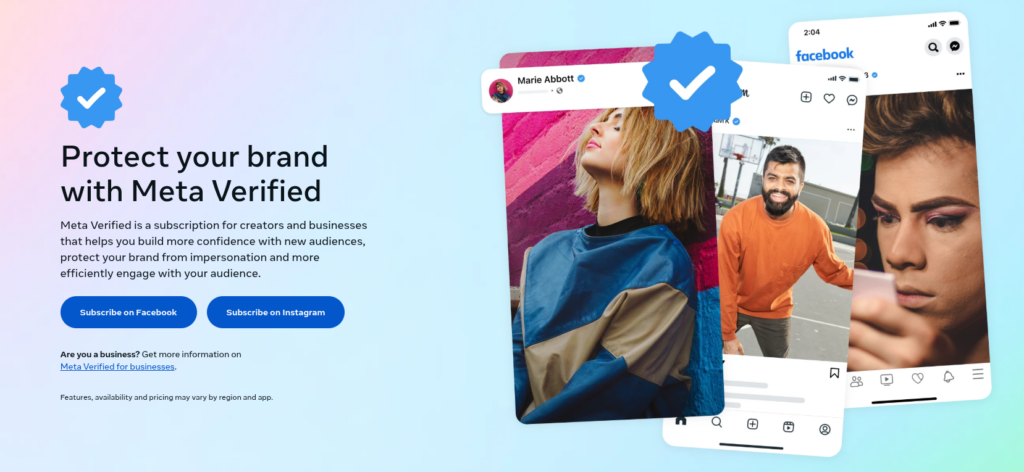
Meta Verified is a subscription offering for eligible creators and businesses. Depending on the plan, it can provide a verified badge, impersonation monitoring, support access, and additional tools for the subscribed account.
The badge tells people that Meta has verified the account through its applicable process. That process may involve account activity, information, or documents.
It does not mean Meta checks every post before publication. It is also not an endorsement of the person or organization.
For example, a customer looking for your business may find several accounts with similar names. A verified badge can help identify the authentic presence, but the customer still needs accurate information about your products, services, and contact details.
Once the account is ready, a social media scheduler can help keep approved posts organized. That is a separate job from verification: a publishing tool cannot approve your application or change Meta’s subscription requirements.
Meta announced Meta One on September 15, 2026. It brings together paid features across its apps, including creator and business plans with verification-related benefits where the account qualifies.
Meta’s current verification landing page points visitors to Meta One, while its Help Centers still explain Meta Verified subscriptions. WhatsApp also says Meta One is still in limited testing and is not available everywhere.
The practical approach is to read the offer in front of you rather than assume every subscription has already changed.
Before subscribing, check:
• The plan name.
• The app or purchase platform.
• The profiles or business assets included.
• Which benefits require successful verification.
• The monthly or annual charge.
• Any introductory price and its renewal terms.
A subscription called Meta One should not automatically be treated as a business-verification plan. Its included features depend on the offer.
This is the most useful question to answer first. A Facebook profile is not a Facebook Page, and an Instagram creator account does not follow the same business process as an Instagram business profile.
| Your account | Route to investigate |
|---|---|
| Instagram personal or creator profile | Creator subscription |
| Facebook personal or creator profile | Creator subscription |
| Instagram professional business profile | Business subscription |
| Facebook business Page | Business subscription |
| WhatsApp Business profile | Available WhatsApp Business subscription |
| Account that already has a badge | Existing verification status and any optional subscription benefits |
If you are an individual creator, do not assume you need to become a business account to apply. Likewise, a business Page should not be put through a personal-profile tutorial. The guide to Instagram creator accounts explains how that account type differs from a business presence.
Changing the account type simply to make a button appear can create a different problem. The right starting point is always the requirements for the account you actually operate.
The badge is the most visible part, but the other benefits may be the reason someone considers subscribing. The important detail is availability. Not every plan includes the same features, and a feature described on a general product page may not be available to every account.
| Benefit | What to look for in your offer |
|---|---|
| Verified badge | Which selected profile or business asset receives it after approval |
| Impersonation protection | Monitoring and protection for the included account |
| Support | Available channels and any eligibility limits |
| Profile tools | Links, presentation options, or other listed features |
| Discovery features | The specific search or profile feature included |
| WhatsApp tools | Devices, channels, broadcasts, or other business capabilities |
Meta describes different benefits across creator, business, and WhatsApp plans. Read the selected plan rather than combining every advertised feature into one assumed package.
Meta describes proactive monitoring for accounts pretending to be the subscriber. This can matter when customers, followers, or partners need to distinguish your authentic presence from an imitation. It does not mean every impersonation attempt will disappear immediately, or that the subscribed account becomes exempt from platform rules.
Support may be useful when an account is important to your work, but check the channel included before paying. Meta’s current product page says enhanced support is not available to all subscribers at this time. A general reference to support should not be read as a guaranteed response time or recovery outcome.
Some plans include additional links, profile presentation options, or discovery features. Those can be useful when they solve a specific problem, such as helping visitors find an important destination. They should not be treated as a promise that every post will receive more reach.
There is no single price that applies to every account. The cost depends on the plan, country, purchase method, and number of profiles or business assets included. Meta Verified and Meta One also use different plan names, so their prices should not be mixed into one universal range.
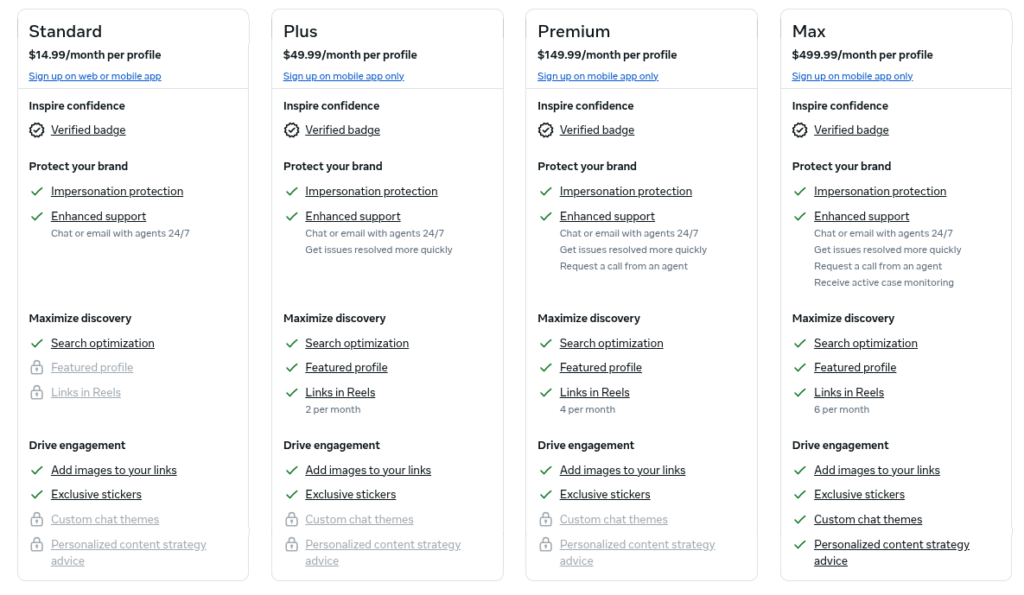
Meta’s creator page lists the following US-dollar monthly references:
| Plan | Published monthly reference |
|---|---|
| Standard | Generally $11.99 on web or $14.99 in-app |
| Plus | $49.99 |
| Premium | $149.99 |
| Max | $499.99 |
Meta states that pricing, plans, and availability can vary by region and app. A bundled offer may have a different price.
Meta’s September 2026 announcement lists a separate plan family:
| Plan | Announced monthly starting price |
|---|---|
| Essential | $14.99 |
| Advanced | $49.99 |
| Expert | $149 |
| Max | $499 |
These are announcement prices, not a guarantee of the offer available to your account. They are not a one-to-one replacement table for every existing Meta Verified subscription.
Before confirming payment, look for five things:
• The currency and billing interval.
• Whether the price covers one account or a bundle.
• The exact profiles or assets selected.
• Any promotional price and its renewal amount.
• Where you will manage cancellation.
Meta subscriptions renew automatically unless canceled. Its billing guidance says the recurring charge follows the purchase date.
Being an influencer, consultant, business owner, or public figure does not establish eligibility by itself. Meta looks at the account and the requirements for the relevant subscription.
Meta’s current creator guidance includes:
• Being at least 18, or the age of majority in the country of residence.
• Living in a supported country.
• Having an eligible personal or creator account.
• Meeting activity requirements.
• Having a government-issued photo ID.
• Following the relevant platform terms and standards.
• Staying within recent profile-change limits.
• Enabling the required Advanced Protection setting.
Meta also describes verification through eligible activity across its products in some circumstances. The method offered during your application should be followed rather than assuming every applicant can choose the same route.
Business applicants need an eligible asset and the authority to represent the organization. The process can involve confirming business information, your connection to the business, and the applicable security settings.
Meta documents several verification methods, so the requested information may differ between applications. The information requested by the official process should be prepared rather than a generic document package from an older tutorial.
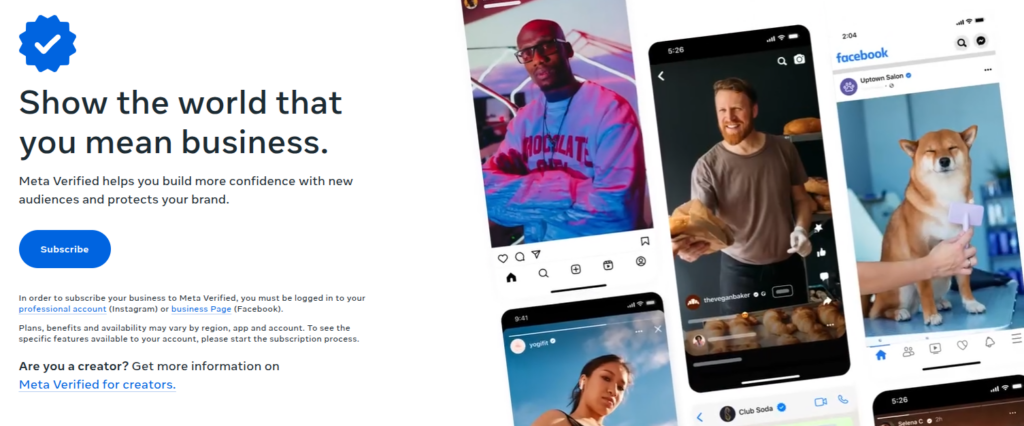
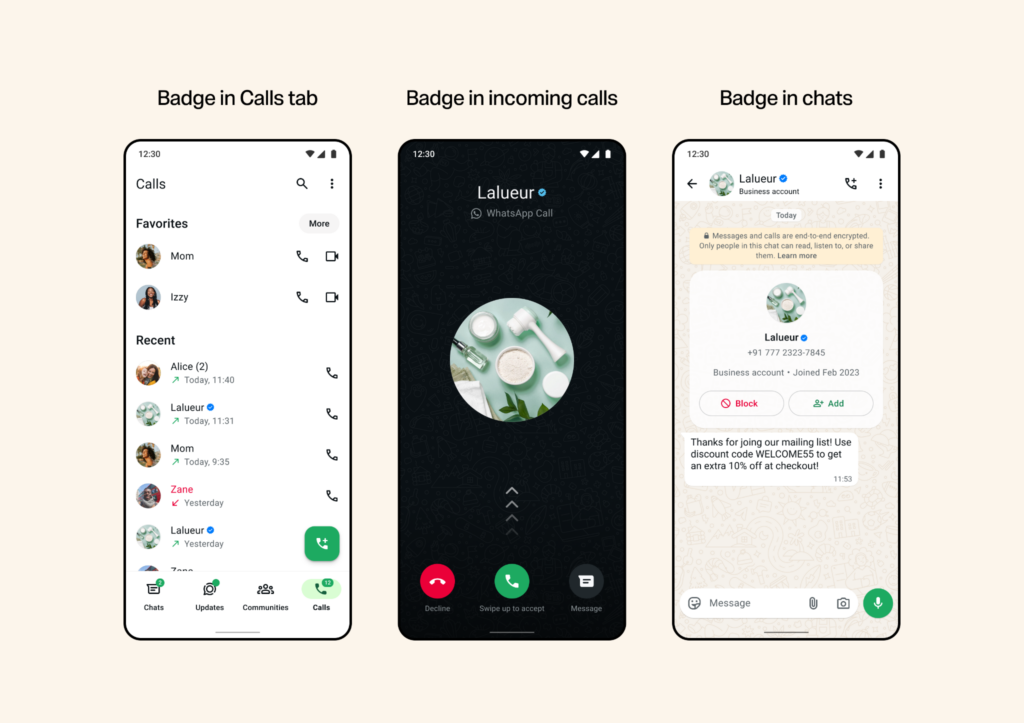
The available offer appears inside the WhatsApp Business app. WhatsApp says you can check Settings or Business Tools for Meta Verified. A missing option means that offer is not currently available to the account. Meta One availability can also differ by location and account.
A few checks now can save confusion later.
The name, image, username, and other identifying details should be reviewed before you apply. Recent changes can affect creator eligibility, and some information may be restricted while an application is under review. For a business, the selected Page or profile should represent the intended organization.
Account access and the requested security steps must be confirmed before beginning. Meta’s creator and business processes refer to Advanced Protection for the relevant profile or business portfolio. An asset you cannot properly administer should not be the starting point for an application.
A business may have several Pages and profiles, but subscribing to one does not automatically cover the rest. The intended assets should be written down and compared with the selection shown during onboarding. This is especially important when several people manage the organization’s accounts. Verification also does not fix an unclear business presence.
A Facebook marketing strategy should still explain the audience, message, and role of the Page beyond the badge.
Meta is gradually moving some users from Accounts Center to Meta Account settings, so the labels you see may differ. The official offer in your account should be followed rather than trying to reproduce every screen from an older tutorial.
Before starting, confirm you have the correct Instagram or Facebook profile open. If you regularly switch accounts, check the name before opening the subscription. Catching the wrong profile now is easier than fixing it after payment.
Open your account settings and find the Meta Verified or Meta One offer. If the offer is not visible, check availability and eligibility first. Switching to professional mode is not a universal requirement.
Meta’s creator documentation supports eligible subscriptions for up to two profiles in the same Accounts Center: one Instagram profile and one Facebook profile. The profiles may need similar names and pictures, and a bundle can receive discounted pricing. Before continuing, confirm the profiles selected match the ones you intend to verify.
Before proceeding, review the included benefits, recurring price, purchase method, and cancellation route carefully. If support or a specific profile feature is your main reason for subscribing, confirm it appears in the offer before you pay.
Follow the requested Advanced Protection and identity process as shown. Meta may require a government-issued ID, and in selected regions it also requests a selfie video. Your application may differ from someone else’s, so follow the requirements shown for your specific case.
Meta says creator verification review can take up to three business days after submission. There is a separate timing requirement: the creator verification process must be completed within three days of subscribing. Meta says an incomplete process can result in cancellation and refund eligibility. Note that a successful payment is not the same as an approval notification.
After approval, confirm the intended profile is verified and review the benefits now available in the account. If something is missing, check whether it is a feature still being activated, a plan limitation, or a benefit that was never included. For anything unresolved, use the official subscription or help route for that account.
A Facebook Page or Instagram business profile should go through the business process, not a personal-profile walkthrough.
Use the relevant business account’s subscription entry or Meta’s official business onboarding route. Before proceeding, select the correct business asset and confirm you have the authority to manage it.
Meta’s business documentation supports combinations of eligible Facebook, Instagram, and WhatsApp assets in the same business portfolio. It generally describes up to two assets, with an option for up to three through specified purchasing surfaces, including the Facebook mobile app or Meta Business Suite on a computer. Check the options shown in your own flow, as not every route offers the same bundle.
Before moving forward, confirm the plan, selected assets, renewal price, support, and feature limits. For a business with multiple locations, this is where careful checking matters. One subscribed Page does not automatically cover every location.
Provide the information the official process requests to verify the business and your connection to it. Meta offers different verification methods, so avoid changing your information to match an example found in an unrelated tutorial.
Meta says business review can take up to three business days after submission. Check the account notification for the result. If Meta requests more information, respond through the official process. No third party can replace Meta’s review, regardless of what they promise.
WhatsApp has its own messaging features and account requirements, so the package may look different from Instagram or Facebook.
Look for the Meta Verified offer inside the WhatsApp Business app. If Meta One appears instead, read that offer’s verification conditions carefully. A missing option usually reflects availability rather than a problem with your application.
Before subscribing, review the business name and other important details. WhatsApp warns that changing certain information after subscription can result in cancellation, so make any necessary corrections before you start.
Depending on the plan, the offer may include additional linked devices, verified channels, support, a business web page, broadcasts, or other messaging capabilities. Check the limits on each, rather than assuming the highest advertised allowance applies to every plan.
Follow the app’s instructions and submit the requested information. WhatsApp says review can take up to three business days and may take longer during periods of high application volume.
WhatsApp’s Meta One guidance says the badge, verified channels, and protected-account benefits all require successful verification. It also notes that other subscription benefits may remain available if the business cannot be verified. An unsuccessful verification outcome is not automatically a cancellation of the whole subscription.
Not automatically. Some plans advertise specific discovery or profile features, such as search optimization, featured profiles, or additional links. Those should be evaluated individually rather than translated into a promise that every post will perform better.
An additional link may make an important destination easier to find. It does not establish that the offer is relevant or that visitors will become customers. Your Instagram marketing strategy still needs to connect the audience, message, content, and next step.
The starting point is the problem you want the subscription to solve.
| Your main reason | What to check |
|---|---|
| Impersonation concerns | Which accounts receive monitoring and protection |
| Account support | Whether the required channel is available |
| A particular profile tool | Whether the feature is included for that app and plan |
| WhatsApp team operations | Devices, channels, broadcasts, and other limits |
| More followers | Whether the plan actually addresses that objective |
| An existing badge | What additional benefit would justify recurring payment |
A concrete reason is easier to evaluate than a vague expectation. “We need the support and protection offered for this business account” gives the team something to assess. “A badge should make all our content perform better” does not.
If a feature supports a marketing objective, the intended outcome should be defined before subscribing. A social media analytics process can help distinguish profile activity, audience response, and business results. Every improvement after subscribing should not be attributed to verification, because content, campaigns, seasonality, and audience changes can also contribute.
Meta subscriptions renew automatically unless canceled. The purchase platform matters because billing is connected to the account and platform used to subscribe.
Before renewal, the active plan, included assets, next charge, and any promotional price ending should be checked. For Apple App Store or Google Play purchases, Meta directs users to the relevant store’s cancellation process. The store account that made the purchase should be used for cancellation.
Meta’s general billing guidance says the subscription remains active until the current billing cycle ends after cancellation. The subscription benefits are then lost. A cancellation is not automatically a refund request. The rules for the actual product, purchasing platform, and outcome should be checked.
Once the subscription decision is made, the content still needs a workable process. An Instagram scheduler can help organize supported posts, Reels, and Stories after review. ContentStudio does not approve Meta applications or control eligibility.
The same distinction applies to Facebook. A Facebook scheduler supports planned publishing for connected Pages and supported formats, not verification or account recovery. The badge and the publishing workflow do different jobs. One identifies a verified presence; the other helps the team maintain it with current information and useful content.
The account should be chosen first, then the benefit you need. The selected assets, recurring cost, and verification conditions should be checked before paying, and the official application route shown in your account should be used.
A badge can help people recognize an authentic presence, but it does not do the rest of the work. The account should be kept secure, the information current, and the communication useful, whether you subscribe or not.
No. Some accounts retain badges obtained under earlier requirements, while others are verified through subscription-related processes. The badge is not an endorsement of everything the account publishes.
Availability can depend on the location, app, account type, and rollout. WhatsApp specifically says a missing Meta Verified option means that offer is not currently available to the account. Its Meta One documentation also describes limited availability.
Creator profiles can make certain updates, but review, similarity requirements, and frequency limits apply. Business and WhatsApp accounts have different restrictions. The applicable process should be checked before changing identifying information.
First, the application status should be checked: whether it is incomplete, still under review, or unsuccessful. The treatment differs. Creator documentation describes cancellation and refund eligibility when verification is not completed within three days, while WhatsApp’s Meta One guidance says other plan benefits may remain after unsuccessful verification. The policy for the product purchased should be followed.
Not automatically. Creator benefits apply to the subscribed profile, while eligible bundles cover selected additional profiles or business assets. The asset list and verification requirements should be checked rather than assuming common ownership provides coverage.
Plan 0 Days of Content in 0 Minutes
Create, schedule, publish and analyze your content across all your social media channels from one simple dashboard.
4.7 on Capterra • 16,500+ marketers trust ContentStudio
Nawal Mansoor is a Digital Marketing Specialist at ContentStudio who tracks the latest trends and technologies. She writes on social media strategy, AI scheduling and video tools, Instagram advertising, LinkedIn marketing, and emerging platforms like Snapchat, and reviews articles for relevance, accuracy, and currency in a fast-moving social media landscape.
View all posts by Nawal MansoorRecommended for you
Meta Business Suite guide: Setup, scheduling, inbox, and insights
How to use the Meta Ads Library for Ad research: Complete guide
How to turn off Meta AI on Facebook, Instagram WhatsApp, & Messenger?
Meta ads benchmarks 2026: Average CPM, CPC, and CTR by industry








