


Black Friday vs. Cyber Monday: The real difference for software buyers
Oct 22, 202614 minutes

Written by
Arooj IshtiaqUpdated
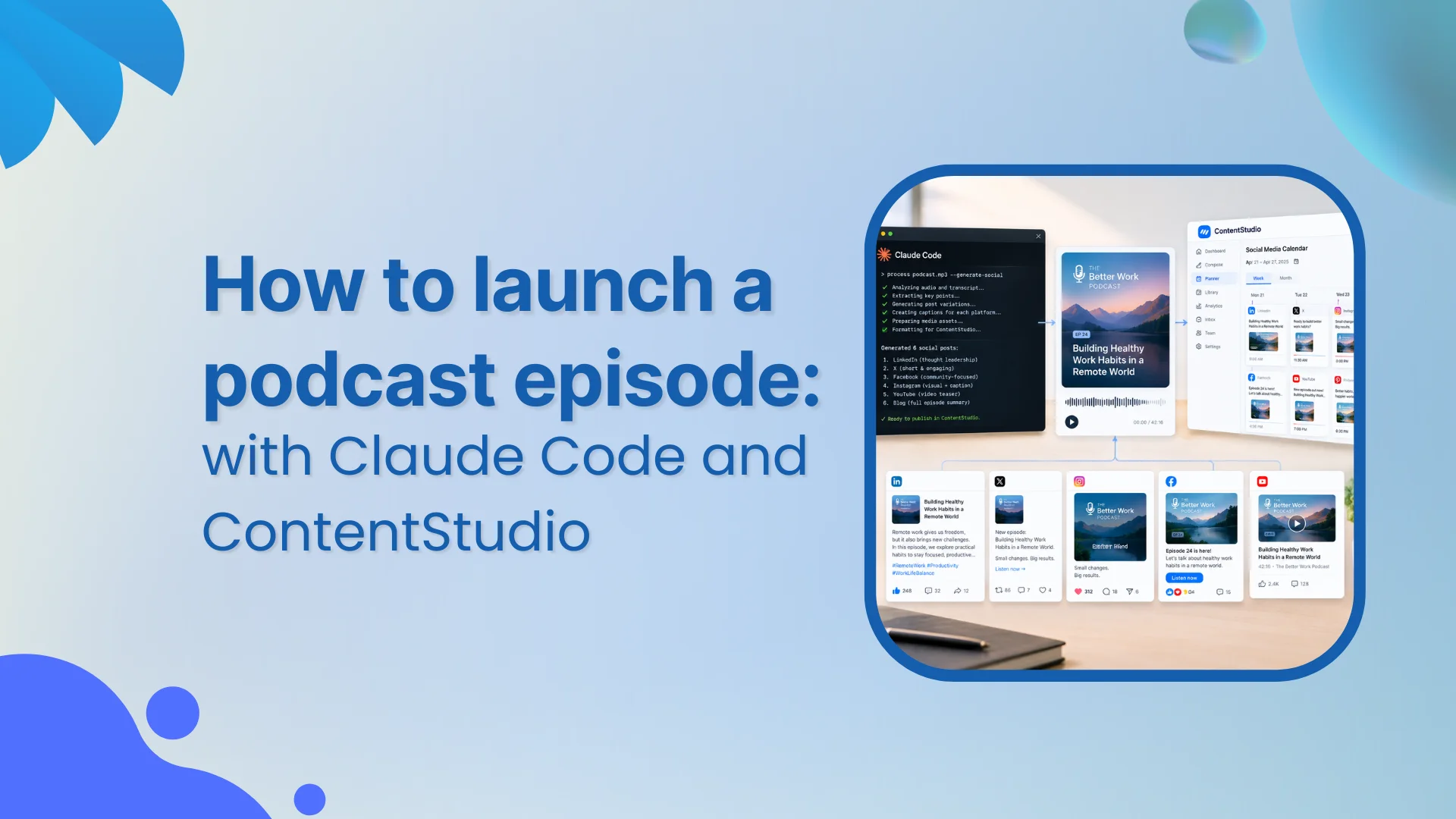
Promoting a podcast episode on social media is not a creative problem. It is a process problem. The creative work happened in the recording. What happens between a finished episode and a scheduled queue is a series of decisions that either happen deliberately or happen badly. This guide gives those decisions a structure: a seven-step workflow that uses Claude Code to plan the campaign and the scheduler to prepare, approve, and schedule every post.
The single reason most podcast episode promotion campaigns fall apart is starting with incomplete inputs. Claude Code can only work with what you give it, and the scheduler can only publish to accounts that are connected. Both of those foundations need to be solid before you write a single word of post copy.
Assemble one document before opening a terminal. This is your source of truth. Every prompt, every draft, and every scheduled post must trace back to it.
Install the CLI globally and add the agent skill that teaches Claude Code how to use every ContentStudio command automatically. This is a one-time setup.
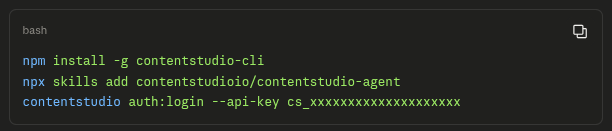
⚠️ Security note: Never put a real API key in a screenshot, a shared project file, or any document that leaves your machine. The cs_ prefix in these examples is a placeholder. Your real key lives in ContentStudio under Settings > API Keys.
Run accounts and list, and look at what comes back. If a channel you planned to use is not in that list, it is not in the campaign until it is connected through the ContentStudio dashboard. A plan built around a disconnected account will fail on publication day.
Before the steps, it helps to be precise about the division of labour, because this is where AI-assisted workflows get described too vaguely to be useful.
The handoff moment is the campaign matrix. Claude Code produces it; a human approves it; only then do CLI commands run. This separation is what makes the workflow auditable at every stage. For teams who prefer a conversational approach without the terminal, the Claude scheduling guide and the ContentStudio MCP server cover that path.
Skipping the audit is the most common mistake in podcast episode social media promotion. You jump straight to generating post copy, and seven polished captions later you discover the guest quote does not match the transcript, or the “listen now” LinkedIn post is scheduled for 7:30 AM when the episode URL does not go live until 9:00 AM. The audit catches both of those problems in five minutes.
Give Claude Code the episode packet and use this prompt:
Read the approved episode packet. Before generating any post copy,
produce an audit report flagging:
Return only the audit report. No post copy yet.
For the customer research episode, the audit flags two blockers: the guest quote in the show notes does not exactly match the transcript at 18:42, and the guest tag is listed as “approved” in the packet but no written confirmation exists. Both need to be resolved before a single word of copy is drafted.
📌 Source-of-truth rule: Every piece of content Claude Code generates must trace to a specific timestamp or transcript passage. If an insight cannot be pinned to the recording, it is a paraphrase that needs to be labeled as such, or it does not belong in the copy.
The most common mistake in podcast episode social media promotion is treating one episode as one post. The same message gets reformatted for LinkedIn, Instagram, and X. The caption shrinks, the hashtags change, and the hook stays identical. That is not a multi-channel campaign. It is one post with cosmetic variations.
A proper angle map identifies several materially different reasons a specific audience might want to listen, each sourced to a real moment in the recording, each capable of standing on its own without requiring the listener to have heard the episode first. This is the Claude social media workflow principle applied at the episode level: you open several different doors into the same conversation, not the same door painted in different colours.
Use this prompt after the audit is resolved:
Read the verified transcript and episode packet. Identify four to six
distinct angles that could each anchor a separate social post.
Each angle must:
Reject any angle that restates another. Return only the angle map:
angle name, source timestamp, target audience, best channel. No copy yet.
| Angle | Timestamp | Target Audience | Best Channel |
|---|---|---|---|
| Counterintuitive finding | 18:42 | B2B marketers who think they already do this correctly | LinkedIn host post |
| Practical reframe: 3 questions | 24:10 | Practitioners who want a framework to apply this week | LinkedIn brand or X |
| Guest’s own perspective | 31:55 | Dr. Nair’s professional network | LinkedIn guest-ready |
| Pre-release teaser question | 07:18 | Strategic leaders, marketing directors | Instagram Story |
| Self-contained clip moment | 18:30-19:45 | Broad discovery audience | Instagram Reel |
Each of these is a different entry point into the same episode. The clip angle only appears here because the team confirmed a finished 75-second captioned vertical video exists for that segment. If that file were not ready, the Reel would not be in the map. The plan is built around what exists today.
With the angle map approved, you assign each angle to a channel, a format, an asset, a CTA, and a go-live check. This is where the podcast episode social media promotion plan becomes operational. The governing principle is straightforward: the asset you actually have determines the format you can use.
You do not promise a Reel and then produce the clip. The Instagram scheduler and the LinkedIn scheduler can handle anything you feed them. The question is whether the asset is ready.
| Post | Channel | Format | Angle | Asset | CTA | Go-Live Check |
|---|---|---|---|---|---|---|
| 1 | LinkedIn Host | Text + cover art | Counterintuitive finding | Cover art | Link in first comment | URL live? Guest tag confirmed? |
| 2 | Instagram Story | Story frame | Teaser question | Teaser artwork | Episode drops Thursday | No listen-now link: not live yet |
| 3 | Instagram Reel | Vertical video | Self-contained clip | 75s clip, captioned | Link in bio | Caption, rights, account settings |
| 4 | LinkedIn Brand | Text only | Practical reframe | None needed | Episode URL + UTM | Different hook from Post 1 |
| 5 | X / Twitter | Text | Teaser question | None needed | Episode URL | Character count; link placement |
| 6 | LinkedIn Guest | Text + guest clip | Guest’s perspective | Approved guest clip | Discussion question | Written guest approval; tag verified |
Posts 1 and 4 are both LinkedIn but use different angles and go live at different times. Reading them back to back, they should feel like two separate reasons to care about the same episode.
If they read the same, one needs a different angle, or it is cut. Post 2 goes live before the episode does, which means no “listen now” CTA under any circumstances. The go-live check column is what enforces that. Post 6 requires written guest approval before it leaves draft status.
If a format requires an asset that does not exist, that format is not in the plan. The Reel appears here because a finished captioned 75-second vertical video is confirmed. If that clip falls through, the Reel is removed, and the team is not scrambling on launch morning.
Assigning times to posts is more than a preference. The sequence has to respect the episode publication time, each platform’s posting cadence, and the dependency between posts. No post with a live CTA fires before the episode URL is confirmed live.
Confirm the workspace timezone before scheduling anything. Run workspaces: list and check the timezone field in the output. A post scheduled at 7:30 in a workspace set to UTC fires at a very different moment if your audience is in Eastern Time.
| Day and Time | Post | Platform | Rationale |
|---|---|---|---|
| Tuesday 4:00 PM ET | Instagram Story teaser (Post 2) | Two days before release. No live CTA needed or appropriate. | |
| Thursday 7:30 AM ET | LinkedIn host post (Post 1) | 30 min after episode goes live at 7:00 AM ET. URL confirmed before post fires. | |
| Thursday 10:00 AM ET | Instagram Reel (Post 3) | Same day, different format and audience. Not a repeat of Post 1. | |
| Friday 9:00 AM ET | X post (Post 5) | X / Twitter | Day-after. Standalone angle that does not duplicate Thursday posts. |
| Friday 2:00 PM ET | LinkedIn brand post (Post 4) | End-of-week practical reframe for practitioners. | |
| Monday following | LinkedIn guest post (Post 6) | Held as draft. Schedule only when written guest approval arrives. |
The 30-minute gap between episode publication (7:00 AM ET) and the LinkedIn host post (7:30 AM ET) is deliberate. It gives the episode time to propagate and confirms the URL resolves correctly before the post fires.
Any “listen now” link that goes live before that check is a broken user experience. For building this into a repeatable weekly cadence, the content calendar and social media scheduling tools guide cover the broader planning structure.
With the matrix approved, you move from planning to execution. Every command in this step runs against the confirmed matrix. Nothing new is being generated at this stage.
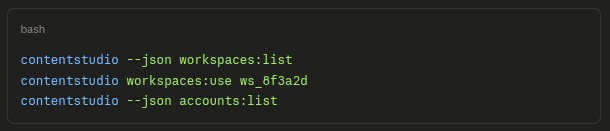
Save the _id values for each account you plan to use. Every posts: create command needs them. If an expected account is missing from the list, connect it through the ContentStudio dashboard before continuing.
Give Claude Code this instruction after confirming account IDs. It prepares structured post payloads for review without creating anything in ContentStudio yet.
Read the approved campaign matrix and the account IDs from the
accounts:list output. For each post in the matrix, prepare the payload:
Do not create posts, upload assets, or schedule anything.
Return the full set of payloads for review.
Before creating any post, preview the exact payload the ContentStudio API will receive. The MCP server and CLI both support this safeguard.
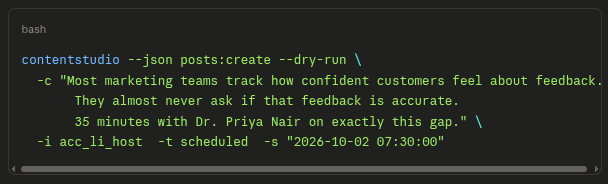
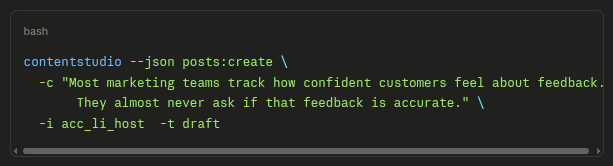
Check the account ID, the scheduled time, the timezone, and the copy. Only when the dry run output is correct do you remove –dry-run and run the live command. For the first run of any new campaign, create drafts rather than scheduled posts so your team can review the full set in the ContentStudio dashboard before anything is locked to a time.
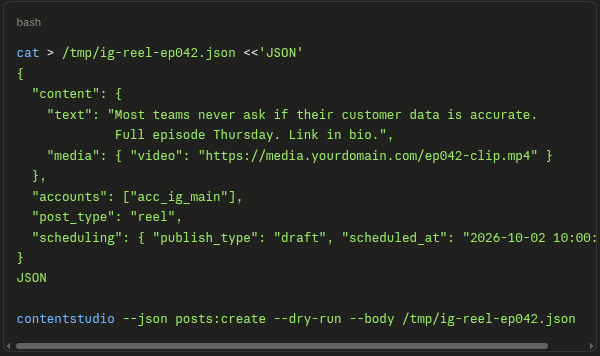
Instagram Reels, TikTok posts, and YouTube Shorts require a full JSON body file because the shortcut flags cannot specify post type or platform-specific options. This is standard ContentStudio CLI behaviour, not an edge case.
💡 One post per variant: ContentStudio’s CLI supports posting to multiple account IDs in a single call with the -i flag. This is useful for identical cross-platform content. For a differentiated podcast campaign where LinkedIn, Instagram, and X have different hooks and assets, use separate posts: create calls so each can be reviewed and approved on its own.
The drafts are in ContentStudio’s approval workflow. This is the human review step. It is not optional, and it is not a formality. This checkpoint is the only safeguard between a planning error and a published post.
| Check | What to Verify |
|---|---|
| Copy accuracy | Does the copy match the approved matrix? Any typos or unintended line breaks? |
| Episode URL | Is the URL live and resolving right now? If not, is this post scheduled for after the confirmed publication time? |
| Guest tag | Is the handle exactly correct? Does written guest approval exist for this specific copy and this tag? |
| Media | Is the correct image or video attached? Does it match the angle and format in the matrix? |
| Account | Is this post going to the right account: host profile, brand page, or guest-ready? |
| Time and timezone | Does the scheduled_at value reflect the right moment in the workspace timezone? |
| CTA | Does the call to action match the post position in the sequence? No listen-now CTA before the URL is live. |
When every check passes, approve and record exactly what you confirmed:

When something needs fixing:

The –comment field is the audit trail. If a post causes a problem after publication, you need to know who approved it, when, and what they confirmed. That information lives in the comment, not in a Slack message.
After all approvals are complete, list the scheduled posts for launch week and scan the output. This is the final check that what was planned is what is actually queued.

Confirm that only the intended posts appear and that the times are correct. Confirm that no post with a live CTA is scheduled before 7:30 AM ET Thursday. A post that appears in this list and was not in the matrix is either a duplicate or a mistake. Find it and remove it.
⚠️ On AI and publishing: Claude Code preparing a post payload and submitting it through the CLI is not a foolproof publishing gate. The approval step is where a person confirms the episode URL is live, the guest tag is verified, the copy is accurate, and the time is right. Automating past this point removes the only human safeguard in the workflow.
After launch week, three separate streams of data need to be assessed separately. Social response from the platforms tells you how the posts performed as content: reach, impressions, engagement rate. It does not tell you whether anyone listened.
Episode-page traffic from your analytics tells you how many people clicked through to the episode destination. That is only measurable if UTM parameters were in place. Listening data from your podcast host tells you whether the episode found an audience. You will rarely have a clean causal line from a specific LinkedIn post to a verified listen, and that is not a reason to stop measuring.
Keep a simple per-episode record that tracks each post by channel, angle, tracked destination, reach, episode-page clicks, and listening data. Run it across several episodes and patterns will emerge: which angle consistently outperforms, which channel drives clicks relative to reach, whether the guest-ready post generates more substantive comments than the launch-day post. These observations inform the next episode’s matrix without prescribing it.
The reusable parts of this workflow are the episode packet template, the audit prompt, the planning prompt, and the QA checklist. The Claude social media tasks guide and the AI social media campaigns resource cover how to extend this kind of structured workflow across other content types. What must be rebuilt fresh every time is the content: the specific angles, the copy, the asset mapping, and the timing, because those belong to this episode, not to the workflow around it.
The workflow in this guide is a repeatable motion, not a one-time build. The episode packet gives you a consistent input structure. The audit catches what is missing before any copy is written. The angle map turns one recording into several distinct reasons to listen. The campaign matrix assigns every post an owner, an asset, a time, and a checkpoint. The CLI commands translate that plan into drafts a human reviews. The approval step confirms everything is actually ready. The queue verification checks that what was planned is what is scheduled.
The only thing that changes episode to episode is the content of the recording. The structure around it stays the same. By the third episode using this workflow, most teams complete the full process from packet to verified scheduled queue in under an hour. The episode is done. Now there is a workflow to make sure the right people hear it.
No. The CLI commands in this workflow follow a consistent pattern, and Claude Code generates the exact commands you need based on your episode packet and campaign matrix. Your role is to review what Claude Code prepares and run the approved commands. If you can copy, paste, and read terminal output, you have everything you need to execute this workflow.
Three to five business days is the minimum for a six-post campaign like the one in this guide. The audit alone can surface blockers like a mismatched guest quote or an unverified tag handle that take a day or two to resolve. Starting the packet on the morning of launch day means the workflow collapses into guesswork under time pressure, which is exactly what the system is designed to prevent.
It stays in draft indefinitely and does not get published. There is no workaround that substitutes for written guest approval. If the relationship allows it, set a clear deadline when you send the copy for review and note that the post will be removed from the campaign if confirmation does not arrive before that date. A dropped post is far less damaging than a published one the guest did not sanction.
Pause all scheduled posts immediately using posts:list –status scheduled to identify every queued item, then reject each one back to draft status. Do not rely on manual memory to catch everything. Once the new publication time is confirmed, rebuild the schedule from the matrix with corrected scheduled_at values, run –dry-run on each updated post, and go through the approval checklist again before rescheduling. A delay is not an edge case in podcast production, so building a pause-and-rebuild step into your standing process is worth doing after the first time it happens.
Plan 0 Days of Content in 0 Minutes
Create, schedule, publish and analyze your content across all your social media channels from one simple dashboard.
4.7 on Capterra • 16,500+ marketers trust ContentStudio
Arooj Ishtiaq is a Content Marketing Strategist with 5+ years of experience writing about social media, SaaS, and AI. At ContentStudio, she creates practical guides, tutorials, and how-to content that help marketers navigate social media trends, sharpen their strategies, and get more from their content.
View all posts by Arooj IshtiaqRecommended for you
Black Friday vs. Cyber Monday: The real difference for software buyers
Black Friday social media post ideas: Captions and posting plan for 2026
Black Friday and Cyber Monday social media checklist 2026

Cyber Monday social media post ideas: Captions, hashtags & retargeting posts








