How to remove connections on LinkedIn?
Oct 20, 202315 minutes

Written by
Khadija AnwarUpdated
Your LinkedIn profile can support both your career search and your professional reputation. While your profile highlights your experience and skills, a resume provides a focused view of your qualifications for a specific opportunity. The right approach depends on how you plan to use the document and who needs to see it.
A clear LinkedIn marketing strategy can also help professionals present their expertise consistently across their profile and content. However, sharing a resume requires separate decisions about placement, visibility, and privacy.
This guide explains how to save a resume for job applications, upload it through Easy Apply, or display it in Featured, along with the key settings to check for each option.
There are three main ways to add or use a resume on LinkedIn:
| Method | Who can see it | Best for | Main consideration |
| Save a resume in job settings | You and LinkedIn job-application workflow | Reusing a resume for future applications | It is not displayed publicly on your profile |
| Upload during Easy Apply | The employer or recruiter connected to that job application | Tailoring a résumé to a specific role | Use the strongest version for that individual application |
| Add a resume to Featured | Anyone who can view your profile | Public job search, portfolio-style career positioning, selected professional opportunities | It may expose information to recruiters, current employer contacts, competitors, and the wider public |
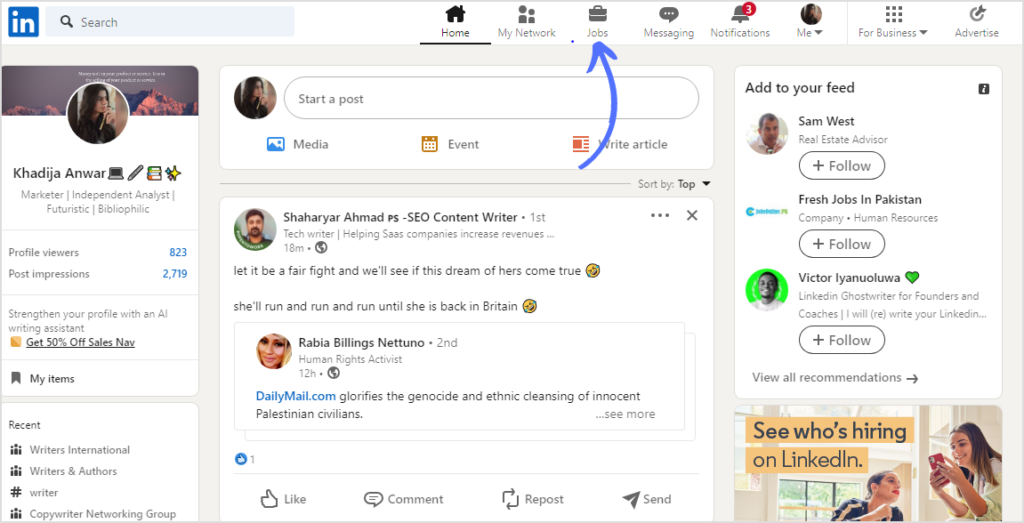
LinkedIn’s help guidance confirms that users can upload a resume through the Jobs area, under Preferences and Resumes and application data, or directly from the Easy Apply flow.
The best method depends on what you want to achieve:
Do not begin with the upload button. Decide what the resume needs to do.
LinkedIn’s job-search guidance notes that you can upload a resume from the Easy Apply process, where the resume field is optional for eligible applications.
A public resume is not required. Many LinkedIn profiles are stronger when Featured contains actual work—such as a portfolio, case study, publication, media appearance, project presentation, or professional resource—rather than a generic resume file.
A saved resume can make future applications more efficient while keeping the file separate from your public profile.
LinkedIn’s current help guidance identifies the Jobs tab, Preferences, and Resumes and application data as a path for uploading resumes used in the job-application workflow.
Depending on your account settings and LinkedIn interface, the relevant area may also appear under Settings & Privacy, Data privacy, or Job application settings.
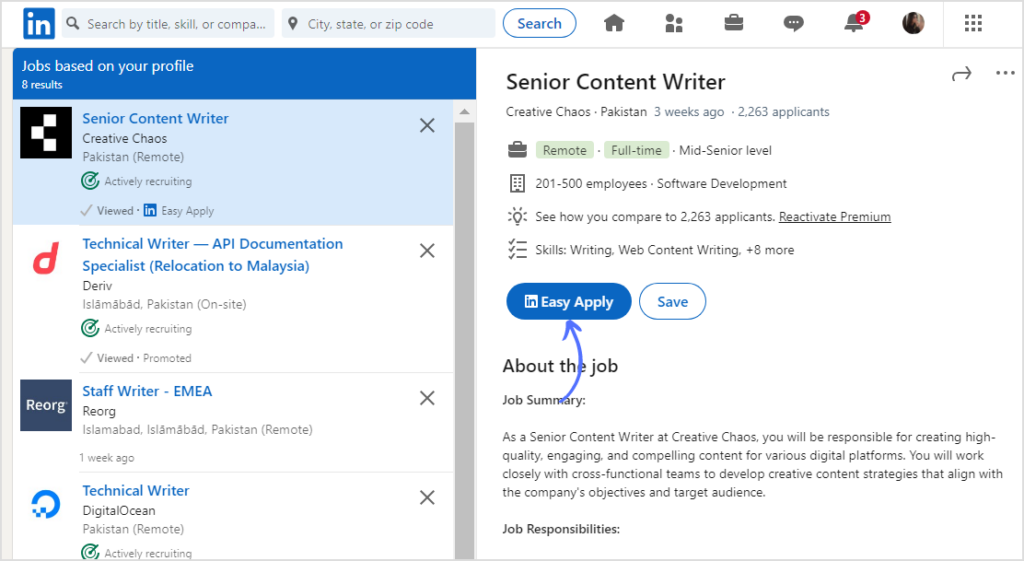
LinkedIn states that users can upload a new resume within the Easy Apply flow and select Submit application after completing required fields.
Do not assume that the saved version is automatically the best version.
Before submitting, compare the job description with your resume:
A tailored resume should be honest. It should clarify your relevant experience—not invent it.
If you want profile visitors to access your resume, add it as media in the Featured section.
A typical Featured workflow uses Add profile section, Recommended, Add featured, then Add media to upload a file and create a visible profile asset.
The exact mobile interface can vary by device and app version. If you cannot access Featured media settings in the app, use LinkedIn in a desktop browser or a mobile browser’s desktop view.
Avoid vague titles such as:
Use a title that tells visitors what the file represents.
Examples:
A clear title makes the Featured section easier to navigate, especially when it contains more than one resource.
A public resume can be useful, but it is not always the best option.
A public resume can also give interested visitors a clearer next step after they discover you through search, comments, recommendations, or professional content. However, visibility alone isn’t enough: improving LinkedIn profile reach works best when the profile gives visitors a credible, current, and relevant reason to stay.
If you decide to publish a resume in Featured:
For many professionals, a well-built profile on LinkedIn can do more than a public resume because it adds current activity, recommendations, skills, work samples, professional context, and search visibility.
A resume and LinkedIn profile should tell the same truthful career story, but they have different jobs.
| Resume | LinkedIn profile |
| Tailored for a particular role, employer, or opportunity | Designed as an ongoing professional destination |
| Usually one to two pages, depending on region and career stage | Can include more detail across multiple profile sections |
| Typically sent privately to a recruiter or employer | Often visible to a broader professional audience |
| Focuses heavily on relevant accomplishments and qualifications | Combines experience, About section, skills, recommendations, activity, and Featured work |
| Can be customized for every job application | Should remain current but not be rewritten for every individual role |
| May use job-description language more directly | Should use accurate professional positioning and natural keywords |
| May exclude older or irrelevant experience | Can retain more career history if it adds context |
| Primarily supports a hiring decision | Supports hiring, credibility, networking, business development, partnerships, and professional visibility |
Do not copy your resume into LinkedIn section by section. Instead:
Inconsistencies between a resume and LinkedIn profile can raise questions for recruiters, employers, clients, or partners.
Review both documents for:
| Detail | Keep consistent |
| Name | Use the same professional name and spelling |
| Headline or target role | Ensure both reflect the career direction honestly |
| Job titles | Use accurate titles; clarify internal titles if necessary |
| Employer names | Use the correct company name and relevant parent or acquired-company context |
| Employment dates | Keep month and year records aligned |
| Education | Match institutions, degree names, and graduation details where included |
| Certifications | List only current, earned, and verifiable credentials |
| Skills | Prioritize demonstrated skills rather than a long wish list |
| Accomplishments | Use accurate figures, scope, and attribution |
| Career transition | Explain it consistently where it needs context |
| Contact details | Use current professional information |
| Portfolio links | Confirm every link works and leads to appropriate work |
Use your LinkedIn About section to make the connection between experience and direction easier for visitors to understand. The guide to writing a LinkedIn summary can help you explain your focus without turning the section into a copied resume.
Whether you upload a resume for an application or make one public in Featured, formatting affects readability.
LinkedIn’s resume-upload guidance specifies Microsoft Word or PDF and recommends a file smaller than 2 MB for the documented application workflow. Follow any additional requirements shown in the application.
For a Featured document, check the formats accepted by the upload control. A PDF is a practical option when you want to preserve the layout, but inspect the uploaded version before relying on it.
Use a filename that is easy for a recruiter or hiring manager to understand.
Good:
Avoid:
Use:
Avoid:
A public profile visitor is less likely to read a long, highly detailed resume. A concise, focused public PDF is often more effective than a five-page career history.
If you have deep technical, academic, medical, legal, or executive experience that requires more detail, use the resume to summarize the essentials and include a portfolio, publication list, case-study link, or project resource in Featured.
A resume may include role-specific language to help an employer understand your fit. Your LinkedIn profile can also use relevant keywords, but keyword stuffing is not useful.
Use skills, job titles, industries, tools, methods, and professional terms naturally.
For example:
I work in customer-success operations, onboarding strategy, lifecycle communication, customer education, and product-adoption measurement for B2B SaaS teams.
This is more useful than:
Customer Success | SaaS | Onboarding | Customer Success | Growth | Strategy | Customer Experience | SaaS Expert.
Use terms that accurately describe your real experience. A keyword you cannot explain in an interview or demonstrate through work may create more risk than value.
The same standard applies to skills. Rather than listing broad terms without proof, choose demonstrated capabilities and connect them to a project, responsibility, outcome, or professional context. For role-specific examples, see the guide to digital marketing skills that employers value.
You may need several truthful resume versions.
| Target opportunity | Resume emphasis |
| Customer success role | Onboarding, adoption, account management, customer education, renewals |
| Product marketing role | Positioning, launches, messaging, research, enablement, campaigns |
| Content marketing role | Editorial strategy, writing, SEO, social distribution, analytics, subject-matter expertise |
| Operations role | Process improvement, cross-functional coordination, reporting, systems, project delivery |
| Sales role | Pipeline contribution, account strategy, discovery, relationship management, revenue support |
| Recruiting role | Talent sourcing, candidate experience, hiring-manager partnership, workforce planning |
| Consulting opportunity | Client outcomes, relevant industries, frameworks, leadership, problem-solving |
| Career-change role | Transferable skills, relevant projects, training, outcomes, clear career direction |
Tailoring means prioritizing the strongest relevant evidence. It does not mean changing job titles, inventing projects, or claiming skills you do not have.
AI can help compare a verified résumé with a job description, reorganize truthful experience, identify transferable skills, or improve clarity. Use ChatGPT for LinkedIn job-search preparation as an editing aid, then verify every keyword, achievement, responsibility, and qualification before applying.
A public resume is only one Featured-section option. Depending on your goals, stronger choices may include:
Choose the assets that best support the question a visitor is likely asking: “Can this person do the work they say they can do?”
If you publish articles, insights, or thought leadership, a practical LinkedIn articles strategy can help turn your profile into a more useful evidence library than a resume file alone.
A strong resume and profile establish credibility. Your activity helps make your expertise current and visible.
For example:
Your published work should support your actual experience rather than create a separate, generic professional persona.
A focused LinkedIn content strategy can help you turn your expertise into a reliable publishing plan with clear topics, source material, formats, approvals, and goals.
ContentStudio does not upload or edit your resume for you. It can, however, help you create the professional activity that gives recruiters, clients, collaborators, and peers more context when they visit your profile.
Building a stronger professional presence may also require tools for drafting, planning, analytics, networking, recruiting, or sales research. This overview of LinkedIn tools for professional growth can help you distinguish content-management software from tools designed for prospecting, hiring, paid advertising, or profile optimization.
Use ContentStudio to:
Use ContentStudio’s LinkedIn scheduling and approval workflow to turn profile positioning into consistent, well-reviewed professional activity.
Avoid these common resume mistakes to protect your privacy and strengthen your LinkedIn job applications:
Adding a resume to LinkedIn is useful when you match the method to the goal. Save private files for job applications, upload tailored versions for individual Easy Apply roles, and publish a carefully edited public version in Featured only when it helps your professional audience.
Keep your resume and profile aligned, but do not make them identical. Your resume should be tailored for an opportunity; your LinkedIn profile should provide a broader, current, and credible professional destination.
Use the resume to support a clear next step. Use your profile, Featured work, recommendations, and professional activity to show the depth behind it.
No. Uploading a replacement changes the file available for future use, not an application already submitted. Contact the job poster if you need to correct a submitted application.
They do not automatically receive the full document from saved application files. However, LinkedIn’s resume-data-sharing setting can use information from saved resumes in recruiter-facing matching features. Review that setting separately from profile visibility.
Do not assume LinkedIn will use it automatically. Select or upload the intended resume in the application itself. Featured and saved application resumes serve different functions.
LinkedIn documents a download option for resumes uploaded through its job-application workflow. Open Jobs → Preferences → Resumes and application data, then check the file’s menu. This does not include files submitted directly to an external company website.
It means the job poster downloaded the attached resume. It does not guarantee an interview, message, or job offer.
Plan 0 Days of Content in 0 Minutes
Create, schedule, publish and analyze your content across all your social media channels from one simple dashboard.
4.7 on Capterra • 16,500+ marketers trust ContentStudio
Khadija Anwar is a Senior Technical Writer at ContentStudio with over 500 published write-ups across the ContentStudio blog and beyond. She specializes in step-by-step platform guides and Help Center content across Facebook, Instagram, LinkedIn, YouTube, TikTok, and X, and reviews how-to articles to verify every step and platform detail is accurate and current.
View all posts by Khadija AnwarRecommended for you
How to remove connections on LinkedIn?
How to optimize your LinkedIn profile?
How to use LinkedIn for Business: Setup, teams, and workflows
How to add a summary on LinkedIn: Write and update your About section